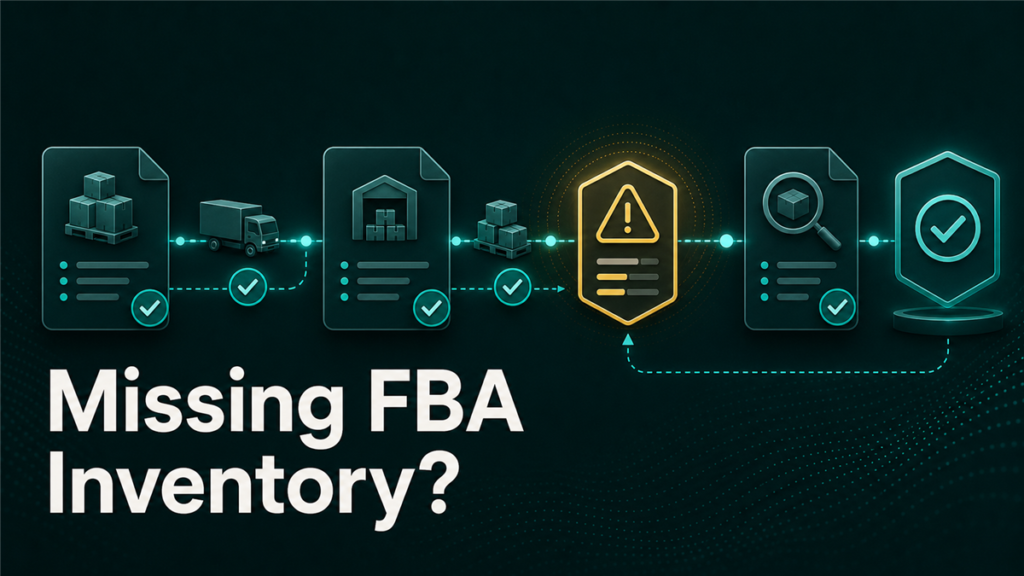
FBA shipment reconciliation is the process of comparing what you shipped to Amazon against what Amazon says it received, then filing claims for the difference. Most sellers encounter inbound discrepancies at some point, and the ones who recover the value consistently share one thing in common: they have the documentation ready before the case is opened.
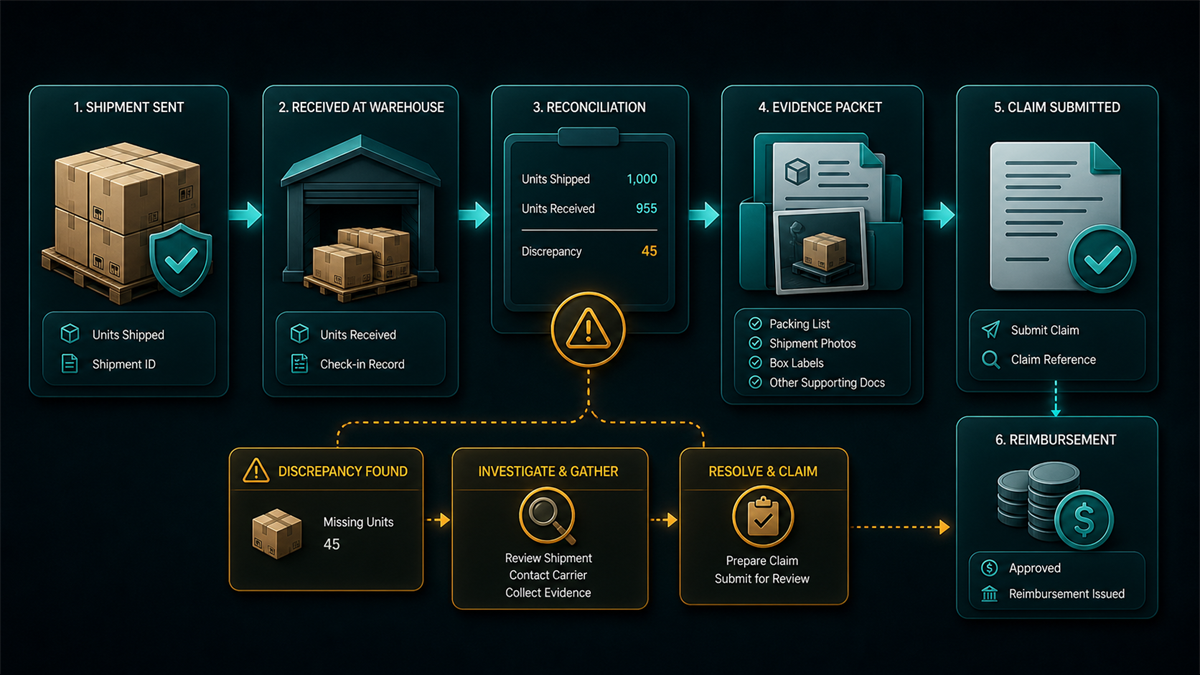
This guide covers the common causes of FBA receiving discrepancies, the documents you need, the claim filing process, and what to do when Amazon closes the case automatically.
Key Takeaways
- Closing a listing, liquidating inventory, removing stock, and deleting a SKU are separate actions. The same applies here: a shipment discrepancy, a reconciliation claim, and a reimbursement are three distinct steps with different requirements.
- Amazon's automated receiving process can produce count errors, especially with mixed-SKU cartons, weight-based auditing, and high-volume intake periods.
- Winning a discrepancy claim depends almost entirely on documentation: supplier invoice, packing slip, and proof of delivery with carrier confirmation.
- If Amazon closes your case with an automated "investigation completed" response, you can escalate with structured documentation through a manual case path.
- Small per-shipment shortages compound over time. Sellers running dozens of inbound shipments per year can lose meaningful margin if discrepancies go unaudited.
Why FBA Inbound Discrepancies Happen
Amazon's fulfillment center receiving process handles enormous volume, and the systems that count and log incoming inventory are largely automated. That speed and scale creates several common failure points.
Mixed-SKU carton errors
When a carton contains multiple SKUs, receiving staff or automated systems may scan one item and apply that count across the entire carton. The result: one SKU shows a surplus while another shows a deficit of the same quantity.
Weight and dimension mismatches
Automated conveyor systems check shipment weight against expected values. If packaging dimensions or unit weight shifted since the last shipment plan, even slightly, the system may flag the shipment as inconsistent and adjust unit counts without a manual recount.
Split receiving during high volume
During peak periods, pallets from a single shipment may be split across receiving bays. If part of the shipment is routed to a secondary processing area, the initial receiving ticket may close as a partial delivery before the remaining units are scanned. This can trigger a reconciliation shortfall that resolves later, or does not resolve at all.
Carrier handling and transit damage
Cartons that arrive damaged, with torn labels, or separated from the main pallet may be set aside and processed separately, sometimes under a different intake record. Units that cannot be identified may not be credited to your shipment.
None of these causes involve bad intent. They are operational realities of high-throughput logistics. The fix is systematic documentation and timely claims.
The Three Documents Every Claim Needs
Opening a case without matching documentation typically leads to a quick automated rejection. To get a manual review, your documentation needs to show an unbroken chain of custody from your facility to Amazon's receiving dock.
1. Supplier invoice or purchase order
This proves the units existed before transit. The invoice should show the supplier name and contact details, item descriptions matching your Seller Central catalog entries, transaction dates before the shipment creation date, and unit quantities equal to or greater than the volume shipped.
2. Internal packing slip or warehouse manifest
If you use a 3PL or pack from your own warehouse, the packing slip links the invoice to the specific shipment. It should show exactly which SKUs and quantities went into each carton, mapped to the shipment ID.
3. Proof of delivery
The requirements depend on shipping method:
- Small Parcel Delivery (SPD): every tracking number must show a valid delivery scan at the Amazon facility.
- Less-Than-Truckload (LTL) or Full-Truckload (FTL): a clean copy of the Bill of Lading with the Amazon fulfillment center's receiving stamp, date, and signature.
Compile these into a single, clearly named PDF before opening the case. A file name like `FBA_Shipment_FBA1234XYZ_Proof_of_Delivery.pdf` makes the case easier for support to process.
How to File an Inbound Discrepancy Claim
Once the shipment reaches its reconciliation window, follow these steps in order.
- Run the manifest audit. Compare your warehouse packing slip against the unit counts in the shipment's Contents tab in Seller Central. Identify exactly which SKUs are short and by how many units.
- Compile the documentation pack. Gather the supplier invoice, packing slip, and proof of delivery. Combine into a single PDF with clear labeling.
- Submit through the reconciliation tool. Open the specific shipment page in Seller Central, go to the Reconcile tab, select the shorted SKUs, choose the appropriate discrepancy reason, upload your documentation, and submit.
- Monitor the response. Review the case response. If the case is closed with an automated message, prepare for escalation using the process below.
The exact Seller Central menu paths and reconciliation tool location may change over time. Confirm the current workflow in your Manage FBA Shipments dashboard before filing.
What to Do When the Case Is Closed Automatically
The most common blocker is an automated response along the lines of "Investigation completed, shipment contents counted and confirmed." This status typically means an automated system checked receiving logs and found no scan gaps. It does not necessarily mean a person physically inspected your inventory.
To escalate past this status:
- Open a new case through Help, then Get Support, then Selling on Amazon. Select the FBA issues path.
- Write a precise, factual message. Avoid emotional language or speculation. Include the shipment ID, the exact unit discrepancy by SKU, and a clear statement that you are attaching proof of delivery documentation that conflicts with the automated count.
- Attach the full documentation PDF.
- Request a manual audit of the physical inventory at the receiving facility.
A structured, evidence-based escalation is more likely to trigger a manual review than a general complaint about missing units. If the first escalation is rejected, you can request further review, but additional attempts without new documentation rarely change the outcome.
Preventing Discrepancies Before They Happen
You cannot eliminate receiving errors entirely, but you can reduce their frequency and make claims easier when they occur.
- Place FBA box labels and carrier labels on flat carton surfaces, away from seams and corners, so scanners read them cleanly.
- Use heavy-duty stretch wrap on pallets and mark mixed-SKU cartons clearly with high-contrast labels.
- Maintain a tracking log for every shipment leg, especially when using cross-dock or upstream storage facilities.
- Verify that the physical weight on your carrier's weight ticket matches the weight in your Seller Central shipment plan. Significant mismatches increase the chance of automated count adjustments.
- Audit every shipment's Contents tab after reconciliation closes, not just the ones that feel wrong. Small discrepancies accumulate.
Mini-Scenario: The Shipment That Looked Complete
A seller shipped a full truckload of accessories across three variations to an FBA facility. The Bill of Lading was stamped at the dock. Two weeks later, the shipment showed a shortfall of several hundred units. The automated investigation came back as "counted and confirmed."
The seller's operations lead pulled the supplier invoice, the 3PL packing manifest, and the stamped Bill of Lading showing the full volume was delivered. They filed a manual escalation case with all three documents in a single PDF. Amazon initiated a facility search and located the missing units on a secondary pallet that had been separated during intake. The inventory was restored to active stock.
The documentation made the difference. Without the stamped BoL and matching manifest, the automated closure would have been the final answer.
FAQ
How long do I have to file an FBA shipment reconciliation claim?
Amazon sets specific windows for filing inbound shipment claims. The exact timeline should be confirmed in Seller Central's current help documentation, as the policy has changed in the past. Do not wait until the last possible day: file as soon as you have the documentation ready.
Does Amazon reimburse in cash or inventory credit?
It depends on the case. Amazon may issue a cash reimbursement or locate and restore the physical units. If units are found after a cash reimbursement has been issued, Amazon may reverse the credit and place the inventory back into your sellable stock.
Are small one-or-two-unit discrepancies worth filing?
Individually, probably not. But if you run dozens of shipments per year, those small shortfalls add up. At minimum, track them in a spreadsheet so you can identify patterns: specific fulfillment centers, shipping methods, or SKU types that consistently produce errors.
Can I prevent the "counted and confirmed" auto-closure?
You cannot prevent the automated response, but you can prepare for it. Having the documentation pack ready before the case is opened means you can escalate immediately rather than scrambling after a rejection.
What if my carrier lost the Bill of Lading?
Request a duplicate from the carrier. Most freight carriers retain delivery records. If the BoL is truly unavailable, the claim becomes much harder to win. For LTL and FTL shipments, always request a digital copy of the stamped BoL within 48 hours of delivery as standard practice.
Keeping Inbound Margins Clean
FBA shipment reconciliation is not a one-time fix. It is a recurring operational discipline: audit every shipment, keep the documentation organized, file claims promptly, and escalate with evidence when the automated system gets it wrong.
Sellers who treat this as routine maintenance recover value that would otherwise be written off quietly. Sellers who ignore it fund Amazon's receiving errors out of their own margin.
If your inbound reconciliation backlog has grown faster than your team can manage, or if you are seeing patterns of discrepancies you cannot resolve through standard cases, Qubeq can audit the shipment history, identify recoverable value, and run the claims process. We have recovered over $300K in FBA reimbursements across the brands we manage.