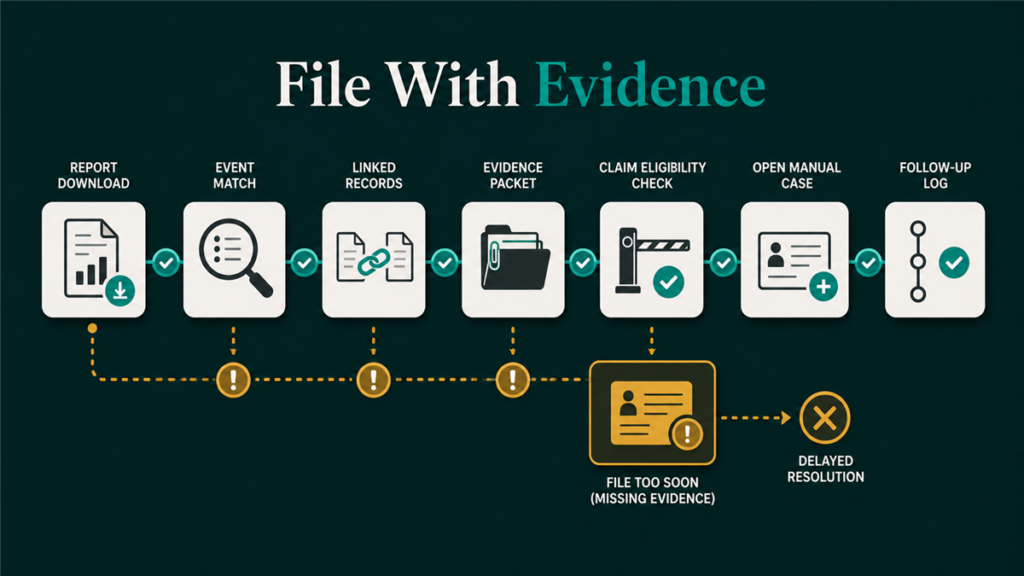
To file FBA reimbursement claims safely, sellers should identify the inventory event, check whether Amazon already reimbursed the account, verify the current claim window, gather matching evidence, and open one focused case. The process matters because Amazon's reimbursement windows, automation rules, and filing labels can change.
Key Takeaways
- Do not file FBA reimbursement claims before identifying the exact claim type.
- Check automatic reimbursements before opening a manual case.
- Verify current policy windows and Seller Central labels before filing.
- Strong claims connect one event to one evidence set.
- Qubeq's reimbursement workflow starts with audit and reconciliation, not case volume.
Why sellers should not file FBA reimbursement claims blindly
Sellers should not file FBA reimbursement claims blindly because weak or premature cases can create support friction and duplicate work. A reimbursement claim is strongest when it names the event, shows the evidence, and makes a clear request.
Policy changes make this even more important. Amazon has announced changes to reimbursement calculation and policy timing in recent years, and some reimbursement events may be handled automatically. That means the seller's first step is to check the current account record, not copy an old claim template.
Step-by-step workflow to file FBA reimbursement claims
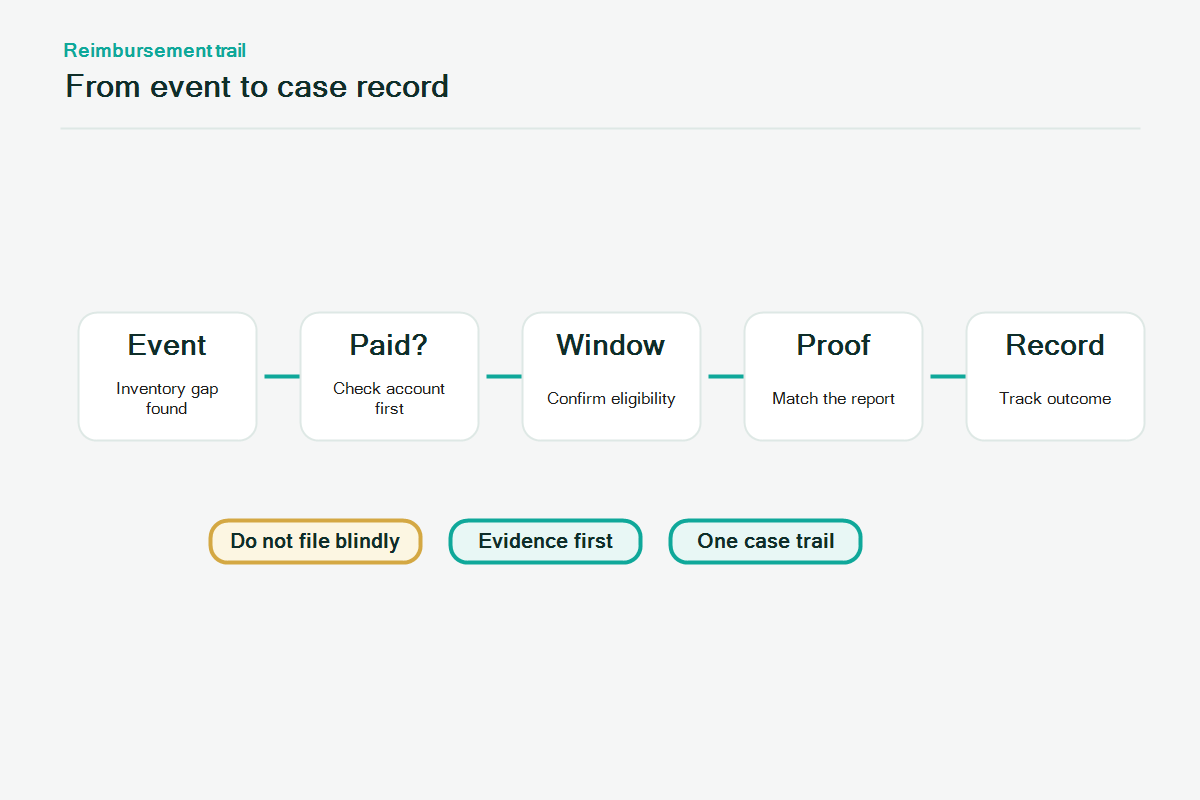
The safest workflow to file FBA reimbursement claims is to reconcile the event before opening the case. Use this sequence as an operating checklist.
1. Identify the inventory event
The claim type determines the evidence. Start by naming the event:
- Inbound shipment discrepancy.
- Fulfillment center lost inventory.
- Fulfillment center damaged inventory.
- Customer return issue.
- Removal order issue.
- Refund, fee, or transaction mismatch.
If the seller cannot name the event, the seller is not ready to file.
2. Check whether Amazon already reimbursed the account
Amazon may issue some reimbursements automatically. Before filing a manual claim, check the reimbursement report, transaction record, inventory adjustment data, and any case history tied to the SKU, FNSKU, shipment, order, or removal order.
Manual claims should not ask Amazon to reimburse something already credited.
3. Confirm the current eligibility window
Claim windows can change, and different claim types may have different timing rules. Sellers should verify the current FBA inventory reimbursement policy inside Seller Central before filing.
Do not rely on old blog posts, old internal SOPs, or memory. For publication, the packaging team should verify the current official Help Hub URL and policy wording.
4. Pull the evidence that matches the claim type
Each claim type has a different evidence set.
| Claim type | Evidence to gather |
| Inbound discrepancy | Shipment ID, shipped quantity, received quantity, box content data, carrier proof |
| Lost inventory | SKU/FNSKU, inventory adjustment, inventory movement, reimbursement check |
| Damaged inventory | Disposition, adjustment event, damage classification, reimbursement check |
| Customer return | Order ID, refund/replacement record, return status, condition, reimbursement check |
| Removal order | Removal order ID, requested units, shipped units, delivery/tracking evidence |
The evidence should be clear enough for a support associate to understand the claim without reconstructing the whole account.
5. Write one focused case
A strong reimbursement case is narrow. It names the claim type, identifies the affected SKU/FNSKU or order, references the event date, explains the mismatch, and asks for review under the current policy.
Avoid emotional language, broad accusations, or multiple unrelated SKUs in one case. The goal is a reviewable record.
6. Track the case outcome
After filing, track the case ID, date opened, claim type, affected units, evidence used, Amazon response, and final outcome. This prevents duplicate cases and helps the seller improve future reimbursement audits.
If Amazon denies the claim, review the denial reason before replying. A stronger response may need clearer evidence, a narrower request, or no reply if the policy does not support the claim.
Filing notes by claim type
Different FBA reimbursement claim types need different filing logic. Sellers should not use the same case language for every loss.
Inbound shipment claims
Inbound claims should stay tied to the shipment record. The seller should show what was shipped, what Amazon received, and why the discrepancy deserves review.
Best evidence:
- Shipment ID.
- SKU/FNSKU and quantity gap.
- Carrier proof or box-level documentation.
- Reconciliation status.
Fulfillment center lost or damaged claims
Warehouse lost or damaged claims should show that the unit was under Amazon control before the loss or damage event. Inventory adjustment and disposition records matter here.
Best evidence:
- Inventory adjustment data.
- Inventory movement history.
- Disposition status.
- Reimbursement report check.
Customer return claims
Customer return claims should connect the refund or replacement to the returned unit status. The seller should show whether the unit returned, what condition Amazon assigned, and whether reimbursement already appeared.
Best evidence:
- Order ID.
- Refund or replacement record.
- Return status.
- Condition and disposition.
- Reimbursement report check.
Removal order claims
Removal claims should focus on the removal order, not the original inbound shipment. The seller should show what was requested, what was shipped, and what did or did not arrive.
Best evidence:
- Removal order ID.
- SKU/FNSKU and quantity.
- Tracking or delivery evidence.
- Removal status.
Do not file yet if the evidence is incomplete
Sellers should not file yet if the evidence is incomplete, the event is still processing, or the current policy window has not been verified. A short delay can create a much stronger claim.
Do not file yet if:
- The claim type is unclear.
- The event may still be eligible for automatic reimbursement.
- The return or shipment status is not final.
- The evidence depends on an unverified policy window.
- The seller cannot identify the SKU, FNSKU, order ID, shipment ID, or removal order ID.
- The claim repeats a case Amazon already answered without new evidence.
Mini-scenario: policy change creates old-template risk
A seller has an internal SOP from a previous year for filing lost inventory claims. The operations team starts copying the old case template into Seller Central, but the reimbursement audit shows that several events were already automatically reimbursed and other events belong to customer returns, not warehouse loss.
The team pauses the filing batch. They separate automatic reimbursements, customer return reviews, and true lost-in-warehouse events. The final claim set is smaller, but every case has a stronger evidence trail.
FAQ
How do I file FBA reimbursement claims?
Identify the claim type, check whether Amazon already reimbursed the account, verify the current claim window, gather matching evidence, and open a focused Seller Central case.
Should I use an old reimbursement claim template?
Use old templates cautiously. Amazon's reimbursement process and policy wording can change, so verify current Seller Central requirements before filing.
Can I file one case for many reimbursement issues?
It is usually better to file focused cases by claim type and event. Mixing unrelated issues can make the case harder to review.
What evidence do I need for an FBA reimbursement claim?
Evidence depends on the claim type, but it often includes SKU/FNSKU, shipment ID, order ID, removal order ID, inventory adjustment records, return records, and reimbursement report checks.
Can Qubeq file FBA reimbursement claims for sellers?
Qubeq can audit reimbursement gaps, organize the evidence, and help sellers pursue eligible recovery paths through a structured reimbursement workflow.
File fewer, stronger reimbursement claims
The best way to file FBA reimbursement claims is to file fewer weak cases and more evidence-backed claims. If your team is unsure which losses are worth pursuing, Qubeq can audit the account, separate claim types, and prepare a cleaner reimbursement recovery workflow.