The Amazon Voice of Customer dashboard helps sellers spot customer-experience problems before they become larger listing or account-health issues. Sellers should use the Amazon Voice of Customer dashboard as a diagnosis tool, not just a report to check after returns increase.
Key Takeaways
- Voice of the Customer is useful because it connects customer feedback to operational causes.
- Sellers should review issue patterns by ASIN, not only by total return volume.
- Many problems are listing accuracy, packaging, fulfillment, product quality, or expectation-setting issues.
- The dashboard should trigger investigation, documentation, and listing correction.
- Qubeq uses Voice of Customer signals as part of catalog, account-health, and returns audits.
What Is the Amazon Voice of Customer Dashboard?
The Amazon Voice of Customer dashboard is a Seller Central tool that helps sellers monitor customer-experience signals for their products. Amazon's public Seller Central overview lists Voice of the Customer among the tools sellers can use to monitor reviews, ratings, and customer feedback.
In daily operations, the dashboard is valuable because customer issues often appear before a seller sees the full commercial damage. A product can have rising returns, poor customer comments, or repeated mismatch complaints before the main listing team realizes the detail page is creating the wrong expectation.
How Sellers Should Read Voice of Customer Signals
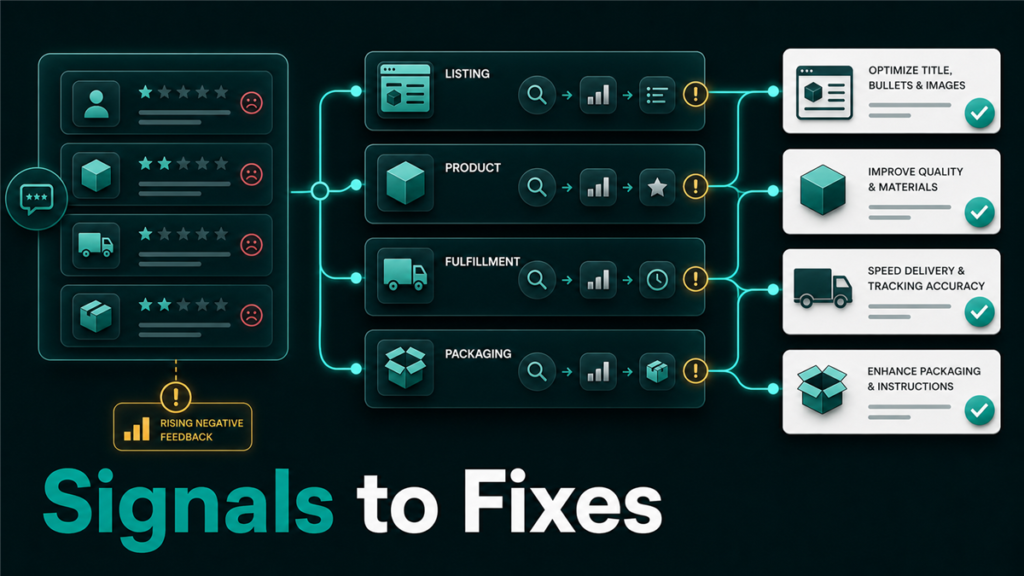
Sellers should read Voice of Customer signals as a triage queue. The goal is not to assign blame to the customer. The goal is to find the broken expectation between the listing, the product, the package, and the fulfillment experience.
Use this simple diagnosis table:
| Signal Pattern | Likely First Check | Possible Fix |
| "Not as described" comments | Title, bullets, images, size chart | Correct content and remove unclear claims |
| "Wrong item" comments | Variation mapping, FNSKU, warehouse labeling | Audit catalog and fulfillment identifiers |
| "Damaged" comments | Packaging, prep, carrier path | Improve packaging and review FBA prep |
| "Missing parts" comments | Bundle structure, kit assembly, product insert | Confirm package contents and listing promises |
| "Poor quality" comments | Supplier batch, listing claims, review trend | Inspect inventory and revise expectations |
Why Voice of Customer Matters for Account Health
Voice of Customer matters for account health because repeated customer problems can become policy, listing, or performance risk. Even if the dashboard itself is not a suspension notice, it can point to the same underlying issues that create restricted listings, negative feedback, safety complaints, or return spikes.
A smart seller does not wait until an ASIN is suppressed. The seller reviews the warning pattern, checks whether the detail page is accurate, confirms inventory quality, and fixes the operational cause.
Voice of Customer Workflow for Sellers
A useful Voice of Customer workflow turns feedback into assigned fixes.
- Review the dashboard on a recurring schedule.
- Sort by ASINs with the highest customer-experience concern.
- Read the issue themes, not only the metric.
- Compare the customer comments against the listing title, bullets, images, variation structure, and packaging.
- Check whether the issue is new, seasonal, or tied to a specific batch.
- Assign the fix to catalog, inventory, operations, support, or supplier management.
- Record the correction and monitor the same ASIN again.
What to Fix Before Editing the Listing
Sellers should diagnose the cause before editing the listing. If the issue is warehouse labeling or a bad product batch, changing the bullet points will not fix the customer problem. If the issue is inaccurate content, opening a support case without correcting the detail page will only slow the work.
Start with the lowest-risk facts:
- Is the product currently being shipped under the right FNSKU?
- Are parent-child variations mapped correctly?
- Does the title describe the exact product being shipped?
- Do images show the correct size, quantity, color, and included parts?
- Are bullets making claims that the product cannot consistently meet?
- Are returns tied to one SKU, one bundle, or one shipment batch?
Mini-Scenario: Return Comments Point to a Catalog Problem
A brand sees rising complaints that a two-pack item arrived as a one-pack. The team first assumes Amazon lost units in fulfillment, but the Voice of Customer comments repeat the same phrase across several orders.
After checking the catalog, the team finds one child ASIN mapped to an old one-pack contribution while the images and title imply a two-pack. The right fix is not a refund template. The right fix is a catalog correction, variation audit, and inventory check so future customers receive what the detail page promises.
FAQ
Is Voice of Customer the same as product reviews?
No. Product reviews are public customer feedback. Voice of Customer is a seller-facing tool that helps sellers monitor customer-experience signals and issue patterns.
How often should sellers check the Voice of Customer dashboard?
Established brands should check it at least weekly, and more often during launches, packaging changes, seasonal demand, or after a return spike.
Can Voice of Customer issues cause suppression?
Voice of Customer signals can point to problems that may later create listing or account risk. Sellers should treat repeated issue patterns as early warning signals.
Should sellers change listings immediately after seeing a warning?
Not always. Sellers should first confirm whether the cause is catalog content, product quality, fulfillment, packaging, or customer misunderstanding.
Can Qubeq audit Voice of Customer issues?
Yes. Qubeq can review the issue pattern, compare it against listing content and catalog structure, and help create the right operational fix.
Turn Customer Feedback Into an Operations System
The Amazon Voice of Customer dashboard is most useful when a seller turns feedback into assigned work. If your team sees repeated customer complaints, return reasons, or ASIN-level warnings, Qubeq can help connect the signals to catalog, inventory, and account-health fixes.