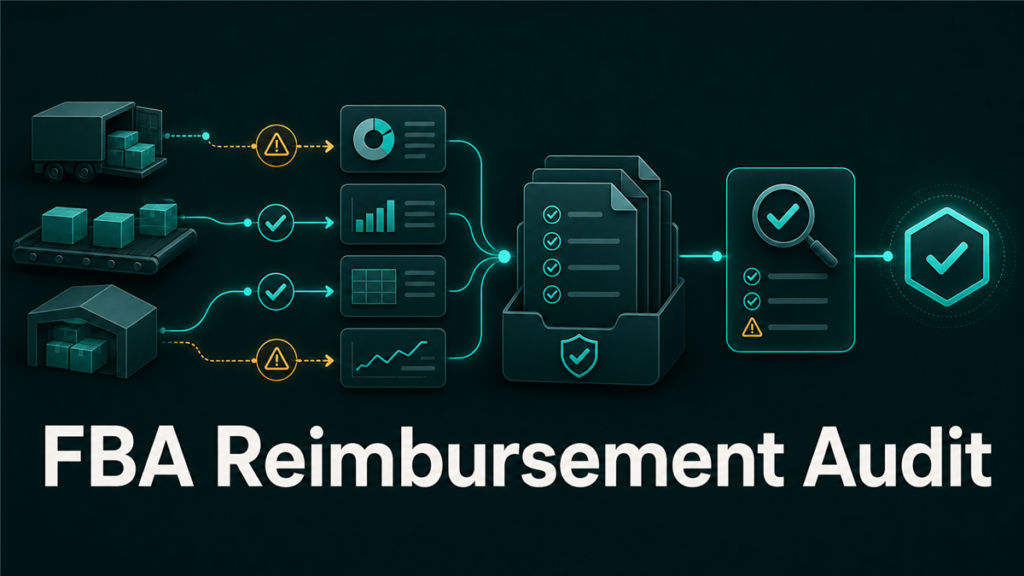
An FBA reimbursement audit checklist helps sellers review lost inventory, damaged units, shipment discrepancies, customer returns, and reimbursement reports before eligible money is missed. The audit should connect inventory movement, Amazon reports, claim windows, and evidence in one controlled workflow.
Key Takeaways
- FBA reimbursement audits should compare shipments, inventory adjustments, returns, removals, and reimbursement reports.
- Automatic reimbursements do not remove the need for manual reconciliation.
- The strongest claims are supported by clear evidence, clean timelines, and SKU-level documentation.
- Sellers should audit by issue type, not by randomly opening cases.
- Claim rules and eligibility windows can change, so source verification is required before publishing or filing.
What Is an FBA Reimbursement Audit?
An FBA reimbursement audit is a structured review of FBA inventory events to identify cases where Amazon may owe the seller a reimbursement. The audit looks at inventory received, lost, damaged, returned, removed, adjusted, or reimbursed across Seller Central reports.
The purpose is not to assume every discrepancy is Amazon's fault. The purpose is to reconcile inventory movement and identify where the seller has evidence for a valid claim. Good reimbursement work is evidence-led. Weak reimbursement work creates noisy cases that slow the account down.
Why FBA Sellers Still Need Reimbursement Audits
FBA sellers still need reimbursement audits because inventory moves through many touchpoints: inbound shipping, fulfillment centers, customer returns, removals, disposal, and reimbursement processing. Some issues may be reimbursed automatically, while other issues may require manual review.
An audit helps answer four practical questions:
| Question | Why It Matters |
| Was the inventory received correctly? | Shipment discrepancies can hide missing units. |
| Was inventory later lost or damaged? | Fulfillment center events may create reimbursement opportunities. |
| Was a customer return handled correctly? | Returned, unsellable, missing, or refunded units need review. |
| Was reimbursement already issued? | Sellers should avoid duplicate or unsupported cases. |
The audit also protects the seller from poor case discipline. A reimbursement case should be opened only when the evidence supports the claim and the issue appears eligible under current Amazon policy.
FBA Reimbursement Audit Checklist
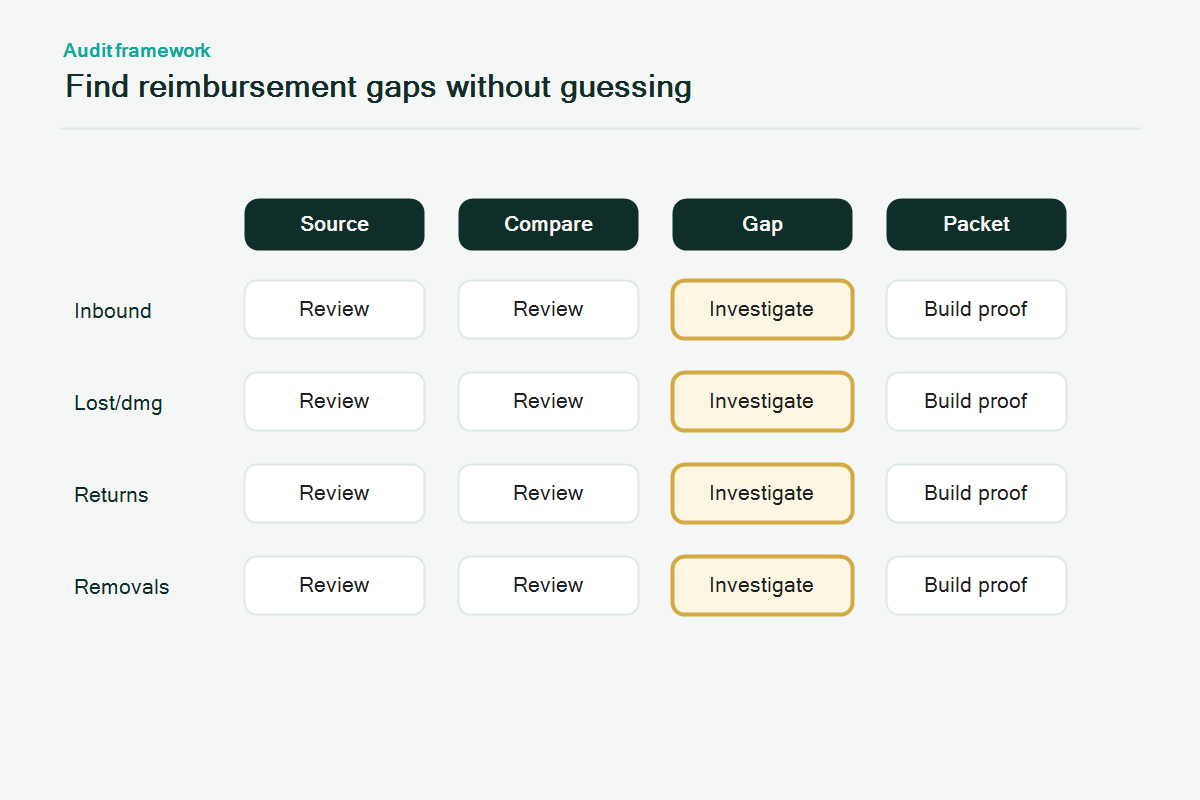
The FBA reimbursement audit checklist should follow the inventory journey from inbound shipment to final reimbursement.
1. Confirm the Audit Period and Scope
Start by defining the exact period and SKU group being reviewed. A vague audit creates duplicate work and missed issues.
Set:
- Date range
- Marketplace
- SKU or ASIN group
- Fulfillment method
- Report sources
- Person responsible for evidence review
- Claim status tracker
For larger accounts, review high-value SKUs first. A small number of expensive units may matter more than hundreds of low-value discrepancies.
2. Reconcile Inbound Shipments
Inbound shipment reconciliation checks whether Amazon received the units that the seller sent into FBA. This is often the first reimbursement category sellers think about, but it needs careful evidence.
Review:
- Shipment ID
- SKU and expected quantity
- Units shipped
- Units received
- Shipment status
- Carrier tracking
- Proof of delivery
- Box-level documents if available
- Photos or packing records if the warehouse keeps them
Do not open a case only because the received quantity is temporarily lower than the shipped quantity. Some shipments need time to process. The next step depends on the shipment status, investigation availability, and current Amazon rules.
3. Review Lost and Damaged Inventory Events
Lost and damaged inventory events can occur inside the fulfillment network. Sellers should compare inventory adjustment reports, reimbursement reports, and current inventory status.
Look for:
- Inventory adjustments marked as lost
- Inventory adjustments marked as damaged
- Reimbursements already issued
- Reversals or clawbacks
- Units later found and returned to inventory
- Repeated issues for the same SKU or fulfillment center
The audit should separate unreimbursed events from already reimbursed events. A clean claim tracker prevents duplicate cases.
4. Audit Customer Returns
Customer returns can create reimbursement issues when a refunded item is not returned, returned in a different condition, or handled in a way that creates an inventory discrepancy. The exact claim path depends on the return event and current Amazon policy.
Review:
- Refund date
- Return status
- Returned quantity
- Disposition
- Customer return reason
- Whether the unit returned to sellable inventory
- Whether reimbursement already appears in the report
Returns require careful language. Not every customer return issue is reimbursable. The audit should identify possible exceptions and evidence gaps, then verify policy before filing.
5. Check Removal and Disposal Events
Removal orders and disposal events should be reviewed because units may leave FBA inventory without the expected outcome. A removal audit compares requested removals, shipped removals, returned units, disposed units, and inventory adjustments.
Review:
- Removal order ID
- Requested quantity
- Shipped quantity
- Delivered quantity
- Disposed quantity
- Tracking details
- Inventory adjustments after removal
If the seller receives damaged or missing removal units, preserve photos, packing slips, tracking details, and receiving records.
6. Compare Reimbursement Reports Against Claims
The reimbursement report is the audit checkpoint that prevents duplicate or unsupported claims. Before opening a case, confirm whether Amazon already issued reimbursement for the event.
Track:
- Reimbursement ID
- Approval date
- SKU or FNSKU
- Quantity
- Amount
- Reason code
- Related shipment or adjustment ID
- Reversal status if applicable
If reimbursement was issued but the amount looks wrong, the issue becomes a valuation review, not a missing reimbursement claim. Valuation claims require extra caution and current policy verification.
7. Build an Evidence Packet Before Opening a Case
The strongest reimbursement cases are easy for support to review. The case should explain the issue, identify the affected units, show the timeline, and attach relevant evidence.
Include:
- Shipment ID, order ID, removal ID, or adjustment ID
- SKU, ASIN, and FNSKU
- Quantity affected
- Date range
- Report screenshots or exports if allowed
- Carrier tracking or proof of delivery
- Invoice or purchase documentation when relevant
- Short explanation of the discrepancy
Avoid emotional case language. A clear case is usually more effective than a long complaint.
FBA Reimbursement Audit Workflow
Use this workflow for each potential issue:
- Identify the inventory event.
- Match the event to a report source.
- Check whether reimbursement already appears.
- Confirm current eligibility rules.
- Gather supporting evidence.
- Open a concise Seller Central case if the claim appears eligible.
- Track the case ID, response, next action, and final outcome.
- Reconcile the reimbursement or denial back into the tracker.
The audit is not complete until the outcome is recorded. Otherwise, the same issue may be reopened later by mistake.
Mini-Scenario: The Missing Shipment That Was Already Partly Paid
A seller sends 600 units into FBA. The shipment closes with 570 units received. The operations team prepares to open a claim for 30 units, but the audit finds a reimbursement for 18 units already issued and 4 units later found in inventory.
The remaining discrepancy is 8 units, not 30. The case should focus only on the remaining unsupported gap, with shipment ID, SKU, received quantity, reimbursement record, and tracking evidence.
The audit prevents an inflated case and gives support a cleaner path to review.
FAQ
What is an FBA reimbursement audit?
An FBA reimbursement audit is a structured review of FBA reports to find possible missed reimbursements for lost inventory, damaged units, shipment discrepancies, returns, removals, or inventory adjustments.
Does Amazon automatically reimburse all FBA issues?
No. Some reimbursement events may be automated, but sellers should still reconcile reports and verify whether manual claims are needed for eligible unresolved issues.
What evidence is needed for an FBA reimbursement claim?
Evidence depends on the issue, but common documents include shipment IDs, tracking, proof of delivery, SKU and FNSKU details, report exports, invoices, photos, and a clear timeline.
How often should sellers audit FBA reimbursements?
High-volume FBA sellers should review reimbursement signals weekly or monthly. Smaller sellers can run a monthly or quarterly audit, with faster checks for high-value shipments.
Can Qubeq recover missed FBA reimbursements?
Qubeq can audit FBA reimbursement opportunities and identify what may be owed. For reimbursement recovery work, Qubeq can review the account and pursue eligible claims based on available evidence.
Turn Reimbursement Audits Into a Repeatable System
FBA reimbursement audits work best when the seller keeps a clean tracker, saves shipment evidence, and reconciles reports regularly. The goal is not just to recover one missed claim. The goal is to build a process that catches inventory discrepancies before they disappear into old reports.
If your FBA reimbursement process has gaps, Qubeq can audit the account and identify what Amazon may owe. No upfront cost.