FBA reimbursement claim types are easier to manage when sellers map the claim to where the inventory event happened. A lost unit in an inbound shipment, a damaged unit inside a fulfillment center, and a refunded customer return all need different evidence before a manual claim makes sense.
Key Takeaways
- FBA reimbursement claim types usually connect to the inventory event: inbound shipment, fulfillment center handling, customer return, removal order, or inventory adjustment.
- Sellers should check whether Amazon already reimbursed the event before opening a manual claim.
- Exact claim windows, report names, and filing paths should be verified in Seller Central before publishing or filing.
- The strongest reimbursement workflow starts with reconciliation, not case volume.
- Qubeq treats reimbursement recovery as an audit process: identify the event, match the evidence, then file only the claim Amazon can review.
What are the main FBA reimbursement claim types?
The main FBA reimbursement claim types include inbound shipment discrepancies, fulfillment center lost inventory, fulfillment center damaged inventory, customer return issues, removal order problems, and inventory adjustment events. Some claims may be reimbursed automatically, while others may require seller review and a manual case.
| Claim type | What happened | What to check first | Common evidence |
| Inbound shipment discrepancy | Shipped units do not match received units | Shipment reconciliation status | Box content records, carrier proof, shipment ID |
| Fulfillment center lost inventory | Amazon-controlled inventory is lost after receipt | Inventory adjustment history | FNSKU/SKU, adjustment code, date, quantity |
| Fulfillment center damaged inventory | Inventory is damaged while under Amazon control | Inventory disposition and adjustments | Disposition change, adjustment report, reimbursement report |
| Customer return reimbursement | Amazon refunded or replaced an FBA order and the return creates a loss | Refund, return status, returned condition | Order ID, return report, inventory disposition |
| Removal order issue | Units are missing or damaged during removal | Removal order status | Removal order ID, units requested, units received |
| Fee or refund edge case | Account is charged or refunded incorrectly | Transaction and reimbursement reports | Settlement data, order ID, fee line, case history |
The table is a map, not a guarantee. Amazon's reimbursement rules and automation coverage change, so sellers should verify the current FBA inventory reimbursement policy before filing.
Why the claim type matters before filing
The claim type determines the timing, evidence, and language of the Seller Central case. A reimbursement case that mixes shipment receiving, customer returns, and inventory adjustments can become hard for support to evaluate.
For example, a seller may see a missing unit and assume the issue is a lost inventory claim. If the unit was never received in the inbound shipment, the better starting point is shipment reconciliation. If the unit was received, transferred, then adjusted out later, the stronger path may be an inventory adjustment review.
This distinction matters because Amazon usually reviews claims against the event record. The claim should point to the specific shipment, order, return, adjustment, or removal order that created the loss.
FBA reimbursement claim types by inventory event
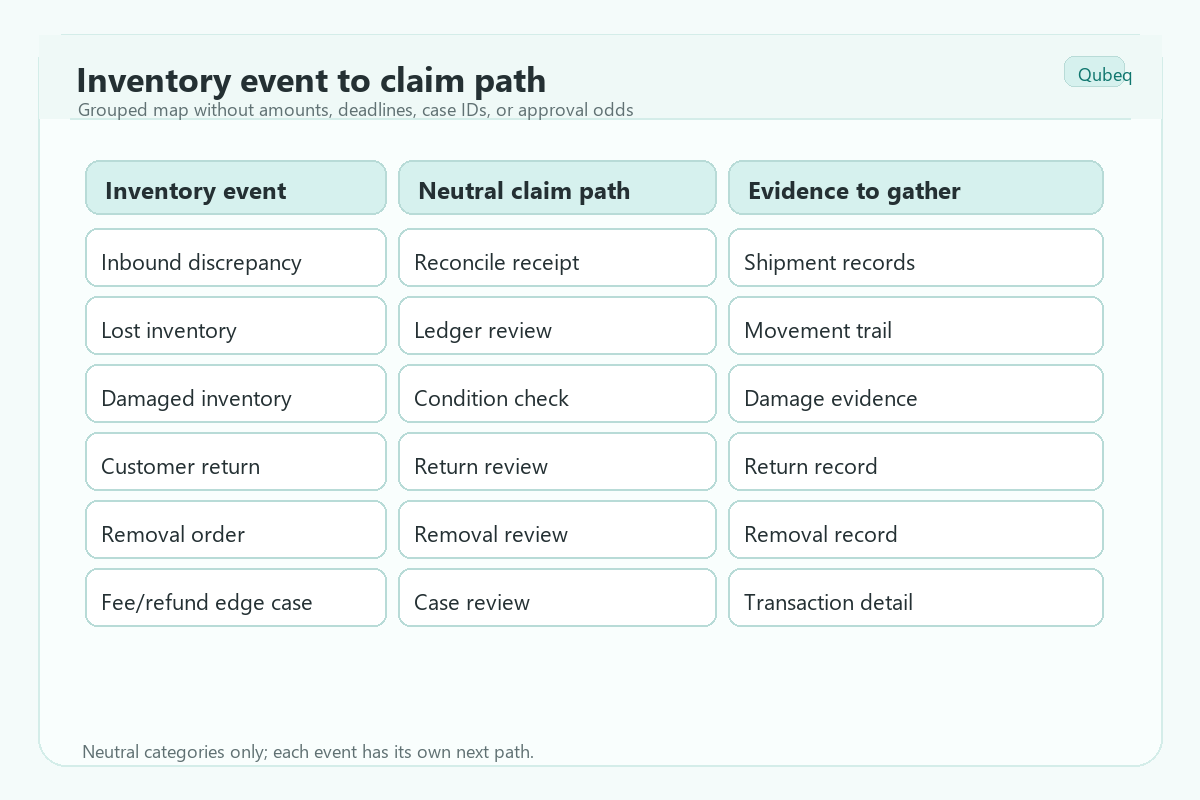
Each FBA reimbursement claim type should start with one question: where did Amazon's custody or process create the inventory gap? The answer tells the seller which report to pull.
Inbound shipment discrepancy claims
Inbound shipment discrepancy claims happen when a seller ships units to FBA and Amazon's received quantity does not match the seller's expected quantity. These claims require a shipment-level review before a reimbursement case is opened.
Check:
- Shipment ID and receiving status.
- Units shipped, received, and adjusted.
- Box-level content data if available.
- Carrier proof of delivery or weight records.
- Any reconciliation status or investigation outcome inside Seller Central.
Do not file a vague "missing inventory" case if the issue belongs to a specific inbound shipment. The case should identify the shipment and the exact SKU/FNSKU quantity gap.
Fulfillment center lost inventory claims
Fulfillment center lost inventory claims happen when inventory was already received by Amazon and later disappears from available or reserved inventory. The reimbursement path usually starts with inventory adjustment records.
Check:
- Inventory Adjustment report.
- Reimbursements report.
- Inventory Ledger or equivalent inventory movement report.
- SKU/FNSKU quantity before and after the event.
- Whether Amazon already issued an automatic reimbursement.
The seller should not assume every negative adjustment is eligible. Some adjustments reflect transfers, found inventory, customer returns, disposal, or corrections.
Fulfillment center damaged inventory claims
Fulfillment center damaged inventory claims happen when units are damaged while under Amazon's control. The key is to separate warehouse-caused damage from customer-caused damage, defective returns, or seller-responsible packaging problems.
Check:
- Detailed disposition.
- Adjustment reason or event code.
- Whether the unit moved to unsellable status.
- Reimbursement report for automatic credits.
- Case history if a previous claim was filed.
Use careful language in the claim. The evidence should show why the inventory event appears to be Amazon-responsible rather than customer-damaged or seller-responsible.
FBA customer return reimbursement claims
FBA customer return reimbursement claims happen after Amazon refunds or replaces an order and the return creates a reimbursable loss. The seller should review whether the item returned, whether the returned unit was sellable, and whether Amazon already reimbursed the account.
Check:
- Order ID and refund or replacement event.
- FBA customer returns data.
- Returned condition and disposition.
- Inventory adjustment history.
- Reimbursement report.
Customer returns are easy to misread. A refunded order is not automatically a reimbursement claim. The return timing, return condition, and current policy determine whether the seller should investigate further.
Removal order reimbursement claims
Removal order reimbursement claims happen when units requested for removal are lost or damaged before reaching the seller or the seller's chosen destination. The evidence should stay tied to the removal order, not the original shipment.
Check:
- Removal order ID.
- Units requested, cancelled, shipped, and delivered.
- Tracking or delivery records.
- SKU/FNSKU quantity by removal order.
- Any existing reimbursement or adjustment.
Removal claims often fail when the seller cannot connect the missing unit to the removal order record. Keep the claim narrow.
Fee, refund, and adjustment edge cases
Some reimbursement work is not a clean lost-or-damaged inventory claim. Sellers may find fee corrections, refund issues, or transaction mismatches during a reimbursement audit.
Check:
- Settlement report.
- Transaction view.
- Reimbursements report.
- Refund and return reports.
- Case history.
These cases need extra caution. If the issue is actually a fee dispute, refund mismatch, or account settlement question, do not force it into an FBA inventory reimbursement claim type.
What should sellers check before filing any FBA reimbursement claim?
Sellers should check the event record, automatic reimbursements, current policy window, evidence, and duplicate case history before filing any FBA reimbursement claim. Filing too early or filing the wrong claim type can waste the strongest evidence.
- Identify the event type: shipment, warehouse loss, warehouse damage, customer return, removal order, or fee/refund issue.
- Check whether Amazon already reimbursed the event.
- Confirm the current eligibility window in Seller Central.
- Pull the report that matches the event.
- Match SKU, FNSKU, order ID, shipment ID, or removal order ID.
- File one focused case with one clear request.
- Track the case result and update the reimbursement audit log.
What not to file blindly
Sellers should not file FBA reimbursement claims blindly when the event type, evidence, or eligibility timing is unclear. A large batch of weak cases can create more support friction than recovery.
Avoid filing:
- Claims for units Amazon already reimbursed.
- Claims with no shipment ID, order ID, removal order ID, or adjustment event.
- Claims that combine several unrelated SKUs and events.
- Claims based only on estimated inventory counts.
- Claims that depend on outdated claim windows.
- Claims that sound like a guarantee rather than a documented reconciliation.
Mini-scenario: one SKU, three possible claim paths
A seller notices that 18 units of one SKU are missing from available inventory. The first instinct is to file a lost inventory claim, but the audit shows three separate events: six units were short-received in an inbound shipment, four units were adjusted after fulfillment center handling, and eight units were tied to refunded customer returns.
One case would not explain the loss clearly. The cleaner approach is three separate reviews: shipment reconciliation for the six inbound units, inventory adjustment evidence for the four warehouse units, and return-condition review for the eight customer-return units.
FAQ
What is an FBA reimbursement claim type?
An FBA reimbursement claim type is the category of inventory or account event behind a possible reimbursement, such as inbound discrepancy, lost inventory, damaged inventory, customer return, or removal order issue.
Does Amazon reimburse every lost or damaged FBA unit?
No. Eligibility depends on the event, custody, timing, evidence, and Amazon's current reimbursement policy. Sellers should verify the current policy before filing.
Should sellers file manual claims if Amazon reimburses automatically?
Sellers should first check whether Amazon already issued an automatic reimbursement. A manual claim may be useful only when the event appears eligible and no reimbursement appears in the account.
Which report should sellers check first?
The first report depends on the claim type. Inbound issues start with shipment records, warehouse issues often start with inventory adjustments, and customer return issues start with refund and return records.
Can Qubeq help with FBA reimbursement recovery?
Yes. Qubeq can audit FBA reimbursement gaps, organize evidence, and identify which claims are worth pursuing before the seller opens manual cases.
Build the claim map before opening cases
The strongest FBA reimbursement process starts with a claim map, not a pile of Seller Central cases. If your team is finding lost units, damaged inventory, customer return gaps, or unresolved shipment discrepancies, Qubeq can audit the account and identify the recovery paths that are worth pursuing.