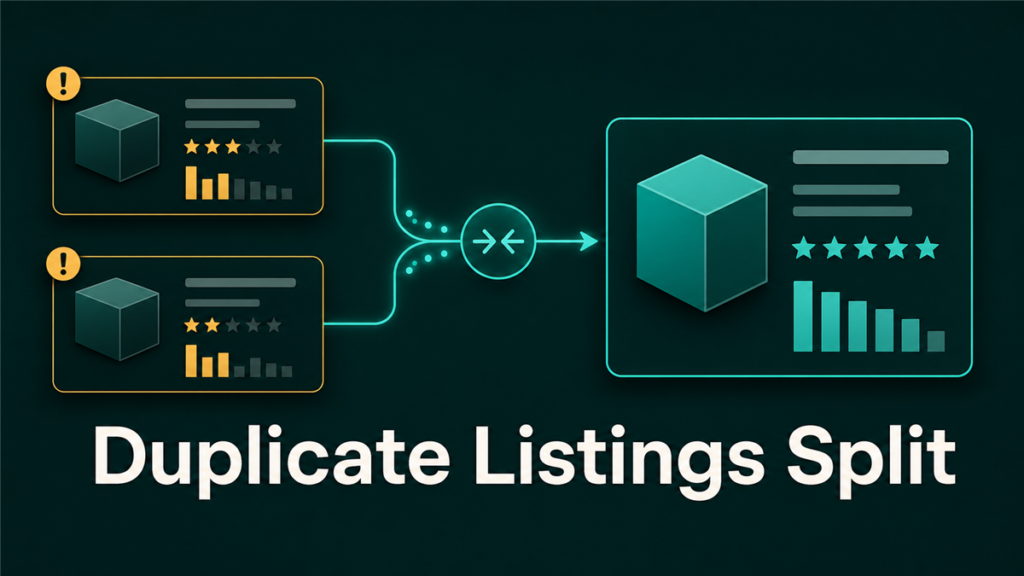
Merge duplicate Amazon listings is one of the first cleanup priorities when catalog integrity starts breaking down. Duplicate Amazon listings happen when the same product exists under two or more separate ASINs. The causes vary: flat file errors, variation misconfigurations, separate contributions from vendor and seller channels, or unauthorized catalog contributions from other sellers. The result is the same: split reviews, fragmented sales history, confused customers, and diluted search ranking.
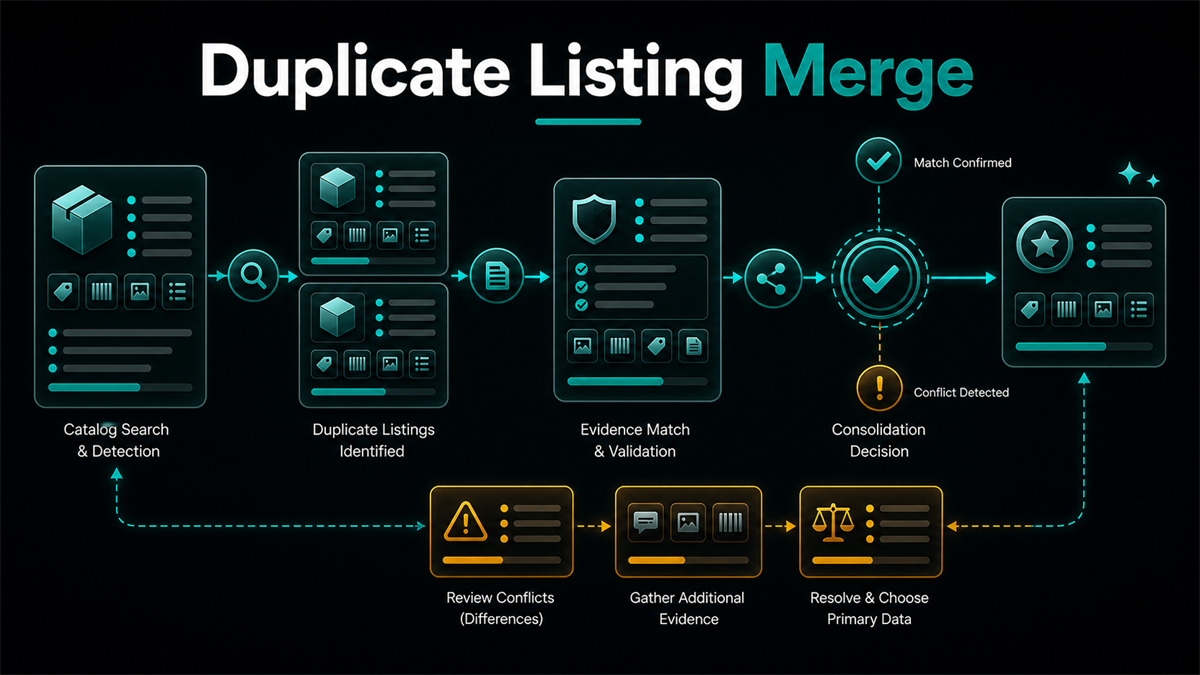
Merging duplicate listings consolidates the product under one ASIN, preserving the strongest listing's reviews and sales history while removing the redundant one from active search results. This guide covers how to identify duplicates, decide which ASIN survives, prepare the documentation, and submit the merge request without creating new catalog problems.
Key Takeaways
- Duplicate ASINs split your reviews, sales velocity, and organic ranking across two pages instead of one. Merging them consolidates that equity into a single listing.
- Amazon does not offer a self-service "merge" button. The process requires a case submission through Seller Central with specific documentation proving the products are identical.
- The surviving ASIN should be the one with the strongest combination of reviews, sales history, and listing quality. Do not default to the newest or the one you created most recently.
- Merging is not the same as creating a variation. Variations group related products under one parent. A merge removes a duplicate ASIN entirely and redirects to the survivor.
- Document everything before submitting. Once Amazon processes a merge, reversing it requires a separate case and is not guaranteed.
How Duplicate Listings Get Created
Understanding the cause helps you prevent the next one.
Flat file and bulk upload errors
When sellers upload catalog data through flat files or inventory loaders, a missing or incorrect product identifier, such as a UPC, EAN, or ASIN, can cause Amazon's system to create a new ASIN instead of matching to the existing one. This is the most common source of duplicates for sellers managing large catalogs.
Variation misconfigurations
A product that should be a child ASIN under a parent variation family sometimes gets created as a standalone listing. This can happen when the variation theme is set up incorrectly, when a child is accidentally detached from its parent, or when a new listing is created without referencing the existing family.
Vendor and seller channel overlap
If the same product exists in Amazon's retail catalog through the vendor (1P) channel and also through a seller (3P) listing, two ASINs for the same product can coexist. This is common for brands transitioning between vendor and seller models.
Unauthorized catalog contributions
Other sellers can contribute product pages to Amazon's catalog. If a seller creates a new listing for a product that already exists rather than listing against the existing ASIN, a duplicate is born. Brand Registry helps reduce this but does not eliminate it.
Regional or marketplace migration
Products listed across multiple Amazon marketplaces sometimes generate duplicate ASINs when catalog data is migrated or synced incorrectly between regions.
How to Find Duplicates in Your Catalog
Duplicates are not always obvious. Two ASINs for the same product may have slightly different titles, images, or descriptions, making them hard to spot in a large catalog.
Start with these checks:
Search your own brand name on Amazon and scan the results for products that appear twice under different ASINs. Pull your active listings report from Seller Central and sort by product name or UPC to find rows that point to different ASINs for the same product. Check the Brand Dashboard in Brand Registry for listings that share the same UPC or EAN but have different ASINs. If you use a catalog management tool, run a duplicate detection report based on product identifiers.
For larger catalogs, a systematic audit is more reliable than spot-checking. Export your full catalog data, match on UPC, EAN, model number, and product title, and flag any product that appears under more than one ASIN.
Deciding Which ASIN Survives
The surviving ASIN is the one that keeps its detail page, reviews, and sales history. The duplicate ASIN gets suppressed or redirected.
Choose the survivor based on these criteria, in priority order:
- Review count and rating. The ASIN with more reviews and a stronger average rating should survive. Reviews are the hardest catalog asset to rebuild.
- Sales history and organic ranking. The ASIN with stronger recent sales velocity and higher organic search placement holds more ranking equity.
- Listing quality. If review counts are similar, choose the ASIN with better images, more complete product data, and stronger listing content.
- Buy box ownership. If you own the buy box on one ASIN but not the other, the one you control is usually the better survivor.
- Brand Registry association. The ASIN that is properly associated with your brand in Brand Registry is cleaner from a catalog governance standpoint.
Do not merge toward the newer ASIN just because you created it. The older ASIN with accumulated reviews and sales history is almost always the better foundation.
How to Submit a Merge Request
Amazon does not provide a self-service merge tool. The process goes through Seller Central case submission.
Step 1: Document the duplicate
Prepare a clear record showing both ASINs are the same product. Include the ASIN numbers for both listings, screenshots of both product pages showing identical products, the shared UPC, EAN, or manufacturer part number, and a brief statement explaining how the duplicate was created if you know.
Step 2: Identify the survivor
State clearly which ASIN should survive and which should be removed. Include your reasoning: review count, sales history, listing quality.
Step 3: Open a case in Seller Central
Navigate to Help, then Get Support, then Selling on Amazon. Select the product listing or catalog issues path. Write a clear, factual message requesting that the duplicate ASIN be merged into the surviving ASIN.
Include in the case:
- Both ASIN numbers
- The shared product identifier (UPC/EAN)
- Which ASIN should survive and why
- Attached screenshots showing both pages are identical products
Step 4: Follow up
Merge requests are processed by Amazon's catalog team and can take days to weeks. If the initial request is denied or if you receive a generic response, respond with the same documentation and a clear restatement of the request. Persistence with consistent documentation is more effective than opening multiple new cases.
Step 5: Verify the result
After Amazon confirms the merge, check the surviving listing: reviews should be consolidated, the duplicate ASIN should redirect or return a "page not found," and your inventory should be associated with the surviving ASIN. If inventory was listed against the duplicate ASIN, update your listings to point to the survivor.
What Can Go Wrong
Merges are not always clean. Be prepared for these issues.
Reviews may not consolidate immediately. Amazon's system processes review merges separately from catalog merges. If reviews do not appear on the surviving listing within a reasonable timeframe, open a follow-up case.
Inventory stranding. If you had FBA inventory listed under the duplicate ASIN, those units may become stranded after the merge. Check stranded inventory in Seller Central and remap the stock to the surviving ASIN.
Buy box disruption. A merge can temporarily affect buy box assignment on the surviving listing, especially if multiple sellers were listed against the duplicate. Monitor buy box status after the merge stabilizes.
Listing content overwrite. In some cases, Amazon's catalog system may overwrite the surviving listing's content with data from the duplicate during the merge. If the surviving listing's title, images, or description change after the merge, submit a content correction through Brand Registry or a flat file update.
Preventing Future Duplicates
Merging is reactive. Prevention is cheaper.
- Always search for existing ASINs before creating new listings. Use the ASIN lookup in Seller Central or search by UPC/EAN.
- Validate flat files before uploading. Check that every product identifier matches an existing ASIN when one should exist.
- Use Brand Registry to control your catalog pages and monitor for unauthorized contributions.
- When creating variations, verify the parent-child structure in your variation family before publishing.
- If you operate across vendor and seller channels, coordinate catalog data to prevent dual ASIN creation.
Mini-Scenario: The Split That Cost Six Months of Reviews
A seller launched a kitchen product and accumulated 180 reviews over eight months. A flat file upload error during a variation restructure created a second ASIN for the same product. New sales started splitting between the two listings, and the new ASIN accumulated 40 reviews over the next two months while the original ASIN's velocity dropped. The seller noticed when their organic ranking fell. They submitted a merge case with UPC documentation and screenshots, requesting the original 180-review ASIN as the survivor. Amazon processed the merge in 10 days, and the consolidated listing showed 220 reviews. The ranking recovered within three weeks.
The two months of split sales and ranking loss were the real cost. The merge fixed the catalog, but the lost momentum took time to rebuild.
FAQ
Will merging duplicate ASINs combine the reviews?
Amazon's standard practice is to consolidate reviews from both ASINs onto the surviving listing. However, the timing and completeness of review consolidation can vary. Monitor the surviving listing after the merge and open a follow-up case if reviews do not appear within a reasonable timeframe.
Can I merge listings if I do not own both ASINs?
If you are the brand owner registered in Brand Registry, you can request a merge even if other sellers are listed on the duplicate ASIN. If you are not the brand owner, the process is more difficult and may require the brand owner's involvement.
Is merging the same as creating a variation?
No. A variation groups related products, such as different sizes or colors, under one parent listing. Each child remains a separate ASIN with its own detail page. A merge eliminates a duplicate ASIN entirely and consolidates everything into the surviving listing.
How long does a merge take?
Timelines vary. Simple merges with clear UPC documentation can be processed in days. Complex cases involving vendor/seller overlap, multiple contributors, or disputed product data can take weeks. Follow up if you do not receive a response within a reasonable period.
Can a merge be reversed?
Reversing a merge requires a separate case and is not guaranteed. Treat the merge decision as difficult to undo. Document your reasoning and verify the survivor choice before submitting.
Keeping Your Catalog Clean
Duplicate listings are one of the most common and most expensive catalog problems on Amazon. Every day a duplicate exists, your reviews, sales history, and organic ranking are split across two pages instead of compounding on one. The merge process is straightforward when you have the documentation: identify the survivor, prove the products are identical, submit the case, and verify the result.
If your catalog has accumulated duplicates from flat file errors, variation problems, or vendor/seller overlap, and the volume is beyond what your team can handle case by case, Qubeq can audit the full catalog, identify every duplicate, prioritize the merge order, and manage the case submissions. We manage catalog operations across 20,000+ listings.