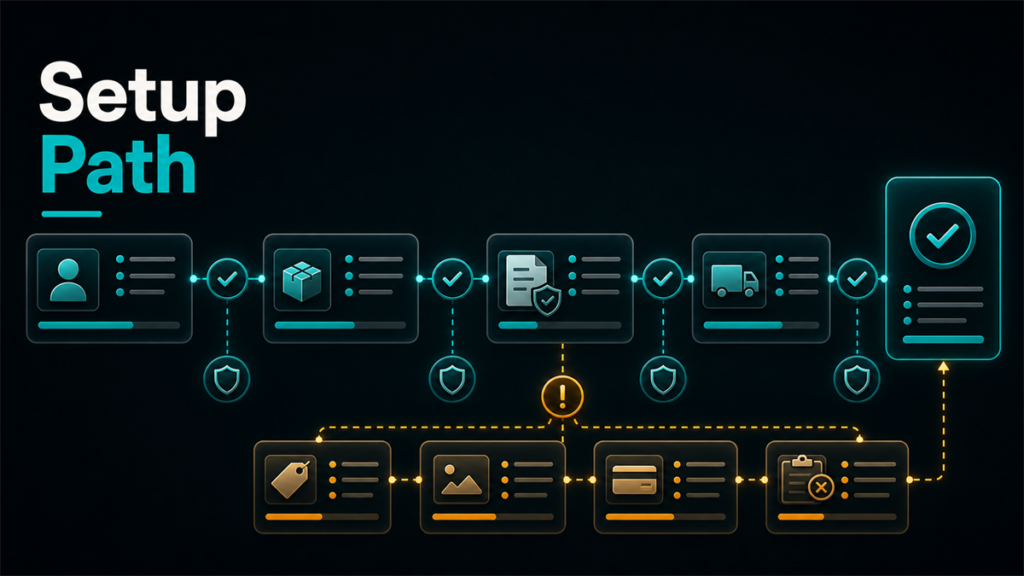
TikTok Shop setup is not just a sign-up form. It is an operating setup. If the warehouse, shipping settings, payout details, and account qualification steps are weak, the shop can stall before product upload ever becomes the real issue.
Key Takeaways
- TikTok Shop onboarding includes account, warehouse, shipping, tax, and payout steps.
- The current Seller Center guidance for US sellers makes shipping and warehouse setup a core early task, not an afterthought.
- Approval blockers usually come from incomplete shop information, qualification issues, or operational settings that were left half-finished.
- Product upload should not start until the shop structure is stable enough to support it.
- A clean setup reduces later confusion in fulfillment, settlement, and account review.
What TikTok Shop Setup Actually Involves
The mistake many sellers make is assuming TikTok Shop works like a simple social profile plus product sync. It does not. The platform's own Seller Center education shows that setup involves:
That means onboarding is partly commercial and partly operational. The shop is not really ready when the account exists. It is ready when the business information, shipping path, and settlement setup are usable.
The Core Setup Sequence
1. Create and verify the shop account
The basic account setup starts the process, but the important part is whether the qualification and review steps are actually complete.
2. Set up the warehouse correctly
Current TikTok Shop setup materials for US sellers emphasize warehouse setup early. That makes sense. Shipping performance depends on it, and product handling becomes harder later if the address and routing logic are weak from the start.
3. Review shipping settings before uploading products
Current TikTok guidance indicates that TikTok Shipping is the default for new US sellers, while Seller Shipping requires additional setup such as shipping-fee templates. That means the team should know which path it is using before catalog work scales.
4. Complete tax and payout setup
This is one of the most common "we will finish it later" areas. The problem is that settlement and compliance issues tend to matter only after the seller already expects to go live.
5. Monitor account status and required updates
TikTok's setup guidance references statuses such as setup in progress, pending review, ready, and update needed. Sellers should use those cues actively rather than assuming silence means everything is fine.
Where Sellers Usually Slow Themselves Down
Treating setup like a marketing task
TikTok Shop is a sales channel. That means operations matter from day one.
Leaving shipping decisions vague
If the team does not understand its shipping path before upload, later fulfillment confusion becomes much more likely.
Waiting too long to finish finance details
Settlement and identity match issues are much easier to solve before launch pressure builds.
Uploading products before the shop structure is stable
That creates noise because the seller is trying to troubleshoot products on top of incomplete onboarding.
A Better Pre-Upload Checklist
Before pushing catalog work forward, confirm:
- the account is fully created and in the right review state
- the warehouse address is accurate
- the shipping mode is understood
- tax and payout details are completed or clearly scheduled
- any qualification-center tasks are closed
- the team knows who owns future updates
This checklist does not make setup perfect, but it prevents the most avoidable false starts.
Scenario: The Seller Who Uploaded First and Configured Later
A seller was eager to launch and started product work as soon as the basic TikTok Shop account existed. Warehouse details were still being finalized, finance setup was incomplete, and no one on the team could explain which shipping path the shop was actually using.
The catalog work did not fail immediately. It just became harder to trust. Questions about shipping settings, shop status, and onboarding tasks kept pulling the team backward.
Once the seller stopped and completed the warehouse, shipping, and finance setup first, the rest of the onboarding became much more manageable. The lesson was simple: product upload should not be the first sign that the store is "real."
FAQ
What should sellers set up first in TikTok Shop?
Start with the account, then make sure warehouse and shipping settings are real before scaling catalog work.
Is TikTok Shipping the default for new US sellers?
Current TikTok Shop educational materials indicate that it is, but this should be verified near publish time.
Should products be uploaded before tax and payout details are complete?
Usually no. Delaying those steps often creates launch friction later.
What slows approval most often?
Incomplete shop information, unresolved qualification tasks, and weak operational settings are common causes.
Is setup the same as profitability planning?
No. Setup gets the channel operational. Profitability planning comes after the shop can actually run cleanly.
A Better Launch Starts Before the First Product Sync
The cleanest TikTok Shop launches happen when sellers treat setup as operating infrastructure, not just as account creation. Warehouse, shipping, tax, payout, and review status all shape what happens next. Once those are stable, the product work has somewhere reliable to land.
If your team is building TikTok Shop alongside other channels and the setup work feels harder to operationalize than expected, Qubeq can help with the broader other marketplace operations behind that launch. If you want help pressure-testing the onboarding path before go-live, contact us here.