Facebook and Instagram Shops can be useful selling surfaces, but they work best when the business is already organized enough to support them. Commerce Manager setup, catalog control, account access, policy eligibility, and website consistency all matter before the shop is worth promoting seriously.
Key Takeaways
- Meta Shops is not just a product-sync feature. It is a commerce setup that runs through Commerce Manager.
- Eligibility, supported-country scope, and account-control requirements matter before products can go live cleanly.
- Catalog readiness is a real part of success. Weak product data creates weak shop experiences.
- Many sellers treat Meta Shops like a side channel and then wonder why it feels messy.
- A cleaner setup starts with business structure, product sync discipline, and realistic expectations about checkout flow.
What Meta Shops Actually Requires
Meta's own guidance is clear that Shops are created and managed in Commerce Manager. That matters because the setup is broader than simply connecting a feed. The seller needs:
If the store uses Shopify, the Facebook and Instagram by Meta channel can make synchronization easier. But easier sync does not eliminate the underlying readiness work.
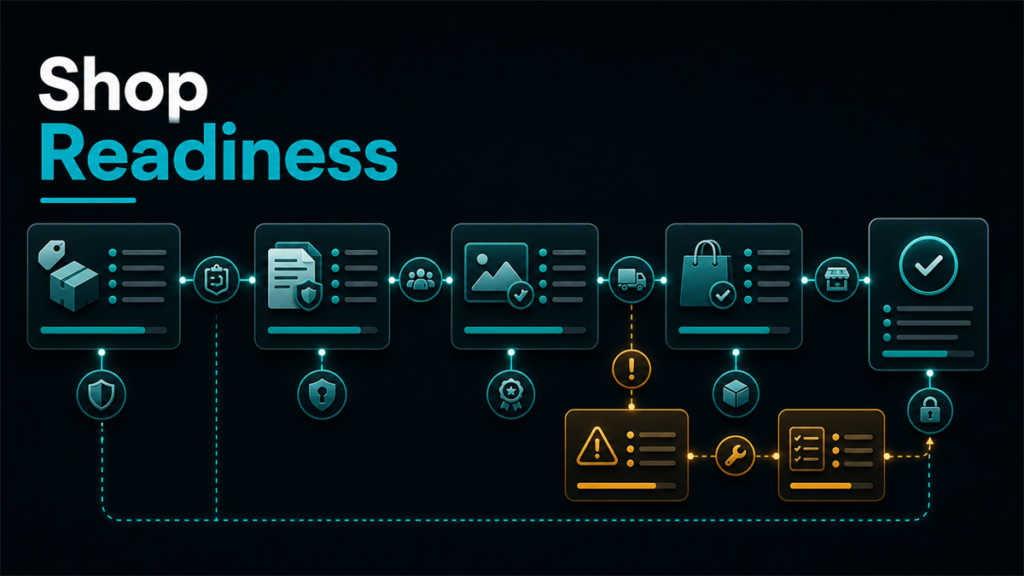
The Four Readiness Questions to Ask
1. Is the business eligible?
Meta's commerce-eligibility guidance requires businesses to comply with commerce policies, represent their business and domain accurately, operate in supported countries, and maintain trustworthiness. That means shop readiness begins with eligibility, not with catalog design.
2. Is the account structure clean?
Page access, business-portfolio control, Instagram professional account status, and catalog ownership all matter. Sellers who are vague about ownership and permissions usually make setup harder than it needs to be.
3. Is the catalog ready to be buyer-facing?
A synced catalog is not automatically a strong catalog. Product titles, images, variants, and website links still need to support a real shopping experience.
4. Is the checkout expectation realistic?
Meta's current shop behavior has changed over time, and region matters. Some flows rely on website checkout rather than native platform checkout. Sellers should know what the actual buyer path looks like before presenting Shops as a major conversion channel.
What Sellers Usually Get Wrong
Treating Shops like a passive extension
If the catalog is weak or the setup is incomplete, the shop becomes another under-maintained sales surface.
Ignoring access and control
Many delays come from account structure, not from the products themselves.
Assuming all countries and features behave the same way
Meta's support and feature availability varies. Sellers should avoid broad assumptions here.
Syncing products before checking how they actually display
Catalog sync is a starting point. Merchandising quality still matters.
A Practical Setup Checklist
Before publishing or promoting the shop, review:
- commerce-account and business access
- catalog ownership and sync path
- product titles, images, and variants
- supported-country and eligibility status
- website checkout path and policy consistency
This is a stronger approach than treating the shop like an automatic growth lever.
When Shops Make the Most Sense
Meta Shops is usually a better fit when:
- the brand already has a clean product catalog
- the website checkout experience is strong
- the team can maintain another product-discovery surface
- the business already creates content or traffic where discovery on Facebook or Instagram matters
It is a weaker fit when the catalog is unstable, the business still struggles with core product data, or the team expects the shop to fix weak channel operations by itself.
Scenario: The Brand That Synced Fast but Launched Weak
A Shopify brand turned on the Meta sales channel and assumed the shop would mostly take care of itself once products synced. The integration worked, but the results were underwhelming.
The real issues were simple. Product presentation was inconsistent, account access was messy, and nobody had reviewed how the buyer experience actually looked inside Instagram or Facebook. The shop existed, but it was not ready.
Once the brand cleaned up product presentation, verified account control, and reviewed the supported flow more carefully, the shop became easier to maintain and more useful as a discovery surface.
FAQ
Do I need Commerce Manager to set up a shop?
Yes. Meta's own guidance points sellers to Commerce Manager as the place to create and manage Shops.
Can I use Shopify to sync products to Facebook and Instagram?
Yes. Shopify supports a Facebook and Instagram by Meta channel that can sync products to a Meta catalog, subject to eligibility and setup requirements.
Is Meta Shops available everywhere?
No. Supported-country rules apply, and those rules should be verified before launch.
Is checkout always native inside Facebook or Instagram?
Not necessarily. Current behavior depends on region and setup, so sellers should verify the live path before making claims about the buying experience.
When is a shop not worth setting up yet?
When the business still lacks clean catalog control, account ownership clarity, or a dependable website checkout path.
Meta Shops Works Best as a Maintained Channel, Not a Side Experiment
Facebook and Instagram Shops can support product discovery and social-commerce buying intent, but only if the catalog, account structure, and checkout reality are ready. Sellers get better outcomes when they treat the shop as a real operating surface instead of a sync toggle.
If your business is expanding into social-commerce and other channels at the same time, Qubeq can help think through those broader other marketplace operations. If you want help deciding whether Meta Shops is operationally worth adding now, contact us here.