Most sellers spend their creative energy on the main image, then fill the rest of the gallery with whatever photos they happen to have. That is backwards effort. The main image wins the click; the secondary images win the purchase. By the time a shopper is swiping through your gallery, they have already chosen to consider you, and they are now hunting for the one reason to stop considering you. Each slot after the main image has a specific job in answering, in order, the questions a buyer asks before they trust their money to a screen.
Key Takeaways
- The main image and the gallery solve different problems: clicks versus conversion. Treat them as separate disciplines.
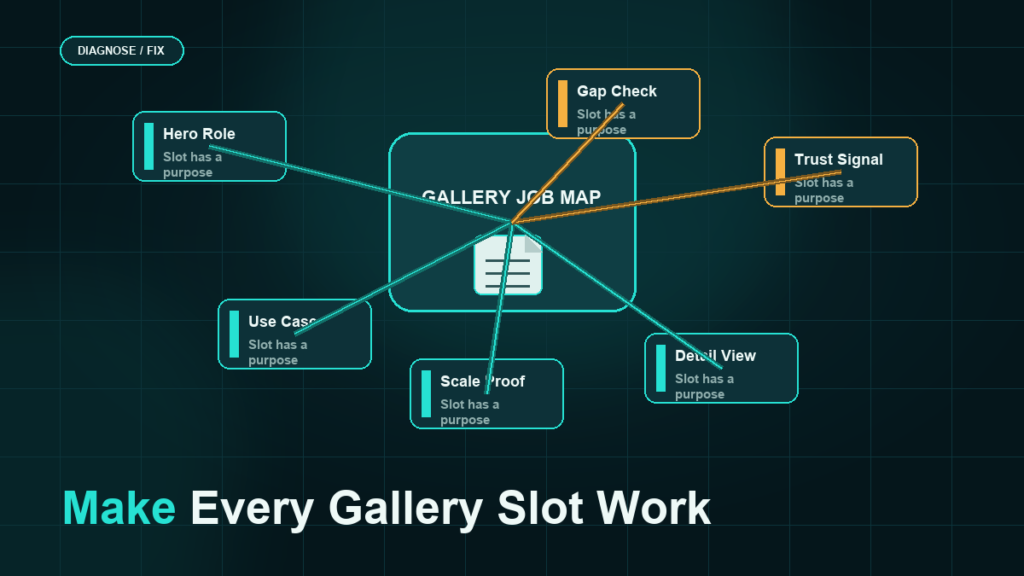
- Each gallery slot should carry one job  features, scale, in-use context, social proof, comparison, or what is in the box  not a second copy of the main image.
- Sequence the gallery to mirror the buying questions: what is it, will it fit my life, can I trust it, why this one over that one, what exactly arrives.
- Build for the thumbnail and the phone first; a slot that only reads on a desktop zoom is a wasted slot.
- A gallery audited against jobs-to-be-done usually reveals one or two missing answers that are quietly costing conversions.
Why the Gallery Is a Separate Discipline
Main-image strategy is a competition for attention in a crowded grid: clarity, recognizability, and standing out at thumbnail size against rivals. The gallery is the opposite environment. The shopper is already on your page, alone with your product, and they are skeptical. They want to be convinced or to find the disqualifier. Your gallery either supplies the convincing or lets them invent the disqualifier from doubt.
So stop measuring secondary images by how attractive they are and start measuring them by which buying question they answer. An unanswered question is a stalled sale.
The Job Each Slot Should Do
Think of the gallery as a sequence of answers. The exact number of slots a category supports can vary, so treat this as a priority order, not a fixed count  fill the most important jobs first.
Slot: Headline feature shot
The first image after the main shot should land the single most compelling, specific feature  the thing that makes this product better, shown rather than claimed. One idea, large, legible at thumbnail size.
Slot: Scale and dimensions
Buyers consistently misjudge size from a floating product shot, and a size surprise is a top return reason. Show the product against a familiar reference or with clean dimension callouts. This single image quietly prevents a category of returns and one-star "smaller than expected" reviews.
Slot: In-use, in-context
Show the product doing its job in the environment where it lives  on the counter, in the hand, in the room. Context lets the shopper picture ownership, which is the emotional half of the decision the feature shot cannot reach.
Slot: Social proof or trust
Convert credibility into a visual: a benefit backed by a specific detail, a certification where genuinely held, a "trusted by" framing where honest. Avoid invented numbers and unverifiable superlatives; a believable specific beats a grand claim.
Slot: Comparison or "why this configuration"
If you sell variations or compete against an obvious alternative, a comparison graphic earns its place  sizes side by side, this-model-versus-that, or a feature matrix. This is the slot that closes the "but which one" hesitation.
Slot: What is in the box / packaging
The last functional slot answers "what exactly will arrive." Show the components, the quantity, the accessories. Removing this uncertainty is the final nudge for cautious buyers and reduces "I thought it included X" returns.
Sequencing for Conversion
Order matters because most shoppers stop swiping early. Lead with the strongest persuasion (headline feature), de-risk fast (scale, then context), build trust, then handle the comparison and the contents. Front-load the answers most likely to either convince or disqualify, so a buyer who only sees two or three images still gets the deciding ones. Save the merely-nice-to-have shots for last, where their absence costs nothing if the shopper has already decided.
What Good Looks Like
- Every slot has one job, and you can name it in a word.
- The first three images each read clearly at phone size without zooming.
- Text overlays are short, high-contrast, and legible on a thumbnail.
- Scale and contents are both answered somewhere in the stack.
- No slot is a near-duplicate of the main image or of another slot.
- Style, color, and font are consistent across the set so it reads as one brand, not six freelancers.
A Quick Gallery Audit
Open your own listing on a phone. For each slot, write the one job it does. If two slots share a job, or a key job (scale, context, contents, comparison) has no slot, you have found your fix. Reorder so the deciding answers come first.
Mini-Scenario: The Missing Scale Shot
A homeware brand had a polished gallery  six images, beautiful studio lighting, consistent style. Conversion was fine but returns ran high, and the reviews repeated one phrase: "much smaller than I expected." Every image was a clean product shot on white; nothing showed the item in a real space or against a known reference. They replaced the weakest two slots with a scale shot (the product beside a common household object) and an in-context shot (the product on a styled shelf). Returns for "size" fell over the following weeks and conversion ticked up, because the gallery finally answered a question the buyers had been answering wrong on their own.
FAQ
How many secondary images should an Amazon listing have?
Use every slot the category allows, but prioritize by job. It is better to fill the deciding jobs well than to pad the gallery with redundant shots. Slot counts can vary by category and change over time.
Should secondary images have text overlays?
Yes, where text clarifies a feature, a dimension, or a comparison  kept short and legible at thumbnail size. Lifestyle and context shots often work better with little or no text.
Is the gallery more important than the main image?
They do different jobs. The main image controls whether you get the click; the gallery controls whether the click becomes a sale. A weak main image starves the gallery of traffic; a weak gallery wastes the traffic the main image earned.
What is the most commonly missing gallery image?
Scale and "what is in the box." Both prevent a specific class of returns and reviews, and both are cheap to produce relative to the value they protect.
Do gallery images affect search ranking?
Their primary effect is on conversion, which can influence ranking indirectly over time. Treat them as a conversion lever first.
Build the Gallery the Buyer Is Reading
A gallery that answers buying questions in order quietly lifts conversion and cuts the returns that come from surprises. If you want a slot-by-slot audit of your current listings, or a full creative plan that assigns each image a job, Qubeq can review your gallery against buyer questions and brief the shots that are missing.