
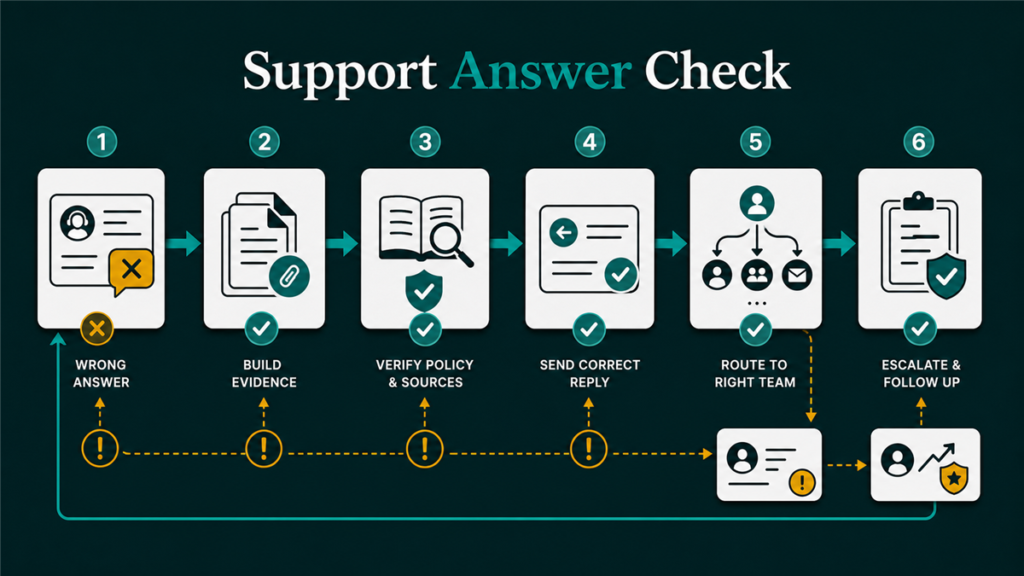
Amazon seller support wrong answers usually happen when the case is missing evidence, routed to the wrong team, or framed around a symptom instead of the underlying operational issue. The fix is not to argue harder. The fix is to rebuild the case around facts, policy context, account evidence, and a clear next request.
Key Takeaways
- A wrong Seller Support answer may be a routing issue, evidence issue, policy disagreement, catalog conflict, or automated template response.
- Sellers should not open duplicate cases or emotional replies without first tightening the evidence.
- The strongest response identifies the issue type, affected ASIN/SKU/order/case ID, current account evidence, and the exact review requested.
- Escalation should be evidence-led, not volume-led.
- Qubeq treats support-case recovery as an operations workflow: diagnose, document, reply, escalate only when the record supports escalation.
What counts as a wrong Amazon Seller Support answer?
A wrong Amazon Seller Support answer is a response that does not address the actual issue, applies the wrong policy, repeats a template, ignores attached evidence, or sends the seller to the wrong workflow. Some answers are factually wrong. Others are incomplete because the original case did not give support enough context.
Common examples include:
- A catalog case receives a generic listing-quality response.
- A reimbursement issue receives an unrelated inventory reply.
- An Account Health issue receives a normal catalog-support response.
- A support associate says an attribute cannot be changed, but the affected contribution or flat file path was never reviewed.
- Seller Support closes the case with a template that does not mention the ASIN, SKU, order ID, shipment ID, or policy question.
The first step is to separate "Amazon is wrong" from "the case record is not reviewable yet." That distinction saves time.
Why Seller Support gives circular or bad answers
Seller Support gives circular or bad answers when the case lacks the facts needed for the right team to review it. In other cases, the issue may sit between catalog, policy, inventory, reimbursement, technical access, and account-health workflows.
| Case pattern | What may be happening | Better response |
| Template reply | The case was routed broadly or lacks evidence | Restate the issue with identifiers and attachments |
| Wrong policy cited | The support team may be reviewing the wrong issue type | Quote the relevant policy or Help page carefully |
| Circular response | The case history is too vague or repetitive | Rebuild the case timeline |
| "Cannot change" answer | Contribution, catalog authority, or attribute ownership may be involved | Show current detail page, intended correction, and evidence |
| Case closed too early | The request may not have been reviewable | Reopen only with new or clearer evidence |
Do not assume every bad answer is careless support. Sometimes the seller's case gives support only a complaint, not a record.
How to triage the case before replying
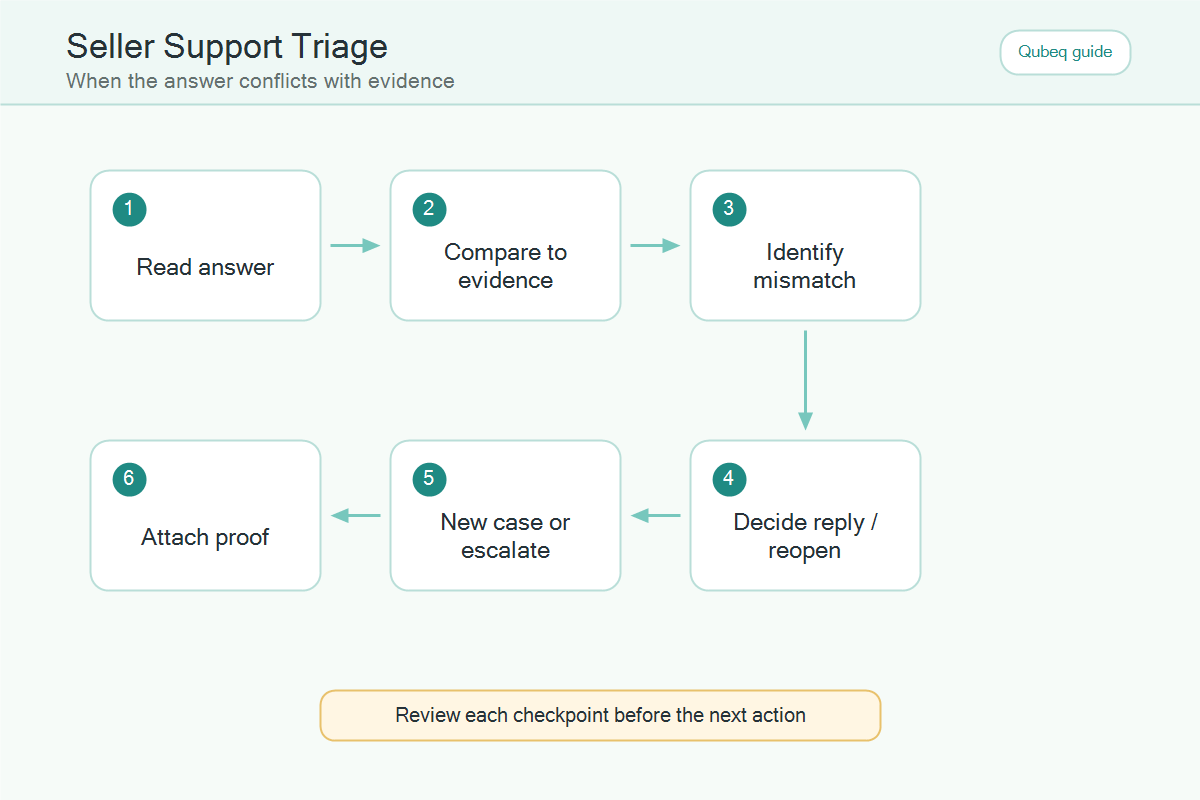
Sellers should triage the case before replying by identifying the issue category, the evidence already provided, and what Seller Support actually answered. A clean triage prevents the seller from replying emotionally.
- Identify the issue type: catalog, Account Health, inventory, reimbursement, order, technical access, advertising, or Walmart/Amazon crossover.
- Identify the affected record: ASIN, SKU, FNSKU, shipment ID, order ID, case ID, batch ID, or policy notice.
- Read the support response literally.
- Mark what the response answered and what the response missed.
- Check the relevant official policy, Help page, or account screen.
- Decide whether to reply, reopen, start a cleaner case, or escalate.
If the seller cannot name the issue type and affected record, the seller is not ready to escalate.
How to reply to a wrong Seller Support answer
The best reply to a wrong Seller Support answer is short, factual, and evidence-led. The reply should make it easy for the next support associate to understand what was missed.
Use this structure:
- State the issue in one sentence.
- Name the affected ASIN, SKU, order, shipment, or case record.
- Explain why the prior answer did not resolve the request.
- Attach or reference the evidence.
- Ask for one specific review or action.
Example structure:
| Reply element | What to include |
| Issue | "This case is about a catalog contribution conflict on ASIN…" |
| Evidence | Screenshots, flat file result, order record, policy notice, or report export |
| Gap | "The prior response addressed image quality, but the current issue is title contribution ownership." |
| Request | "Please review the attached manufacturer evidence and current contribution conflict." |
Avoid long frustration paragraphs. Support does not need the seller's full emotional history. Support needs the next reviewable fact.
When to reopen, start a new case, or escalate
Sellers should reopen, start a new case, or escalate based on the case record, not frustration level. Each path has a different purpose.
Reopen when:
- The original case is still about the right issue.
- The prior answer missed evidence already attached.
- The seller can add new evidence or clarify the request.
Start a cleaner case when:
- The original case mixed multiple unrelated issues.
- The case was routed to the wrong support area.
- The original message used vague language and cannot be salvaged.
Escalate carefully when:
- The issue is materially affecting the account or listings.
- The seller has a complete evidence trail.
- Seller Support has repeatedly missed the same specific issue.
- The seller can explain the root issue without speculation.
Do not open several duplicate cases at once. Duplicate case volume can make the issue harder to track.
What not to say in a Seller Support reply
Sellers should not threaten, accuse, exaggerate, or demand guaranteed outcomes in a Seller Support reply. Emotional language can hide the evidence.
Avoid:
- "Your team is wrong again."
- "Escalate this immediately or I will lose my business."
- "Amazon always approves this."
- "This is urgent" without a specific account impact.
- Copy-pasted templates that do not match the case record.
- Multiple unrelated ASINs, orders, or shipments in one case.
Use calm, specific language instead. The goal is not to win an argument. The goal is to get the correct workflow to review the correct evidence.
Mini-scenario: wrong catalog response
A seller opens a case because the product title keeps reverting after flat file uploads. Seller Support replies with a generic image-compliance message. The seller almost replies with frustration, but the account manager reviews the case and sees the original message mentioned "listing not updating" without naming the title contribution problem.
The cleaner reply says: "This case is about title contribution on ASIN X, not image compliance. The attached flat file processing report shows the title update was accepted, but the live title reverted. Please review the contribution conflict for the title attribute." The case is now easier to route.
FAQ
Why does Amazon Seller Support give wrong answers?
Seller Support may give wrong answers when the case is vague, routed incorrectly, missing evidence, or sitting between multiple workflows such as catalog, policy, inventory, or reimbursement.
Should I open a new case if Seller Support is wrong?
Open a new case only when the old case is too mixed, incorrectly routed, or impossible to clean up. If the case is still focused, reply with clearer evidence first.
Can I escalate a Seller Support case?
Escalation may be possible in some workflows, but the exact options depend on issue type and current Seller Central routing. Sellers should verify current support paths before relying on escalation.
What should I attach to a Seller Support reply?
Attach only relevant evidence, such as ASIN/SKU data, flat file results, screenshots, policy notices, order IDs, shipment IDs, reimbursement checks, or case history.
Can Qubeq help with bad Seller Support responses?
Yes. Qubeq can review Seller Central case history, identify what support missed, rebuild the evidence trail, and prepare clearer replies or escalation-ready case records.
Turn the case into a reviewable record
Amazon seller support wrong answers are frustrating, but frustration is not a case strategy. If your team is stuck in circular Seller Central replies, Qubeq can review the issue, clean up the evidence, and help create a case record that is easier for Amazon to evaluate.
