Listing images do more selling than the copy. On a small screen, the gallery is the pitch, and most buyers decide whether to keep reading based on the first image alone. This guide gives you a repeatable system: the shots every listing needs, the lighting and background basics that make them clean, the composition rules for the screen most buyers actually use, and an honest way to decide whether to shoot in-house or hire it out.
Key Takeaways
- Every listing needs a planned shot list, not a random pile of photos. Each image should do one job.
- The main image follows strict marketplace rules; get it compliant before anything else, because a suppressed main image kills the listing.
- Lighting and background basics matter more than expensive gear. Even, neutral light on a clean background carries most of the result.
- Compose mobile-first. If the image does not read on a phone, it does not read.
- DIY makes sense for simple products and iteration; hire when the product is complex, high-value, or your time is the bottleneck.
Build the Shot List First
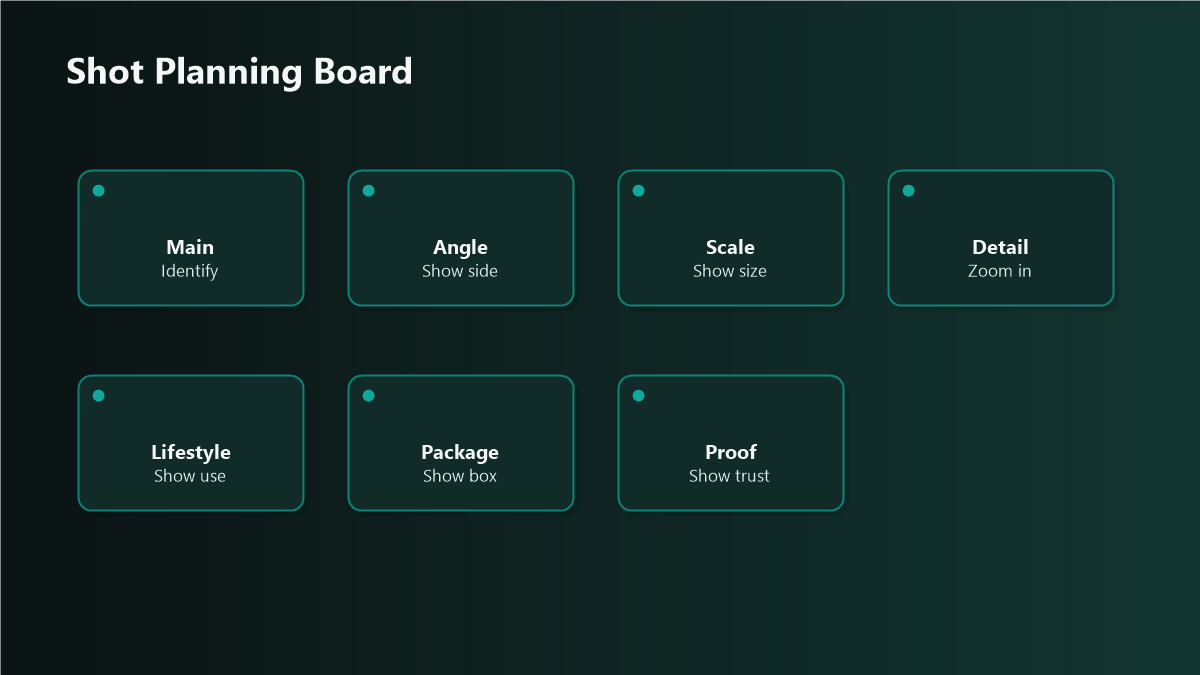
Plan the gallery before you pick up a camera. Each slot has a job.
A complete gallery usually runs six to nine images. Fill every slot you are allowed; empty slots are conversion left on the table.
Lighting and Background Basics
You do not need a studio. You need even, neutral light and a clean surface.
Main-Image Compliance
The main image is where rules are strictest, and where a mistake gets the listing suppressed. The exact specifications differ by marketplace and change over time, so confirm the current requirements for each platform before you shoot. The durable principles, however, hold across most marketplaces:
Treat the main image as a compliance object first and a creative object second. Save the storytelling for the slots where it is allowed.
Compose Mobile-First
Most marketplace traffic is on a phone. Design for the thumbnail and the small screen, then confirm it still works on desktop.
Plan Infographics and Lifestyle Shots
These are the images that convert browsers into buyers, and they reward planning.
DIY or Hire?
Both are legitimate. Decide on the product and your constraints, not on ego.
Shoot in-house when:
Hire a photographer when:
A common middle path: shoot the straightforward feature and scale images in-house, and commission the main image and lifestyle set where the production value pays back.
Mini-Scenario: The Thumbnail That Was Invisible
A kitchenware brand had professionally lit images that looked excellent at full size. Sales were soft. The problem surfaced only when the team viewed the main image at actual thumbnail size: the product sat small in the center of a large white frame, and at the size buyers actually saw it, the item was barely distinguishable from competitors. The fix was not a reshoot but a recrop, filling the frame so the product read instantly in search. Click-through improved without a single new photo being taken.
FAQ
How many images should a marketplace listing have?
Fill every slot the marketplace allows, typically six to nine. Each should do a distinct job: main, features, scale, infographic, lifestyle, and what's-in-the-box. Empty slots are missed conversion.
Do I need a professional camera?
No. A modern phone in even, diffused light on a clean background produces listing-grade images for most products. Lighting and composition matter far more than the camera body.
What are the rules for the main image?
A pure white background and the product shown alone with no added text, logos, or props is the near-universal standard, but exact specifications vary by marketplace and change over time. Confirm the current requirements for each platform before you shoot.
Why should I design for mobile first?
Most marketplace shoppers browse on phones, and they see your images as small thumbnails first. An image that looks great on a large monitor can be illegible at thumbnail size, so design for the small screen and confirm it still works on desktop.
Is it worth hiring a product photographer?
It depends on the product and your constraints. Reflective, transparent, complex, or high-value products and polished lifestyle sets reward professional skill. Simple products and rapid iteration often make in-house shooting the better call.
Make Your Gallery Earn the Click
A planned shot list, clean light, a compliant main image, and mobile-first composition will lift most listings without a bigger budget. If you want your catalog's images audited against what is actually converting, or a shot list and brief built for a new launch, Qubeq can plan the gallery and coordinate the production.