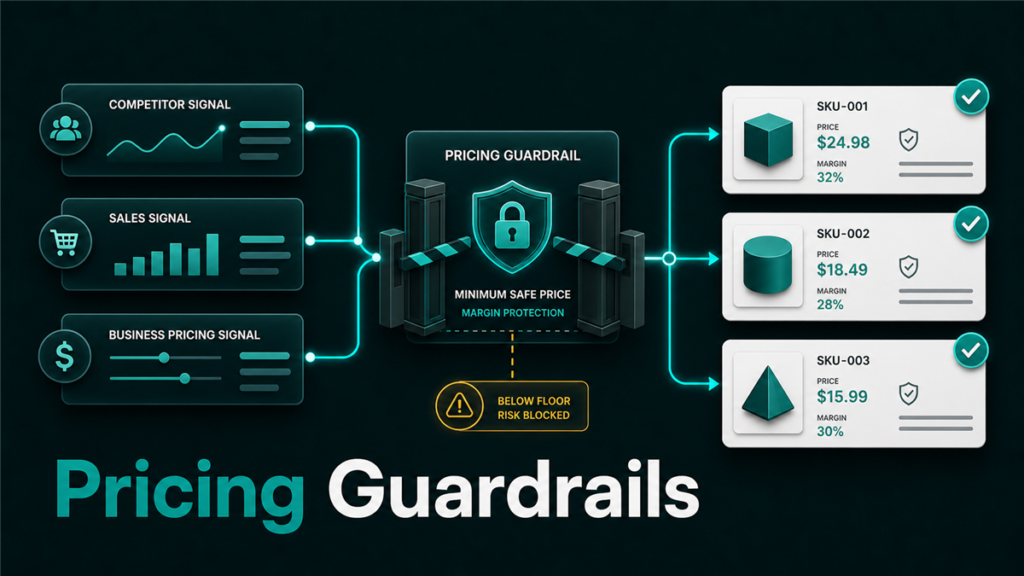
Amazon Automate Pricing rules let Professional sellers adjust prices automatically based on selected rule logic, such as Featured Offer, lowest price, external price, sales units, or business pricing. The tool can save time, but sellers should set minimum prices, review margins, and monitor outcomes before letting automation control a large catalog.
Key Takeaways
- Amazon Automate Pricing is available for sellers with a Professional selling plan.
- Pricing rules can respond to competitive, sales-based, and business pricing signals.
- Minimum price is not optional in practice. It is the main guardrail that protects margin.
- Automated repricing should start with a limited SKU group, not the full catalog.
- Operators should review Featured Offer percentage, sales, profit, and exceptions after rules go live.
What Is Amazon Automate Pricing?
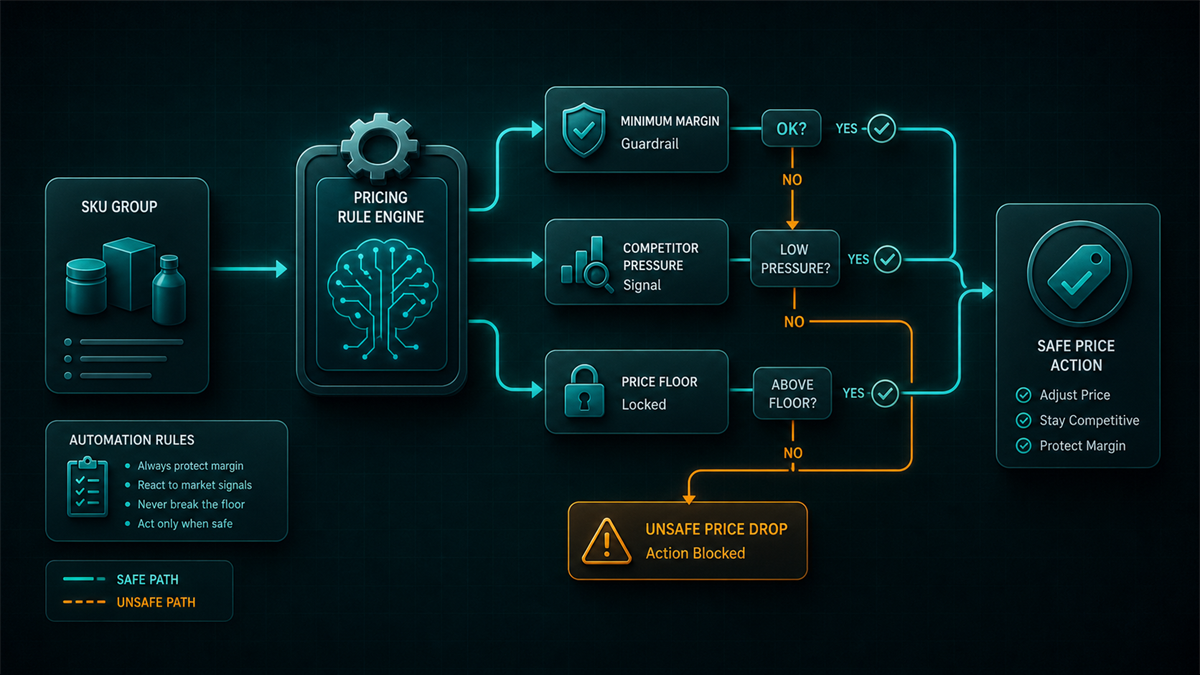
Amazon Automate Pricing is a Seller Central tool that adjusts product prices based on rules the seller chooses. Amazon describes the tool as a way to automate pricing strategy and improve the seller's potential to become the Featured Offer.
The important phrase is "rules the seller chooses." Automation does not remove pricing strategy. It executes the strategy faster, which means a weak rule can create problems faster too.
A seller should know:
- Which SKUs are eligible.
- Which rule type fits each SKU group.
- The lowest price the business can accept.
- Whether the SKU needs a maximum price.
- How the team will review results.
If those answers are missing, the seller is not ready to scale repricing.
Main Types Of Automate Pricing Rules
Amazon describes several rule types, including competitive price-based rules, sales-based rules, and business price or quantity discount rules.
Here is the operator-level version:
| Rule type | What it responds to | Best fit | Risk |
| Competitive Featured Offer | Featured Offer pricing signals | SKUs where Featured Offer visibility matters | Margin erosion if minimum price is wrong |
| Competitive lowest price | Lowest price in the Amazon store | Commodity or highly comparable products | Race-to-bottom pricing |
| Competitive external price | External competitive price signals | Products with strong off-Amazon price pressure | Misalignment with brand price policy |
| Sales-based rules | Sales volume in a selected period | SKUs where price should react to velocity | Price changes may hide demand issues |
| Business pricing rules | Business price and quantity discounts | B2B or bulk-purchase strategy | Discount structure can become messy |
The right rule depends on the SKU's role. A replenishable commodity SKU may need different pricing behavior than a premium branded product with MAP concerns or strict margin targets.
Minimum Price Is The Most Important Guardrail
The minimum price is the price floor that keeps automation from going below the seller's acceptable threshold. Before enabling a pricing rule, calculate the lowest safe price for each SKU.
Include:
- Product cost.
- Amazon referral fee.
- FBA or fulfillment cost.
- Inbound shipping and prep.
- Storage assumptions.
- Promotions or coupon overlap.
- Return or damage allowance.
- Required gross margin.
Do not set the floor by instinct. If the minimum price is guessed, the rule can protect the wrong number.
Example:
| Cost item | Example |
| Landed product cost | $8.50 |
| Amazon and fulfillment fees | $6.25 |
| Inbound/prep allowance | $0.75 |
| Return/damage allowance | $0.50 |
| Required gross profit | $5.00 |
| Minimum safe price | $21.00 |
This is only an example. Each seller needs SKU-specific math.
How To Choose The Right Rule For A SKU
Start by grouping SKUs before choosing rules.
Fast-moving competitive SKUs
These products may benefit from Featured Offer or competitive price-based rules if the seller has healthy margin and enough inventory. The goal is usually to stay visible without dropping below the floor.
Premium branded SKUs
These products may need tighter guardrails. A seller may choose a more conservative rule, use a higher minimum price, or avoid automated repricing if brand positioning matters more than short-term order volume.
Slow-moving SKUs
Automation can help test price sensitivity, but it can also distract from the real issue. Slow sales may come from weak content, poor reviews, poor category fit, low demand, or inventory age. Do not assume price is the only lever.
B2B SKUs
Business price and quantity discount rules can make sense when the seller has a clear wholesale or bulk strategy. The team should check whether quantity breaks still protect margin.
A Safe Rollout Workflow
Use a controlled rollout instead of enabling repricing across the whole catalog.
- Pick a small test group.
Choose 10 to 25 SKUs with similar pricing logic. Avoid mixing premium, seasonal, clearance, and commodity SKUs in one test.
- Calculate minimum prices.
Use real SKU economics. Include fees, fulfillment, inbound, returns, and required margin.
- Select one rule type.
Match the rule to the SKU group's business goal. Do not choose a rule only because it looks aggressive.
- Add maximum prices where needed.
Maximum prices can help avoid strange pricing behavior, especially when external signals or low competition create unexpected movement.
- Start repricing.
Enable the rule and document the start date, SKU group, rule type, and guardrails.
- Review after 7, 14, and 30 days.
Look at Featured Offer percentage, sessions, conversion, units, revenue, gross profit, price movement, and exceptions.
- Expand only after learning.
If the test group behaves cleanly, expand to similar SKUs. If it creates margin loss or noisy results, fix the rule before adding more products.
What To Monitor After Automate Pricing Goes Live
Automated pricing needs an operator review rhythm. The dashboard can change prices, but it cannot decide whether the business result is healthy.
Track:
- Price changes by SKU.
- Featured Offer percentage.
- Unit sales and revenue.
- Gross profit per unit.
- Inventory position.
- Coupon or promotion overlap.
- Buy Box or Featured Offer losses.
- Customer-facing price consistency.
- MAP or channel conflict risk.
If a SKU sells more but profit per unit collapses, the rule may be winning the wrong game.
Common Automate Pricing Mistakes
Common mistakes include:
- Setting the same minimum margin across every SKU.
- Ignoring inbound, prep, storage, and returns when calculating price floors.
- Applying competitive lowest-price rules to premium branded products.
- Forgetting that coupons or promotions can stack with lower prices.
- Expanding to the full catalog before reviewing the first test group.
- Treating sales lift as success without checking gross profit.
- Letting old rules run after costs, fees, or inventory strategy changed.
Pricing automation should have an owner. If nobody owns the review, the tool slowly becomes background noise.
Mini-Scenario
A seller enables a lowest-price rule across 80 SKUs because competitors keep undercutting them. Sales increase for a week, but margin drops sharply on bulky products where FBA fees and inbound costs were not included in the minimum price.
A safer rollout would have separated SKUs by margin and fulfillment cost. The bulky products needed higher price floors or a different rule. The fast-moving, higher-margin products could test a more competitive setting. Same tool, better guardrails.
FAQ
Is Amazon Automate Pricing free?
Amazon describes Automate Pricing as a free tool available with the Professional selling plan. Sellers should still verify current plan and fee details before relying on that statement.
Does Automate Pricing guarantee the Featured Offer?
No. Competitive pricing can improve eligibility or potential, but Featured Offer placement depends on multiple factors. Sellers should avoid treating any repricing rule as a guarantee.
Should I use the lowest-price rule?
Only for SKUs where that strategy fits the business. A lowest-price rule can be risky for premium products, thin-margin products, or products with strict brand pricing expectations.
How often should I review pricing rules?
Review new rules after 7, 14, and 30 days. After that, review at least monthly and whenever costs, fees, inventory position, or competitor behavior changes.
Can Automate Pricing be managed in bulk?
Amazon's guidance describes applying pricing rules one SKU at a time or in bulk by file upload. Bulk workflows are useful, but they require careful data hygiene and review.
Use Automation Without Giving Up Control
Amazon Automate Pricing can save time, but it should not replace margin math or operator review. The strongest setup is simple: group SKUs, calculate safe floors, test rules, monitor results, and expand slowly.
Qubeq helps marketplace teams build Seller Central workflows that protect catalog control, pricing discipline, and backend execution. If automated repricing is creating more questions than clarity, the fix is usually better SKU grouping and guardrails before more automation.