Amazon's Seller Assistant has evolved from a basic help chatbot into an agentic AI system that can monitor account health, suggest inventory actions, generate ad creatives, and flag compliance issues before they become problems. For sellers managing multiple brands or high SKU counts, the question is not whether the tool exists but which tasks it handles reliably and where human review is still non-negotiable.
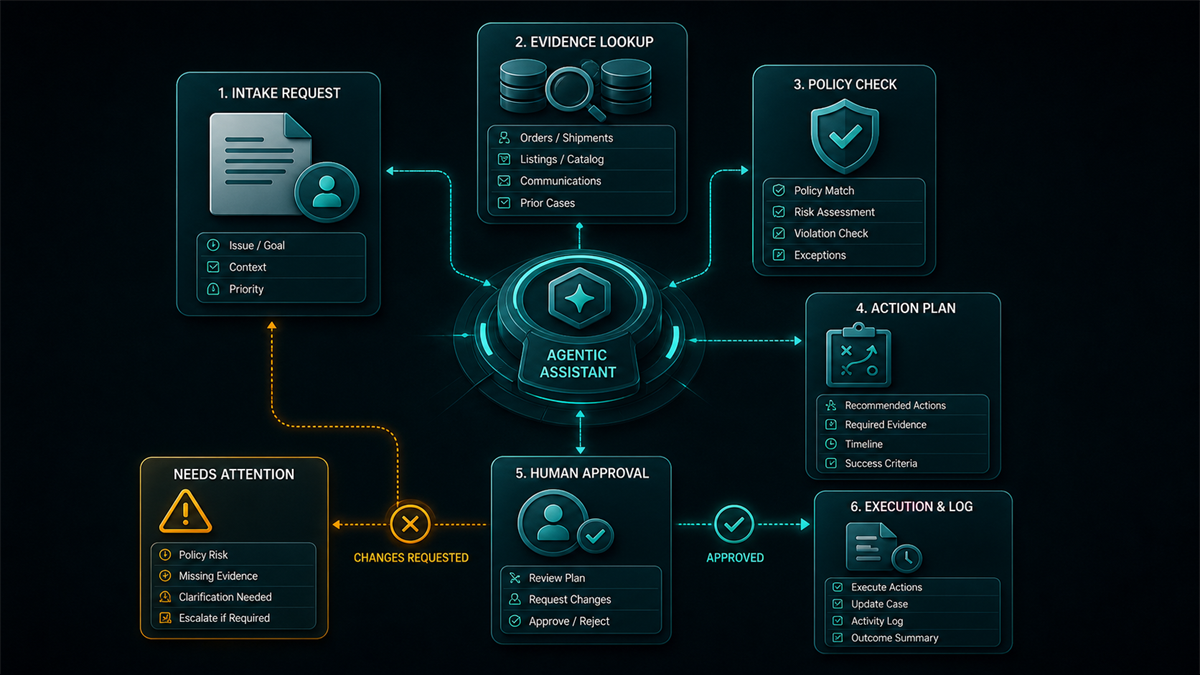
This guide covers what the AI assistant does, how it works, where it adds real operational value, and the specific areas where sellers should not trust it without verification.
Key Takeaways
- Amazon's Seller Assistant is now an agentic AI system, meaning it can take proactive actions and surface recommendations without the seller asking first.
- The system is powered by Amazon Bedrock, using Amazon Nova and Anthropic Claude models to process seller data across inventory, advertising, compliance, and account health.
- As of the announcement, the assistant is available to all sellers in the US store, with international rollout in progress.
- AI-generated recommendations for pricing, inventory, compliance, and advertising should be reviewed by a person before execution. The system optimizes for Amazon's marketplace signals, which may not align with your margin targets or brand strategy.
- The most practical use cases are monitoring and summarization: catching account health issues early, summarizing performance trends, and reducing the time spent navigating Seller Central for routine checks.
What the Seller Assistant AI Actually Does
The assistant operates across five functional areas, each with a different level of autonomy and reliability.
Inventory and FBA optimization
The AI analyzes sales velocity, storage costs, and replenishment timing to recommend when to send inventory, how much to send, and which fulfillment method to use. It can flag aging inventory before long-term storage fees hit and suggest removal or liquidation when sell-through rates drop below break-even.
Where it helps: reducing the manual work of pulling inventory reports and calculating reorder points across dozens of SKUs.
Where to verify: the system does not know your supplier lead times, cash flow constraints, or upcoming product changes. Its reorder suggestions assume current demand patterns continue, which breaks during seasonal shifts or promotional spikes.
Proactive account health management
Instead of waiting for sellers to check Account Health manually, the assistant monitors for policy violations, listing deactivations, and compliance flags in real time. It can alert sellers to problems and, in some cases, suggest corrective actions or documentation to submit.
Where it helps: catching issues within hours instead of days, especially for sellers with large catalogs where a single suppressed ASIN can go unnoticed.
Where to verify: the AI's suggested corrective actions may be generic. Policy violations involving intellectual property, restricted products, or Section 3 issues require careful, case-specific responses. Do not submit AI-suggested appeal language without reviewing it against the actual violation notice and your documentation.
Compliance navigation
The assistant can flag potential listing compliance issues, such as restricted claims in bullet points, category-specific requirements, or missing product attributes, before they trigger enforcement.
Where it helps: catching preventable listing errors during creation or editing, particularly for sellers expanding into regulated categories.
Where to verify: Amazon's compliance rules vary by category, marketplace, and product type. The AI may not catch every edge case, and it does not replace legal review for supplements, health products, pesticides, or other heavily regulated categories.
Creative Studio for advertising
The AI can generate ad creatives, including lifestyle images and video content, using product data and brand assets. Amazon has reported that AI-generated creatives through Creative Studio have shown strong engagement metrics in early testing.
Where it helps: reducing the cost and turnaround time for creating sponsored brand ad assets, especially for sellers without in-house design teams.
Where to verify: AI-generated creatives should be reviewed for brand consistency, accuracy of product representation, and compliance with Amazon's advertising policies. Performance metrics from Amazon's own testing may not generalize to your product category or audience.
Growth strategy recommendations
The assistant can analyze account performance data and suggest actions across pricing, keyword targeting, product bundling, and market expansion. It functions as a summarization layer on top of data that sellers previously had to pull from multiple reports.
Where it helps: surfacing patterns and opportunities that would take hours to identify manually, such as keyword gaps, underperforming listings with fixable issues, or products approaching fee thresholds.
Where to verify: growth recommendations optimize for Amazon's marketplace signals. They may not account for your brand positioning, channel strategy, margin targets, or competitive context outside Amazon.
Where the AI Saves Real Time
The highest-value use of the Seller Assistant is not decision-making. It is monitoring, summarization, and early warning.
Sellers managing 50+ SKUs across FBA spend hours each week on routine checks: scanning account health, reviewing inventory levels, checking for suppressed listings, pulling advertising reports. The AI reduces the time cost of these checks by surfacing the important signals without requiring manual navigation through multiple Seller Central dashboards.
Think of it as a daily briefing rather than a decision-maker. The assistant tells you what changed, what needs attention, and what is trending, but the response strategy should still come from the seller or their operations team.
Where Sellers Should Not Trust It Blindly
Three categories of decisions require human review regardless of what the AI recommends.
Policy and compliance responses
Account health violations, intellectual property complaints, and listing deactivations require precise, documented responses. AI-generated appeal language tends toward generic templates that miss the specific evidence Amazon's enforcement teams need. A poorly worded appeal can burn your escalation opportunity.
Pricing and margin decisions
The AI optimizes for Amazon's conversion and buy box signals. It does not know your landed cost, your cash flow position, or your margin floor. A pricing recommendation that wins the buy box at a loss is not a useful recommendation.
Catalog and listing changes
AI-suggested edits to titles, bullet points, backend keywords, and product attributes should be reviewed against your SEO strategy, brand voice, and compliance requirements. Automated optimizations that improve one metric, such as click-through rate, may degrade another, such as conversion rate or compliance standing.
Mini-Scenario: The Daily Briefing Workflow
A seller running three brands across 120 SKUs used to start each morning with a 45-minute routine: checking account health, reviewing inventory age reports, scanning for suppressed listings, and pulling yesterday's advertising summary. After integrating the Seller Assistant into their workflow, the morning check dropped to about 15 minutes. The AI surfaced two aging inventory alerts, one listing compliance flag, and a keyword opportunity the seller had missed in a manual review the previous week.
The seller still made every decision, but the AI did the scanning work. The compliance flag turned out to be a false positive after manual review, which reinforced the point: the alert was useful, the suggested fix was not.
FAQ
Is the Seller Assistant AI available to all Amazon sellers?
According to Amazon's announcement, the agentic AI assistant is available to all sellers in the US store as of the rollout. International availability is expanding but not yet universal. Check your Seller Central dashboard for current access.
Does the AI make changes to my account automatically?
The system is designed to recommend and assist, not to execute changes without seller approval. However, sellers should verify the current permission model in their Seller Central settings, as the level of autonomy may evolve over time.
Can the AI write my product listings?
The assistant can suggest listing content and generate ad creatives through Creative Studio. For product listings, the suggestions should be treated as a starting point. SEO strategy, brand voice, compliance, and keyword architecture require human review and editing.
Is this the same as Amazon's Rufus shopping AI?
No. Rufus is a customer-facing shopping assistant. Seller Assistant is a seller-facing operational tool. They serve different audiences with different data and different objectives.
Should I replace my operations team with this tool?
No. The AI reduces monitoring and summarization time. It does not replace strategic judgment, cross-channel coordination, supplier management, or the nuanced case work that account health and compliance issues require.
Using AI Without Outsourcing Judgment
Amazon's Seller Assistant AI is a legitimate time-saver for monitoring, early warning, and routine data summarization. Sellers who use it as a daily briefing tool, catching what changed and what needs attention, will get the most value. Sellers who treat AI recommendations as final answers will eventually hit a pricing mistake, a compliance misstep, or a failed appeal that a human reviewer would have caught.
If your account health, catalog operations, or compliance workload has grown beyond what your team can monitor manually, Qubeq can build the operational layer around these tools: setting up the review workflows, catch processes, and escalation paths that turn AI signals into reliable actions. We manage over 20,000 listings across the brands we support.