Helium 10 is one of the most widely used Amazon seller software suites, covering keyword research, listing optimization, product research, and operational monitoring. This Helium 10 review breaks down what the platform does well, where it falls short, and how established Amazon sellers should fit it into a real operating workflow.

Key Takeaways
- Helium 10 is strongest for keyword research, competitor keyword analysis, listing content planning, and index monitoring.
- The platform does not replace Seller Central execution: flat file work, variation repairs, case handling, and account health management still require operator-level action.
- Sellers with complex catalogs get more value than single-product beginners because there is more data to act on.
- Pricing, plan limits, and marketplace coverage change regularly, so sellers should verify current details before subscribing.
- Tool data should inform decisions, not replace evidence-based Seller Central workflows.
What Is Helium 10?
Helium 10 is a subscription-based Amazon seller software suite that combines keyword research, product research, listing optimization, market tracking, refund management, and operational alerts into one platform. The suite includes individual tools, each designed for a specific workflow: Cerebro for reverse ASIN keyword lookups, Magnet for keyword discovery, Frankenstein for keyword processing, Scribbles for listing content drafting, and Profits for financial tracking.
For an established Amazon brand, the value of Helium 10 is not the number of tools in the dashboard. The value is whether the software helps the team catch weak keyword coverage, missing listing attributes, competitor movement, and margin pressure before those gaps turn into lost rankings or revenue.
Helium 10 supports multiple Amazon marketplaces, though feature availability varies by plan tier and region. Sellers should confirm current marketplace support and plan inclusions on the Helium 10 pricing page before committing.
Which Helium 10 Features Matter Most?
Not every feature in the Helium 10 suite carries equal weight. The features that connect directly to listing quality, keyword strategy, and operational monitoring deliver the most consistent value.
Keyword Research: Cerebro and Magnet
Cerebro lets sellers reverse-engineer competitor ASINs to see which search terms drive traffic. Magnet generates keyword lists from seed terms. Together, these two tools form the backbone of most Helium 10 keyword workflows.
The practical value: sellers can identify keyword gaps in their own listings by comparing their indexed terms against top competitors. The limitation: search volume estimates are directional, not exact. Sellers should cross-reference Helium 10 keyword data with Amazon Brand Analytics (for enrolled brands), Search Query Performance reports, and actual search results before making listing changes.
Listing Builder and Scribbles
Scribbles helps sellers organize keywords into title, bullet points, description, and backend search terms while tracking which keywords have been used. This reduces the risk of missing high-value terms during listing creation.
The tool is useful for content planning, but a listing can still fail if the product type, browse node, variation theme, required attributes, or compliance data is wrong in Seller Central. Listing content is only one layer of catalog quality.
Index Checker and Keyword Tracker
The Index Checker tests whether a listing appears to be indexed for specific search terms. The Keyword Tracker monitors ranking positions over time. Both tools help sellers measure the impact of listing changes and catch ranking drops early.
These checks are useful signals, but they do not explain why a ranking changed. A ranking drop could be caused by a competitor's PPC push, a suppressed listing, a variation structure break, or a backend attribute error. The seller still needs to investigate the root cause in Seller Central.
Alerts and Monitoring
Helium 10 alerts notify sellers about listing hijackers, Buy Box changes, price drops, and review shifts. For multi-ASIN brands, alerts reduce the time between a problem appearing and the team noticing it.
The alert is the first step. The seller still needs a response process: identify the cause, gather evidence, and decide whether to open a Seller Central case, adjust pricing, or escalate.
Profits and Financial Tracking
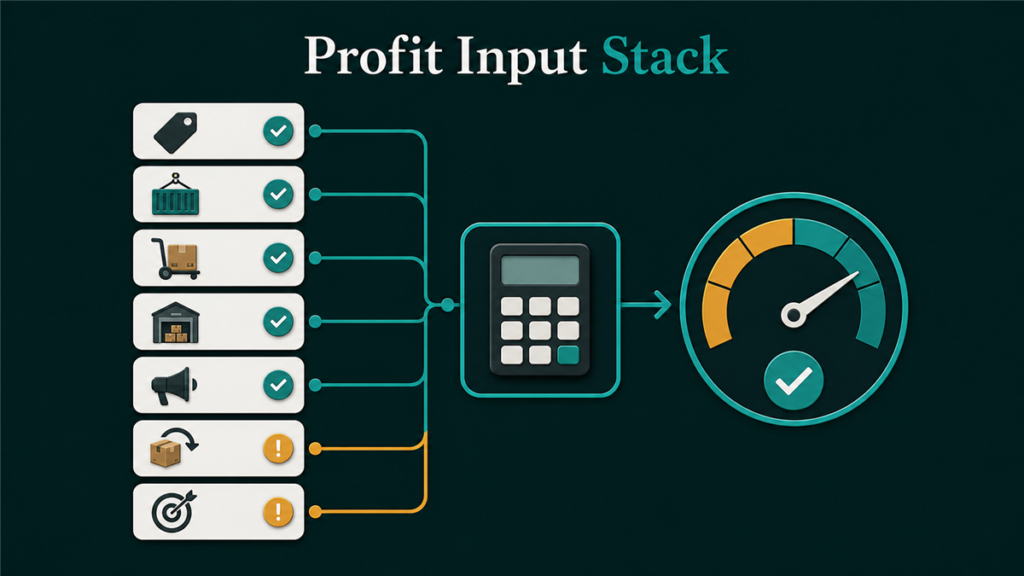
The Profits dashboard tracks revenue, fees, refunds, and estimated profit at the ASIN level. This gives sellers a faster view of margin changes than waiting for Seller Central payment reports.
The data is useful for directional monitoring but should not replace formal accounting. Fee structures, reimbursement timing, and promotional costs may not align perfectly between Helium 10 and Amazon's own reports.
Product Research: Black Box and Xray
Black Box filters product opportunities by revenue estimates, review count, category, and other criteria. Xray (the Chrome extension) shows estimated sales data on Amazon search result pages. Both tools are popular with sellers evaluating new product ideas.
Sellers should treat product research estimates as rough signals, not validated demand. Estimated revenue, sales volume, and review velocity are approximations. Proper product validation requires supplier quotes, landed cost modeling, competitive positioning analysis, and margin testing, not just a dashboard filter.
Where Does Helium 10 Fall Short?
Helium 10 falls short when a seller expects the software to solve problems that require Seller Central execution, catalog structure knowledge, or case-level follow-through.
A broken parent-child variation family may require a category-specific flat file, a parent ASIN rebuild, and a Seller Central case escalation. Helium 10 cannot do that.
A suppressed Amazon listing may require correcting missing attributes, uploading compliant images, resolving restricted product flags, or fixing browse node placement. That work happens in Seller Central, not in a third-party tool.
An FBA reimbursement claim may require shipment documentation, inventory ledger review, and timely case filing within Amazon's claim windows. Helium 10's refund tools cover part of this, but complex claims need manual evidence gathering.
A Brand Registry catalog contribution conflict may require proof of brand ownership, contribution history documentation, and repeated follow-up through Seller Central support channels.
These workflows sit closer to Amazon catalog and listing management, FBA reimbursement recovery, and Amazon account management than to software usage alone.
Helium 10 Pricing: What Sellers Should Know
Helium 10 currently lists three main paid plan paths on its official pricing page: Platinum, Diamond, and Enterprise. As of this review, monthly pricing is shown as $129/month for Platinum, $359/month for Diamond, and Enterprise starting at $1,499/month when billed annually. Annual billing is advertised with lower effective monthly prices for Platinum and Diamond. Sellers should still verify the official Helium 10 pricing page before subscribing because plan names, limits, add-ons, and promotional pricing can change.
| Consideration | What to Check |
| Plan tier | Platinum, Diamond, Enterprise, and any current trial or promotional offer |
| Usage limits | Monthly keyword lookups, tracked keywords, ASIN limits |
| Marketplace access | Which Amazon marketplaces are supported |
| Add-ons | Whether advertising, refund, or managed services carry extra fees |
| Contract length | Monthly vs. annual billing discounts |
| Sales stage fit | Whether the plan is built for early sellers, scaling brands, or enterprise teams |
The practical question is not "which plan is cheapest" but "which plan gives the team enough access to the features they actually use." A seller who only needs Cerebro and Magnet may be overpaying on a full-suite plan. A seller managing 200+ ASINs across multiple marketplaces may need the highest tier.
How Should an Amazon Brand Use Helium 10?
An Amazon brand should use Helium 10 as a research and monitoring layer inside a documented operating process. The tool should inform decisions. Seller Central records, catalog files, and account health data should control execution.
- Start with the business question: keyword gap, listing quality issue, margin pressure, or competitor movement.
- Use Helium 10 to gather supporting data.
- Compare tool findings against Seller Central reports, Amazon Brand Analytics, Search Query Performance, and the actual product detail page.
- Update the listing, flat file, PPC structure, or case plan based on verified evidence.
- Track the result after the change: ranking movement, sessions, conversion rate, suppression status, and account health impact.
Amazon also offers official A/B testing for eligible brand owners through Manage Your Experiments. When a seller can test listing content through Amazon's own experiment workflow, actual performance data should take priority over a tool score.
Seller Situation Guide
| Seller Profile | Helium 10 Value | Operational Caution |
| New seller validating a product idea | Useful for initial product and keyword research | Do not treat estimated data as guaranteed demand |
| Growing seller with 5 to 20 ASINs | Useful for keyword tracking, listing checks, and alerts | Seller Central data should confirm every action |
| Established brand with complex catalog | Useful as part of a broader operating system | Variation repair, flat files, and case work still need operator judgment |
| Agency or operations team | Useful for repeatable research workflows | Tool output needs SOPs, clear ownership, and quality control |
Example: When Tool Data Is Not Enough
A brand sees strong keyword opportunities in Helium 10 and rewrites a listing around those terms. Traffic increases slightly, but conversion stays flat and the listing loses its organic rank within two weeks.
The underlying problem: the product had the wrong browse node, three missing required attributes, and a damaged parent-child variation structure. The optimized copy could not compensate for broken catalog data.
The correct sequence is catalog repair first, listing optimization second, and measurement third. Only after the catalog foundation is clean does keyword optimization have a fair chance to deliver results.
FAQ
Is Helium 10 accurate?
Helium 10 keyword and sales estimates are directional, not exact. Search volume figures, revenue estimates, and sales velocity data should be treated as rough signals. Cross-reference with Amazon Brand Analytics, Search Query Performance reports, and actual Seller Central data before making business decisions.
Can Helium 10 fix a suppressed Amazon listing?
No. Helium 10 may help identify listing or keyword issues, but a suppressed Amazon listing requires a Seller Central fix. The exact resolution depends on the suppression reason: missing attributes, image compliance, restricted product flags, or category rule violations.
Does Helium 10 replace flat file work?
No. Helium 10 does not replace category-specific flat file work when a seller needs to repair product data, rebuild variation structures, or update attributes in bulk through Seller Central.
Is there a free version of Helium 10?
Helium 10 frequently changes trials, promotions, and entry-level access. At the time of this review, the public pricing page emphasizes paid Platinum, Diamond, and Enterprise plans, so sellers should check Helium 10 directly for any current free access or trial offer instead of assuming a permanent free plan is available.
Should I use Helium 10 or Jungle Scout?
The choice depends on the seller's workflow priorities. Helium 10 is often preferred for keyword-heavy workflows, while Jungle Scout has strengths in product research and supplier discovery. For a detailed comparison, see our Helium 10 vs Jungle Scout vs AMZScout comparison.
Making Helium 10 Work Inside Real Operations
Helium 10 is a capable research and monitoring platform, but it works best when the seller treats it as one input inside a structured operating process. The software does not fix broken catalogs, resolve Seller Central cases, or manage account health. Those require operator judgment, evidence-based workflows, and consistent execution inside the marketplace backend.
If your team has the data but still cannot keep the catalog clean, variation structures intact, or Seller Central cases moving forward, the issue is probably operational ownership, not tool selection. Qubeq helps established Amazon brands turn research, catalog files, Seller Central cases, and FBA checks into a managed operating system. Start with a free Amazon account audit if you want a second set of operator eyes on the backend.