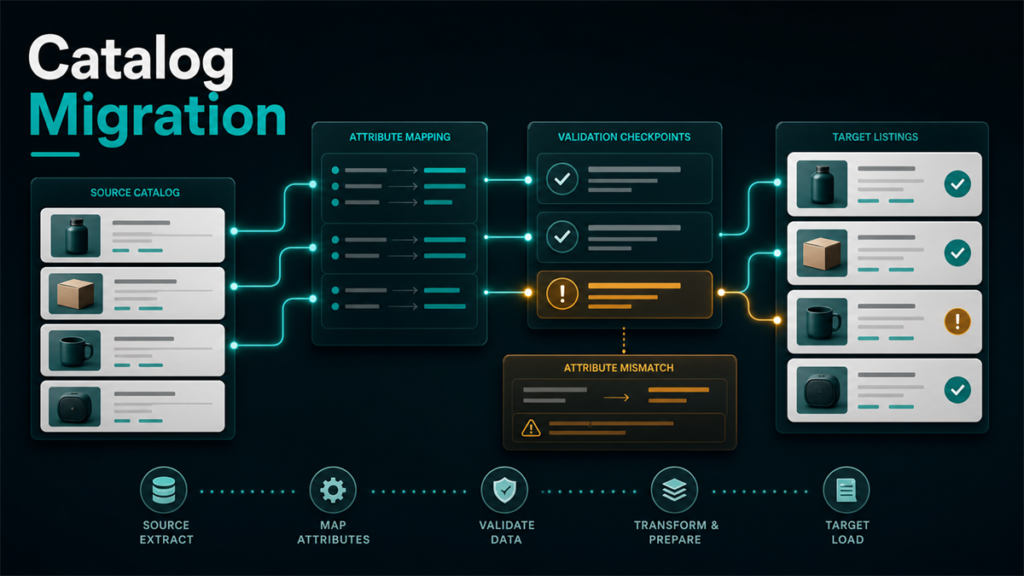
Moving a catalog from Amazon to Walmart is not a copy-and-paste task. It is a translation task. The source data from Amazon can save time, but only if the team stops first to review what is reusable, what is incomplete, and what Walmart will expect in a different format or attribute structure.
Key Takeaways
- Amazon listing completeness does not automatically equal Walmart readiness.
- The safest migration starts with a field audit, not with the upload itself.
- Titles, dimensions, category attributes, compliance data, images, and variation structure often need cleanup before Walmart setup.
- A better workflow translates the catalog before bulk upload instead of repairing large batches after the fact.
- Sellers usually save time by slowing down early and uploading cleaner data once.
Why Migration Goes Wrong
Amazon-first teams often underestimate how much invisible adaptation is happening inside their existing catalog. Over time, products become "good enough" for Amazon because the detail pages are already live, the marketplace contribution history is long, and the team is used to Amazon's structure.
Then Walmart exposes the gaps:
The catalog was not necessarily bad. It was just Amazon-shaped.
The Better Workflow
Use migration in five stages.
1. Audit the Amazon source data
Before you upload anything, review the current Amazon listing source:
The goal is to identify what is reliable and what only looks complete because the listing has been living on Amazon for a long time.
2. Separate reuse from rebuild
Some data can usually transfer with editing. Some should be rebuilt or confirmed from product source documents.
For many sellers:
This step is what prevents the upload from becoming a repair project later.
3. Map the data into Walmart's item-setup reality
Walmart's item-spec and setup workflows are not just a different upload screen. They force a different emphasis on structured data. That means the team should map Amazon content into Walmart's field logic intentionally.
Ask:
This is the step many sellers skip. It is also the step that usually determines whether the migration feels smooth or messy.
4. Test a smaller product set first
Do not make your first migration run the biggest one possible. A smaller pilot reveals where the mapping logic breaks without turning the whole catalog into a troubleshooting exercise.
5. Build the correction loop before bulk scale
After the test set, write down what failed:
Then correct the migration process before the next batch.
The Field Groups Most Likely to Break
Titles
Amazon titles often reflect category habits and search logic that do not transfer cleanly.
Dimensions and packaging
These are common hidden weak spots. A catalog can function for years with "good enough" numbers until migration pressure makes accuracy matter.
Category-specific attributes
This is where Walmart often exposes the biggest gaps. Sellers realize the product was never fully structured for cross-channel use.
Variations
A team may understand the parent-child logic internally, but if the structure is not documented well enough for Walmart setup, the migration slows down fast.
Images
Images may be reusable, but the seller should still ask whether the current set gives Walmart shoppers what they need.
Common Migration Mistakes
Uploading before the field audit
This is the classic one. It feels faster and usually creates more rework.
Assuming Amazon bullets equal Walmart readiness
Marketing copy is not the same thing as structured completeness.
Migrating too much at once
A smaller initial test often saves much more time later.
Treating errors as random
Errors usually reveal a pattern in the source data or mapping logic.
A Simple Migration Checklist
Before bulk uploading to Walmart, confirm:
- the product title is reviewed, not blindly copied
- all key dimensions and packaging fields are trusted
- category attributes are complete enough for Walmart setup
- variation families are documented clearly
- compliance-sensitive data is reviewed before submission
- the first batch is small enough to learn from safely
Scenario: The Team That Tried to Save Time
A seller with a mature Amazon catalog decided to expand to Walmart and treated the migration as a mostly administrative project. The team reused titles, copied content, and pushed a large upload forward quickly.
The first wave of work seemed efficient. The second wave was repair. Several products needed attribute cleanup, one product family had variation confusion, and dimension accuracy turned out to be shakier than expected. The time the team thought it saved up front was paid back through cleanup and repeated review.
The next batch went differently. The team audited Amazon source data first, rebuilt the weak fields, and tested a smaller product set before scaling. The process became slower in the first hour and much faster in the next week.
FAQ
Can I use my Amazon catalog as the starting point?
Yes. It is a strong starting point, but it still needs translation before Walmart upload.
What usually fails first?
Category attributes, dimensions, variation structure, and weakly documented product details are common problem areas.
Should I upload everything at once?
Usually no. A smaller pilot batch is safer.
Is this only a big-catalog problem?
No. Even a small catalog can create a lot of cleanup if the source data is not reviewed.
Why is Walmart migration slower than expected?
Because sellers often discover that "live on Amazon" is not the same as "ready for another marketplace."
Good Migration Work Looks Like Translation, Not Copying
The best Amazon-to-Walmart migrations are rarely the fastest uploads. They are the cleanest translations. Once the team accepts that catalog expansion is a data-shaping exercise, not just a channel-opening task, the whole workflow gets better.
If your business is expanding across marketplaces and the catalog is beginning to feel more fragile than reusable, Qubeq can help with other marketplace operations and the cleanup work between source data and real channel performance. If you want help pressure-testing the migration path before a larger rollout, contact us here.