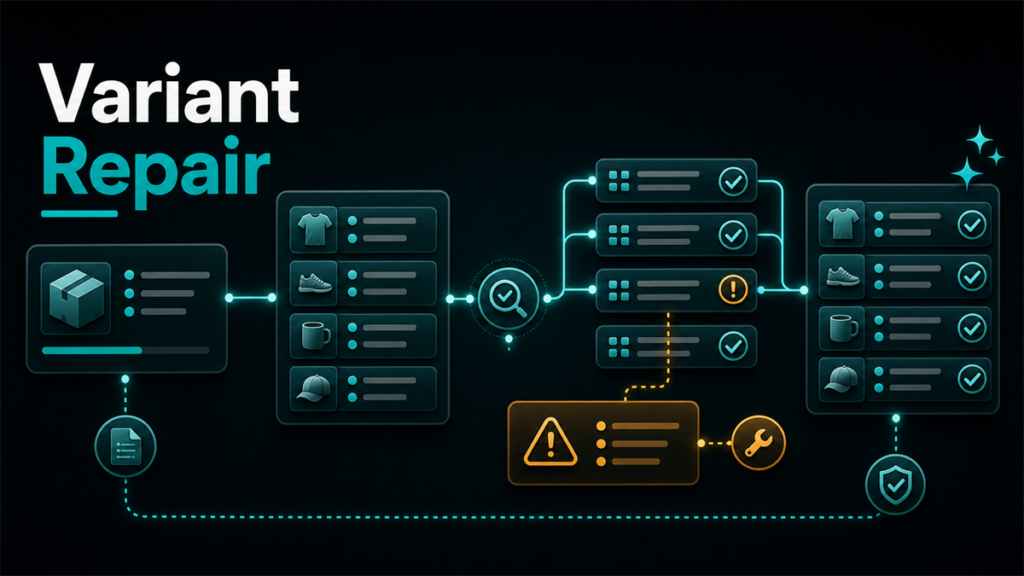
Walmart variant group errors usually look like a surface problem, but they often start deeper in the catalog. A child item does not attach correctly, a size or color family breaks, or the grouping logic behaves differently than the seller expected. The fastest fix is rarely random re-uploading. It is tracing the relationship back to product type, attribute consistency, and the source data feeding the setup.
Key Takeaways
- Walmart variant problems often begin with inconsistent category choices, mismatched attributes, or weak source data.
- A relationship error is not always a "Walmart bug." It is often a structure problem in how the products were prepared.
- Item Spec choices matter because they determine which structured fields exist and how Walmart reads the family.
- Bulk fixes work better when sellers clean the shared logic for the whole family before editing individual children.
- The cleanest workflow is diagnose the relationship, fix the shared data, then resubmit intentionally.
Why Variant Groups Break on Walmart
Sellers often assume that if each individual item record looks acceptable, the family should group correctly. Walmart setup is more sensitive than that. Related items still need to behave like a logical family. If the product type, shared attributes, or identifiers are inconsistent, the relationship can fail even when each child item looks usable alone.
This is especially common when:
That is why the right fix starts with the family model, not with one isolated error field.
The Most Common Causes
1. The family was built under the wrong product type
Product type controls which attributes are available and how Walmart expects the listing to behave. If the selected type does not match the actual item family, the relationship logic becomes harder to keep clean.
2. Shared attributes are inconsistent
Variant families usually need a stable base identity with controlled differences such as size, color, count, or other valid variation logic. If brand, dimensions, material, or other shared product characteristics differ too much between children, Walmart can treat the family as incoherent.
3. A copied listing brought hidden bad data with it
This happens often when sellers move products from Amazon or from an older bulk file. The visible content may look fine, but the underlying relationship logic or attribute formatting may be weak.
4. One child was created differently from the rest
A family can be stable until one child is added later through a different method or with weaker source data. Then the grouping starts to fragment.
5. SKU or identifier cleanup happened halfway
Walmart's own setup guidance warns sellers to be careful with identifiers because some changes are difficult later. When one part of a family is updated and the rest is not, relationship issues become much more likely.
How to Diagnose the Problem
Start with the family, not the error message alone.
Review:
The goal is to answer one question: does Walmart see this as one real product family, or as several loosely related item records?
If the answer is "several loosely related records," the relationship error is doing its job. It is exposing broken logic, not randomly blocking you.
A Cleaner Fix Sequence
1. Freeze edits on the family
If multiple people or systems are pushing updates while you diagnose, the problem becomes harder to isolate.
2. Confirm the product type
Make sure the whole family belongs under the correct Walmart setup path and product type.
3. Normalize shared attributes
Check brand, material, dimensions, use case, and other core details. Clean the family so the shared identity is actually shared.
4. Recheck the true variation dimensions
Ask whether the family really varies by the dimension you think it does. If the items differ more fundamentally, they may not belong in one group.
5. Rebuild or resubmit with one clean logic
After the family data is corrected, reprocess the relationship in a controlled way instead of editing random children one by one.
What Amazon-First Sellers Often Get Wrong
Amazon experience can help, but it can also create false confidence here. Teams assume parent-child habits transfer cleanly, even when Walmart's item setup is structured differently. That leads to copy-paste families that look familiar to the seller but not coherent enough to the receiving system.
The lesson is simple: do not treat relationship setup as a cosmetic grouping layer. Treat it as catalog architecture.
Scenario: The Family That Looked Fine Until New Colors Were Added
A seller had a working family of kitchen towels on Walmart with basic size and color variation. Months later, new colors were added through a second upload process. The new children used slightly different material wording, one had a different product type selection, and another inherited a stale attribute from an old source sheet.
The seller tried to fix the family by resubmitting only the failing rows. The errors kept returning.
The real fix was broader. The seller paused edits, reviewed the full family, normalized the shared attributes, corrected the product type mismatch, and rebuilt the children with one cleaner relationship logic. Once the family made sense as one structured group again, the relationship problem became much easier to resolve.
FAQ
Are Walmart variant group errors always caused by the platform?
No. Many start with category, attribute, or relationship inconsistency in the source catalog.
Can one bad child break the whole family?
It can create enough inconsistency to destabilize how the family is read or displayed.
Should I keep editing one child until it works?
Usually no. Review the whole family first.
Does product type matter for variant setup?
Yes. Product type influences which attributes exist and how the setup behaves.
Is this the same as general item setup errors?
Not exactly. Variant group errors are a narrower relationship problem inside broader setup logic.
Clean Families Start With Clean Structure
The fastest way to reduce Walmart variant group errors is to stop treating them like isolated upload annoyances. They are usually structure signals. Once the family is rebuilt around the right product type, consistent shared attributes, and a believable variation dimension, the catalog becomes easier to maintain.
If your Walmart catalog keeps breaking at the relationship layer, Qubeq can help with the underlying catalog cleanup and the broader other marketplace operations that sit behind it. If you want help diagnosing why the family logic keeps failing, contact us here.