FBA damaged inventory reimbursement depends on how the damaged unit was classified, where the damage happened, and whether Amazon already reimbursed the seller. Sellers should review the damage event, inventory disposition, reimbursement history, and evidence before opening a manual claim.
Key Takeaways
- FBA damaged inventory reimbursement is not automatic for every unsellable or damaged unit.
- The first question is whether the damage appears Amazon-responsible, customer-responsible, carrier-related, or tied to seller prep or product condition.
- Sellers should check whether Amazon already issued an automatic reimbursement before filing manually.
- Current claim windows, report labels, and eligibility rules should be verified in Seller Central before publishing or filing.
- A strong damaged inventory claim is narrow, evidence-based, and tied to one inventory event.
What is FBA damaged inventory reimbursement?
FBA damaged inventory reimbursement is a possible repayment when inventory is damaged while under Amazon's responsibility and the event meets Amazon's current reimbursement policy. The seller's job is to prove the event path, not just show that the unit became unsellable.
Damaged inventory can appear in several places:
- Inventory adjustment records.
- Unsellable inventory views.
- Customer return records.
- Reimbursement reports.
- Removal order or disposal records.
- Case history tied to the affected SKU or FNSKU.
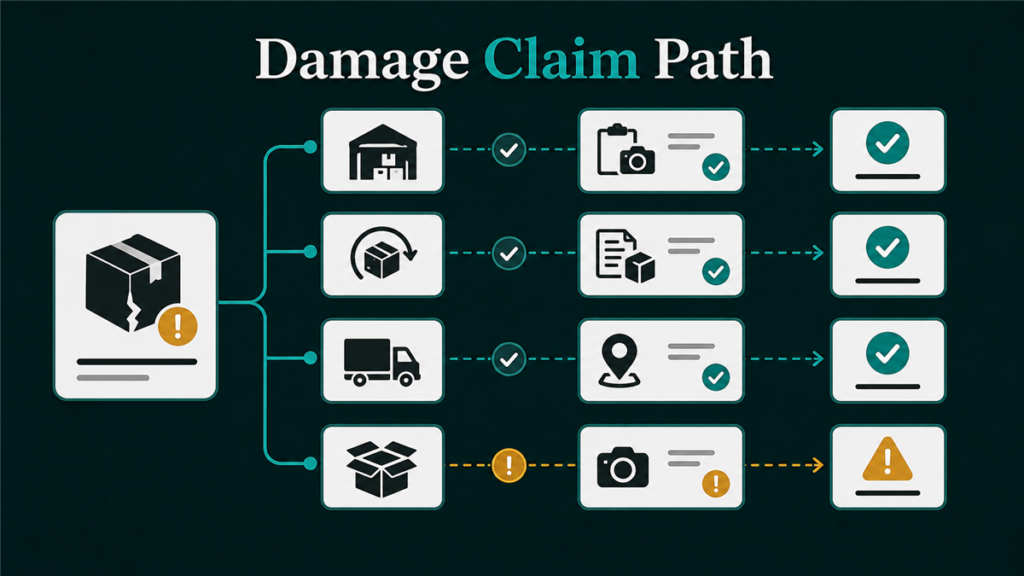
The same SKU can have several damaged units with different causes. One unit may be damaged in a fulfillment center. Another may be returned by a customer in damaged condition. A third may be defective because the product or packaging was not acceptable. Those events should not be treated as one claim type.
Why damaged inventory classification matters
Damaged inventory classification matters because Amazon reviews the event according to custody, responsibility, timing, and evidence. A claim for warehouse damage needs different support than a claim connected to a customer return.
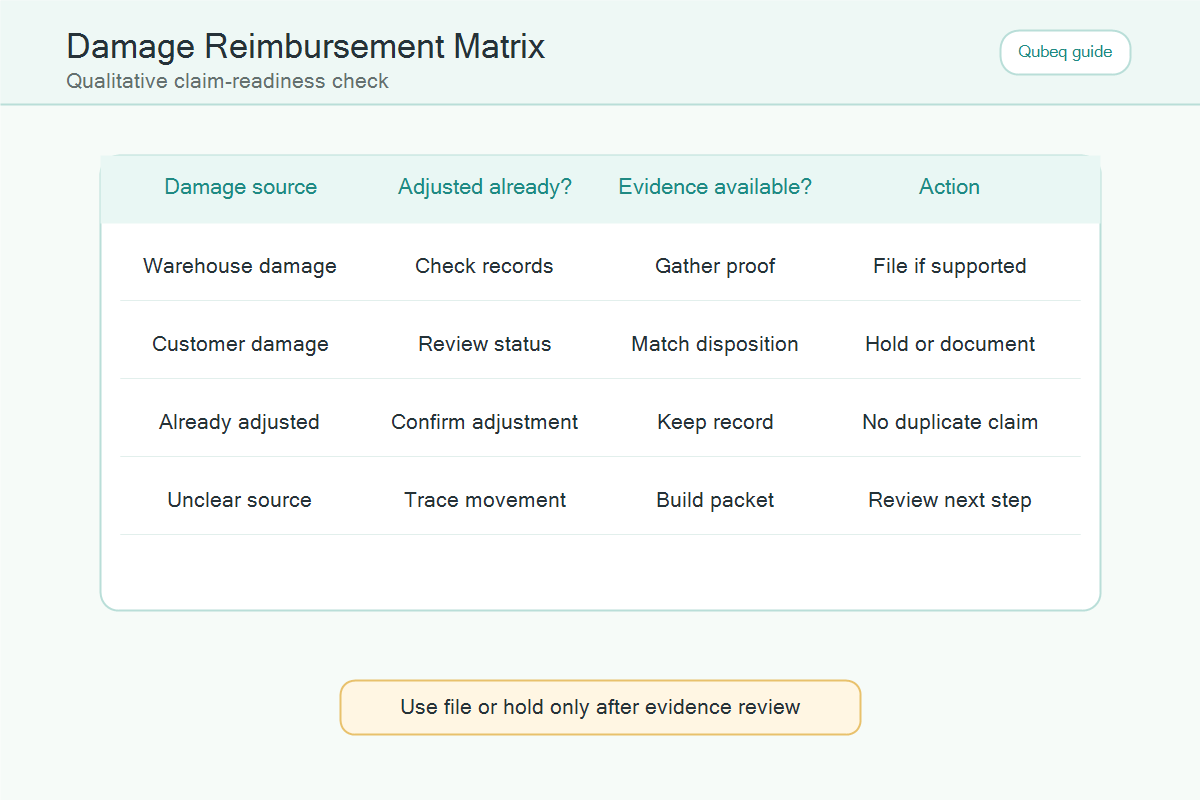
| Damage path | What it may mean | First checks | Claim caution |
| Fulfillment center damage | Inventory may have been damaged while under Amazon control | Adjustment, disposition, reimbursement report | Verify Amazon responsibility and automatic reimbursement first |
| Customer damage | A returned unit may be marked customer damaged | Order, refund, return, condition | Do not treat every customer-damaged unit as warehouse damage |
| Carrier damage | Damage may be connected to inbound or outbound transport | Tracking, shipment, delivery proof | Evidence depends on shipment path and carrier records |
| Seller or product issue | Packaging, prep, expiration, or defect may explain the damage | Prep category, condition, product documentation | Do not file as Amazon-responsible without support |
This distinction keeps the case clean. If a support associate has to guess which event caused the loss, the case is likely too broad.
How sellers should investigate a damaged FBA inventory event
Sellers should investigate a damaged FBA inventory event by matching the SKU, FNSKU, date, quantity, disposition, and reimbursement record before filing. The goal is to build a timeline of what happened to the unit.
- Start with the affected SKU or FNSKU.
- Review the inventory movement or adjustment record around the damage date.
- Check the unit disposition and whether the item moved to unsellable inventory.
- Search reimbursement records for an automatic credit.
- Check whether the event is tied to a customer return, shipment, removal order, or warehouse adjustment.
- Confirm the current policy window and evidence requirements.
- Open a focused case only if the event appears eligible and unreimbursed.
The investigation should answer one clear question: did an eligible Amazon-responsible damage event create an unreimbursed loss?
What evidence supports an FBA damaged inventory claim?
The best evidence for an FBA damaged inventory claim connects the damaged unit to the event record. Screenshots are not enough if they do not show the SKU, date, quantity, and damage path.
Useful evidence may include:
- SKU and FNSKU.
- Inventory adjustment or movement record.
- Disposition change showing the unit became unsellable.
- Reimbursement report check showing no credit has been issued.
- Order ID and return record if the damage came from a customer return path.
- Shipment ID or carrier record if the damage connects to inbound movement.
- Removal order record if the unit was removed or disposed.
- Case history showing the issue has not already been resolved.
The evidence should be presented in a short, readable case. A good case says what happened, which unit is affected, why the seller believes the event is reimbursable, and what review the seller is requesting.
When sellers should not file a damaged inventory claim yet
Sellers should not file a damaged inventory claim yet when the damage path is unclear, Amazon may still issue an automatic reimbursement, or the seller has not verified the current policy window. Waiting for the right evidence can be better than filing a weak case.
Do not file yet if:
- The unit is still moving through a return, removal, or receiving process.
- The reimbursement report has not been checked.
- The event may be seller-responsible because of prep, packaging, expiration, or condition issues.
- The seller cannot identify the affected SKU, FNSKU, date, and quantity.
- The claim depends on an old reimbursement rule that has not been verified.
- A previous case was denied and there is no new evidence.
The safest reimbursement workflow is not "file every possible damage case." The safer workflow is "confirm the event, match the evidence, then file only the claim Amazon can review."
Practical damaged inventory reimbursement checklist
A damaged inventory reimbursement checklist should separate diagnosis from filing. Use this operating sequence before opening a Seller Central case.
- Identify the damaged SKU/FNSKU and unit quantity.
- Find the event date and report source.
- Classify the damage path: warehouse, customer, carrier, seller/product, or unclear.
- Check whether Amazon already reimbursed the unit.
- Confirm current claim timing and evidence rules.
- Pull only the reports that support the event path.
- Draft one focused case with the claim type, quantity, and evidence.
- Track the case ID, response, outcome, and recovered amount.
This process also helps prevent duplicate claims. If Amazon asks for more information, the audit log should show exactly what evidence was already used.
Mini-scenario: one damaged SKU, two different paths
A seller sees 12 damaged units for the same FNSKU. At first, the team wants to file one damaged inventory claim for all 12 units. The audit shows that five units were tied to fulfillment center adjustments, four units came back through customer returns, and three units were connected to a removal order.
The stronger approach is to split the review into separate event paths. The fulfillment center units need adjustment and reimbursement checks. The customer return units need order and return-condition review. The removal order units need removal-order evidence. One broad case would hide the actual issue.
FAQ
Does Amazon reimburse all damaged FBA inventory?
No. Amazon does not reimburse every damaged unit by default. Eligibility depends on the damage path, custody, evidence, timing, and Amazon's current reimbursement policy.
How do I know if damaged FBA inventory was already reimbursed?
Check the reimbursement report, transaction history, inventory adjustment records, and case history for the affected SKU, FNSKU, date, and quantity.
Is customer-damaged inventory the same as warehouse-damaged inventory?
No. Customer-damaged inventory and warehouse-damaged inventory can follow different review paths. Sellers should check the order, return status, disposition, and current policy before filing.
What should I include in a damaged inventory claim?
Include the SKU/FNSKU, quantity, event date, damage classification, report evidence, reimbursement check, and a focused request for review.
Can Qubeq help with damaged inventory reimbursement?
Yes. Qubeq can audit damaged FBA inventory events, separate claim paths, organize evidence, and identify which reimbursement claims are worth pursuing.
Build the evidence before the case
FBA damaged inventory reimbursement works best when sellers treat the issue like an audit, not a guessing game. If your account has repeated damaged inventory events, Qubeq can review the reimbursement trail, separate warehouse damage from return-related damage, and prepare a cleaner recovery workflow.