Seller Central case writing is an operations skill, not a typing task. A good case gives Amazon the ASIN, SKU, issue type, evidence, timeline, attempted fixes, and a precise request in one clean packet. A weak case asks for help without giving the support team enough facts to route or resolve the issue.
Key Takeaways
- The first sentence should state the issue, affected ASIN/SKU, and requested action.
- Every case should include evidence: screenshots, batch IDs, processing reports, policy notices, invoices, or compliance documents where relevant.
- Do not mix unrelated issues in one case. One case should usually have one problem and one requested outcome.
- Case history matters. Mention prior case IDs only when they help show unresolved evidence or repeated misrouting.
- Escalation works better when the original case is structured, calm, and specific.
Why Seller Central Cases Get Stuck
Seller Central cases get stuck when the support team cannot identify the exact issue, route the case to the right internal team, or verify the seller's claim from the evidence provided. The case may be transferred, closed with a generic reply, or answered with instructions the seller already tried.
Common reasons cases stall:
- The case combines catalog, FBA, payment, and account health issues in one message.
- The seller does not include ASIN, SKU, marketplace, batch ID, or case history.
- The request is too broad, such as "please fix my listing."
- The evidence is missing, blurry, incomplete, or unrelated.
- The seller argues instead of documenting.
- The case is opened in the wrong support category.
- The seller opens duplicate cases before the first one is routed.
The goal is not to write a long message. The goal is to write a case Amazon can classify and act on.
The Seller Central Case Formula
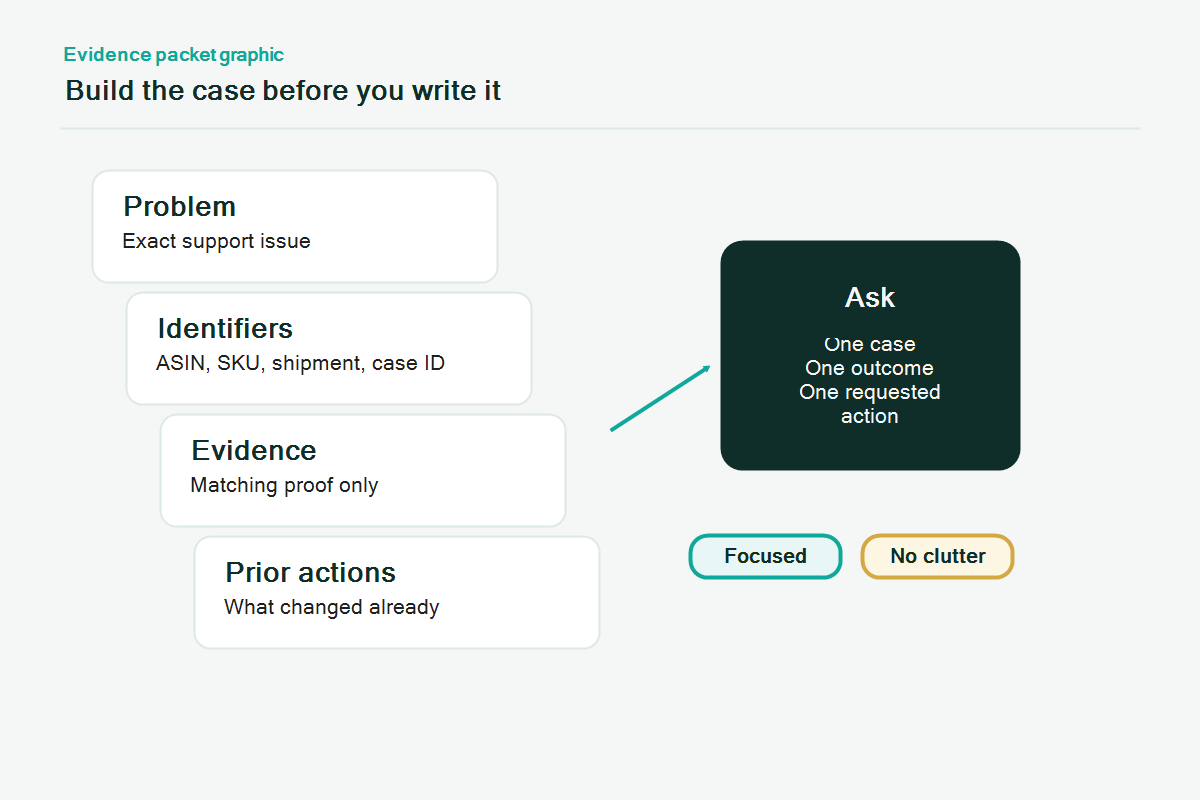
A strong Seller Central case follows a simple structure:
- Issue summary
- Affected entity
- Evidence
- Steps already taken
- Requested action
- Attachments
1. Issue summary
Start with one direct sentence:
"ASIN B0XXXXXXX is inactive because the detail page is removed, but Account Health does not show an active violation. Please identify the blocking policy or catalog attribute so we can correct the listing."
The first sentence should not be a story. It should tell Amazon what the case is about.
2. Affected entity
List the exact identifiers:
- Marketplace
- ASIN
- SKU
- Parent ASIN, if variation issue
- Batch ID, if flat file issue
- FNSKU or shipment ID, if FBA issue
- Prior case ID, if relevant
Do not assume Seller Support will find the right listing from the title alone.
3. Evidence
Evidence depends on the issue type.
| Case Type | Useful Evidence |
| Catalog correction | Current detail page, desired attribute, manufacturer or brand proof, flat file report |
| Variation issue | Parent SKU, child SKUs, variation theme, processing report, intended structure |
| Listing suppression | Suppression reason, corrected images or attributes, Account Health screenshot |
| FBA shipment issue | Shipment ID, receiving status, proof of delivery, carton contents, invoice |
| Reimbursement issue | Transaction IDs, adjustment report, inventory ledger, case history |
| Account health issue | Performance notification, root cause, corrective action, prevention evidence |
Attach evidence in clean file names. A file named `ASIN-B0XXXX-title-proof.pdf` is easier to review than `screenshot-final-new-3.png`.
4. Steps already taken
Tell Amazon what you already tried. Keep the list short:
- Updated title through listing editor on 2026-06-02.
- Uploaded flat file batch ID 123456789 with corrected variation theme.
- Removed restricted claim wording from title and bullets.
- Checked Account Health and no active violation appears.
This prevents the case from receiving a basic first-level answer that repeats the same steps.
5. Requested action
Ask for one decision or action:
- "Please confirm the specific attribute preventing this contribution from applying."
- "Please route this case to catalog contribution review."
- "Please review the attached invoice and confirm whether the reimbursement claim can be reopened."
- "Please identify why this ASIN remains detail-page removed when no violation appears in Account Health."
Avoid asking for everything at once. A precise request is easier to route.
Case Templates by Situation
Catalog contribution case template
Subject: Catalog contribution not applying for ASIN [ASIN]
Message: We are requesting review of a catalog contribution for ASIN [ASIN], SKU [SKU], marketplace [marketplace]. The intended correction is [specific attribute]. The current live detail page shows [current incorrect value]. We attempted correction through [listing editor or flat file batch ID] on [date], but the contribution did not apply.
Evidence attached:
- Screenshot of current detail page
- Manufacturer or brand source showing correct value
- Flat file processing report, if used
- Brand Registry proof, if relevant
Requested action: Please identify whether this is blocked by contribution authority, product type, attribute validation, or another catalog restriction.
FBA shipment case template
Subject: FBA shipment discrepancy review for shipment [Shipment ID]
Message: We are requesting review of shipment [Shipment ID]. The shipment shows [received quantity] received against [shipped quantity] shipped for SKU [SKU]. We have attached proof of delivery, supplier invoice, packing slip, and carton-level notes.
Evidence attached:
- Proof of delivery
- Supplier invoice
- Packing slip
- Shipment contents export
- Receiving discrepancy screenshot
Requested action: Please review the attached documentation and confirm whether the missing units are eligible for reconciliation or next-step investigation.
Account health case template
Subject: Account Health notice response for [policy or ASIN]
Message: We are responding to the Account Health notice dated [date] for [ASIN/account issue]. The identified issue is [issue]. We have completed [corrective action] and added [prevention control]. Supporting evidence is attached.
Requested action: Please review the attached evidence and confirm whether any additional documents or corrections are required.
What Not to Put in a Seller Central Case
Do not include:
- Threats, blame, or emotional pressure
- Multiple unrelated issues
- Claims that are not supported by documents
- Customer personal data unless Amazon specifically requires it and the data is handled safely
- Screenshots with sensitive information that is not needed
- Long histories that do not help the current decision
- Duplicate case IDs unless they show the same unresolved issue
Keep the case professional and factual. Amazon support teams are not helped by frustration, even when the frustration is reasonable.
Mini-Scenario
A seller opens a case saying, "Our variation is broken, please fix urgently." The case closes with a generic help article. The seller rewrites the case with parent SKU, child SKUs, variation theme, flat file batch ID, processing report, and the exact requested action: "Please confirm whether the child SKUs are blocked by variation theme mismatch or catalog contribution authority." The second case has a better chance of being routed because Amazon can see the structure and the decision needed.
FAQ
How long should a Seller Central case be?
A good case is usually short but complete. The message should summarize the issue in a few paragraphs and rely on attachments for evidence.
Should I open multiple cases for the same problem?
Usually no. Duplicate cases can fragment the evidence and create inconsistent replies. Escalate or update the existing case when possible.
What if Seller Support sends a generic reply?
Reply with the specific evidence and the exact question that was not answered. If needed, ask for routing to the correct internal team, such as catalog, FBA, or Account Health.
Should I include screenshots?
Yes, when the screenshot proves the issue. Use screenshots for status messages, listing errors, Account Health notices, processing reports, and receiving discrepancies.
Can a good case guarantee resolution?
No. A good case improves clarity and routing, but Amazon still controls the decision and may require more evidence or policy review.
Need Cleaner Seller Central Case Packets?
Qubeq helps sellers prepare catalog, FBA, Account Health, and listing issue case packets that are easier to review. If your cases keep closing with generic replies, Qubeq can help rebuild the issue summary, evidence, and requested action.