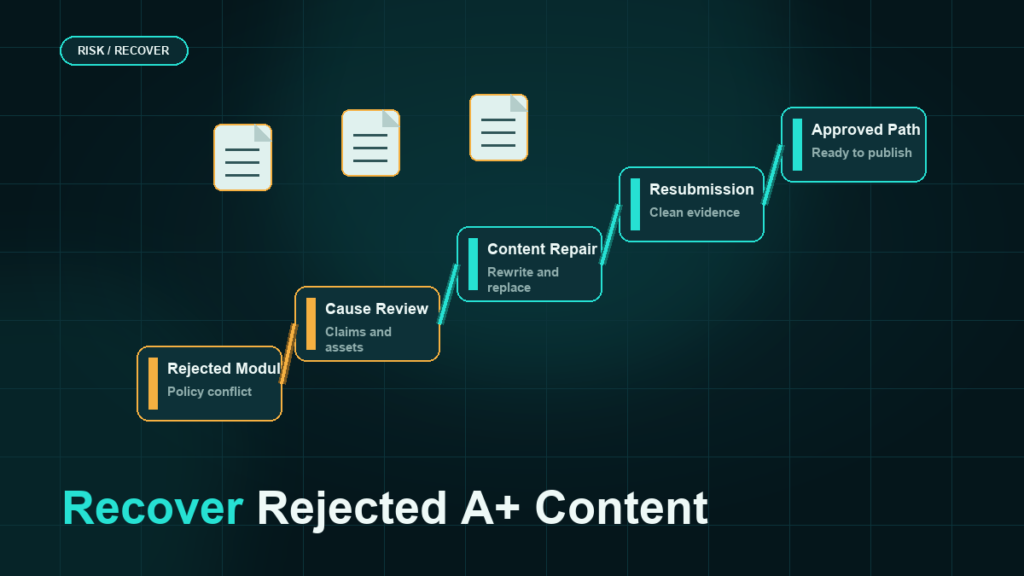
A rejected A+ Content submission almost always violates one of a handful of guideline families: prohibited claims, pricing or promotion language, contact and off-Amazon references, or image rules. Find the rejection reason in A+ Content Manager, match it to the violation family, fix only what failed, and resubmit; guessing and rewriting everything wastes review cycles.
Key Takeaways
- The rejection reason in A+ Content Manager names the violated guideline; start there, not with a full rewrite.
- Most text rejections come from superlatives and guarantees, pricing and promotion language, or references that point buyers off Amazon.
- Most image rejections come from low resolution, illegible text at display size, watermarks, or borrowed marks and badges.
- Fix the flagged module precisely and resubmit; review the rest of the content against the same rule while you are in there, because reviewers flag one instance, not every instance.
- A pre-submission checklist catches nearly all of these violations before the first review.
Where to Find the Rejection Reason
Open the submission in A+ Content Manager. Rejected content shows its status with a rejection reason attached, typically referencing the guideline area that failed. The reason can be terse, and it may identify only one offending module even when several share the same problem.
Two habits make this stage faster:
- Read the current A+ Content guidelines page alongside the rejection. The reason text usually paraphrases a guideline; the guidelines page gives you the full rule.
- Assume the flagged rule applies to the whole submission. Fix every instance, not just the flagged one, or the next review may fail on the module the first reviewer did not mention.
The Text Violation Families
Prohibited claims and superlatives
Unverifiable claims fail: best, number one, top rated, perfect. Health, safety, and efficacy claims without required substantiation fail in regulated categories. Award and endorsement mentions typically need the award name, year, and awarding body, and some are not allowed at all.
Failing: "The best knife sharpener on the market, guaranteed to last a lifetime." Passing: "A two-stage sharpener with tungsten and ceramic slots, built with a full-steel chassis."
Guarantees and warranty language
Satisfaction guarantees, money-back promises, and warranty claims are restricted in A+ text. Warranty details generally belong elsewhere on the listing per current policy, not in A+ modules.
Pricing and promotion language
Price mentions, discount percentages, "sale," "free shipping," coupon references, and time-limited offers fail. A+ is product content, not promotional space.
Contact information and off-Amazon references
Web addresses, emails, phone numbers, QR codes, social handles, and "visit our website" phrasing fail. Anything that routes the buyer away from Amazon is removed.
The Image Violation Families
- Resolution and quality: blurry, stretched, or upscaled images fail. Build at the module's required pixel dimensions, not scaled up from small assets.
- Illegible text: text baked into images must be readable at actual display size, including mobile. Dense paragraphs inside images are a common silent failure.
- Watermarks and borrowed marks: photographer watermarks, stock-site marks, third-party logos, certification badges you cannot substantiate, and marketplace iconography all fail.
- Duplicated content: reusing the exact main-image set as A+ modules can be flagged as low-value content.
Fix and Resubmit Workflow
- Map the rejection reason to its violation family using the current guidelines page.
- Sweep the entire submission for that family, not just the flagged module.
- While editing, run the other families as a quick checklist; serial rejections usually mean several latent violations were present from the start.
- Keep a change note of what you fixed, so a repeat rejection tells you whether the reviewer found something new or you missed an instance.
- Resubmit and track status. Approval times vary; do not stack a launch on an assumed turnaround.
If a rejection cites a rule the content clearly does not violate, resubmit once with the content unchanged or minimally clarified before escalating; a second reviewer often resolves borderline calls. Escalate through a case only with the guideline text and your content side by side.
Pre-Submission Checklist

- No superlatives, unverifiable claims, or guarantee language anywhere in module text.
- No pricing, promotion, shipping, or deal references.
- No URLs, contact details, QR codes, or social references.
- Every image at required resolution, text legible at mobile display size.
- No watermarks, third-party logos, or unsubstantiated badges.
- Claims in regulated categories checked against category requirements.
- Keywords present naturally in text modules, since A+ body text is buyer-facing content first.
Mini-Scenario: Three Rejections for One Word Family
A cookware brand's A+ submission was rejected three times over two weeks. The first rejection flagged a guarantee claim in module two; the team fixed it. The second flagged module five for the same rule, where "risk-free purchase" had survived. The third flagged the banner image, which contained "100% satisfaction" baked into the artwork. One sweep for guarantee language across text and images at the first rejection would have shipped the content two weeks earlier. The fourth submission, after a full-family sweep, was approved.
FAQ
Why was my A+ Content rejected?
The rejection reason in A+ Content Manager names the guideline area. The most common families are prohibited claims and superlatives, guarantee language, pricing or promotion references, contact information, and image quality or borrowed-mark issues.
How long does A+ Content review take?
Review times vary from hours to several days. Plan launches with buffer rather than an assumed turnaround.
Can I mention my warranty in A+ Content?
Warranty and guarantee language is restricted in A+ modules under current policy. Check the live guidelines; warranty details usually belong elsewhere on the listing.
Why does my content keep getting rejected after fixes?
Reviewers typically flag one instance, not all of them. Sweep the entire submission, including text inside images, for the flagged rule family before resubmitting.
Does rejected A+ Content affect my listing or account?
No. The existing listing content stays live and there is no account penalty. The cost is time: each rejection cycle delays the conversion lift the content was built for.
Ship A+ That Passes the First Review
A+ rejections are predictable, which means they are preventable. If your team is burning weeks in rejection cycles, or your catalog has approved A+ that was watered down just to pass, Qubeq can audit the content against current guidelines, rebuild the failing modules, and set up a pre-submission QA pass so new content ships on the first review.