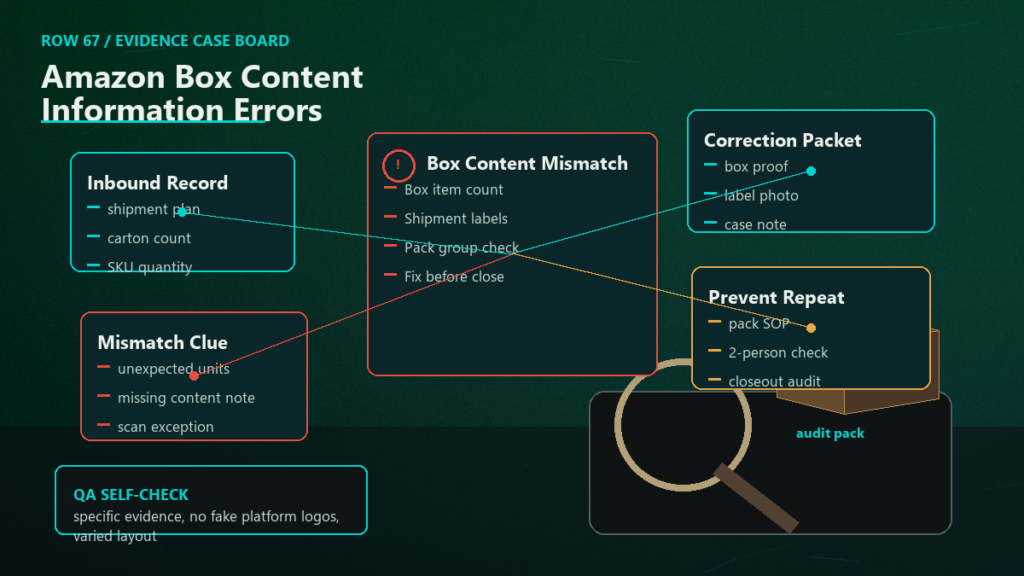
Box content information tells Amazon exactly which SKUs and quantities are inside each box of an FBA shipment, and errors in that data cost you three ways: manual processing fees, slower receiving, and weaker evidence when units go missing. Most box content errors come from one root cause, recording the data separately from the physical packing, and the fix is a workflow change, not more careful typing.
Key Takeaways
- Box content information is box-level data: which SKUs, what quantities, and where applicable expiration dates, for every box in the shipment.
- Missing or wrong box content data can trigger manual processing fees and delays receiving, because Amazon has to open and count instead of scanning and shelving.
- Accurate box content data is also claim evidence: shortage disputes are much stronger when you can show what was in the specific box.
- The errors that matter are mismatches: data says one thing, the physical box contains another, often from last-minute packing changes.
- Record the data at the moment of packing, from the physical box, and the error rate drops to near zero.
What Box Content Information Is and Why Amazon Wants It
When a shipment arrives at a fulfillment center, Amazon can either scan box labels and trust the declared contents, or open every box and count. Box content information enables the first path: receiving moves faster, your inventory becomes sellable sooner, and discrepancies are easier to localize to a specific box.
Depending on your workflow and shipment type, the data is provided through manual entry in the shipment workflow, an uploaded file, or 2D barcodes printed on the boxes that encode the contents. Which options appear depends on the current Send to Amazon flow and your shipment configuration, so work from the options the workflow presents rather than an old SOP.
The Common Error Types
Quantity and SKU mismatches
The data says 24 units of SKU A in box 3; the box holds 20, or holds SKU B. The usual cause is packing changes after the data was entered: a short carton, a substituted product, a last-minute rebalance between boxes that never made it back into the data.
Swapped box labels
Box 3's label goes on box 4 and vice versa. Contents are right in aggregate, wrong per box. This is invisible until receiving scans individual boxes, and it can present later as a phantom shortage in one box and an overage in another.
Mixed-box mistakes
A box declared as single-SKU actually contains a second SKU tucked in to fill space, or a mixed box's declared assortment misses one product. Filler decisions on the packing floor are a classic source.
Expiration and lot data gaps
For date-sensitive products, missing or wrong expiration data at the box level causes receiving exceptions even when counts are perfect.
File and format errors
For file-based submissions: rows that do not match the shipment's SKUs, totals that disagree with the shipment-level quantities, and template version mismatches. These block submission rather than causing downstream surprises, which makes them the cheapest errors to have.
What Box Content Errors Cost
- Fees: shipments without valid box content data, or with data Amazon has to correct, can incur manual processing charges per the current FBA fee schedule. Verify current amounts; the structure has changed over the years.
- Time: manual receiving takes longer, which means inventory sits unreceivable during exactly the restock window you shipped against.
- Claims: when units go missing, box-level data plus carrier proof is the evidence pair that wins shortage disputes. A shipment with sloppy box data gives Amazon's receiving record the benefit of the doubt.
A Packing Workflow That Produces Accurate Data
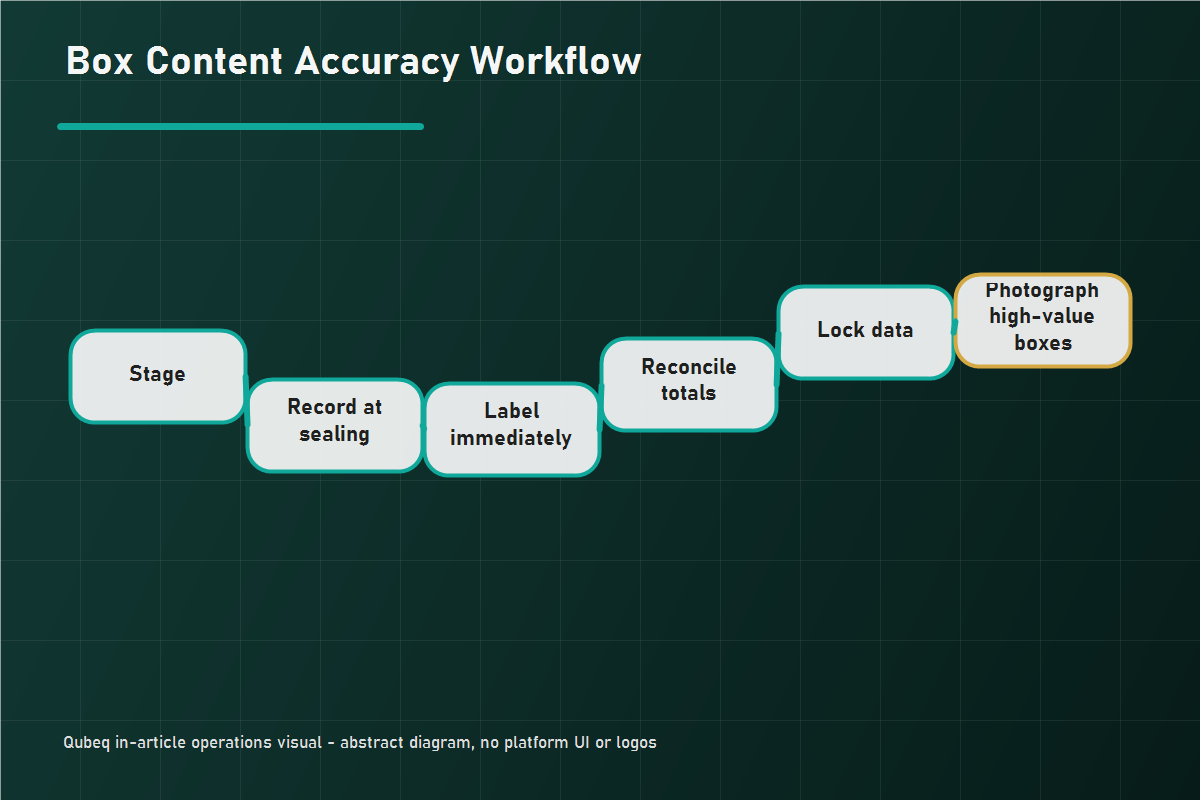
The root fix is sequencing: record from the physical box, not before it.
- Stage by box plan, but treat the plan as provisional until each box is sealed.
- Record contents at sealing time, from what actually went in, scanning units or counting against a checklist as the box closes.
- Apply the box label immediately at sealing, before the next box opens. Swapped labels die here.
- Reconcile totals against the shipment before submitting: box-level data summed must equal shipment-level quantities exactly.
- Lock the data after submission. Any physical change after that point requires a data change first, then the box change, never the reverse.
- Photograph open boxes for high-value shipments before sealing. Thirty seconds per box, and your shortage claims gain evidence no spreadsheet provides.
Mini-Scenario: The Phantom Shortage That Was a Label Swap
A supplements seller shipped six boxes and got a shortage notice: box 2 received 18 units short of its declared contents. The reconciliation looked like a claim, until the team noticed box 5 had been received with an 18-unit overage of the same SKU family. The packing-floor photos showed the labels for boxes 2 and 5 printed together and applied at the end of the session, swapped. No units were missing; the per-box data was wrong twice in offsetting directions. The team moved label application to sealing time and the pattern never recurred. The claim that almost got filed would have been denied, and would have deserved it.
FAQ
What is box content information for FBA shipments?
Box-level data declaring which SKUs and quantities are inside each box of an inbound shipment, provided via manual entry, file upload, or 2D barcodes depending on the workflow.
What happens if I skip box content information?
Where it is required, missing data can trigger manual processing fees and slower receiving. Check the current Send to Amazon workflow and fee schedule for what applies to your shipment type.
Why was I charged a manual processing fee?
Amazon's receiving could not use your box data: it was missing, invalid, or contradicted by the physical contents. The fee structure and amounts follow the current FBA fee schedule.
Can I fix box content information after shipping?
Options narrow once the shipment is in transit. Fix what the workflow allows, and document what you shipped (counts, photos, carrier records) so any receiving discrepancy can be disputed with evidence.
Does box content information help with lost-unit claims?
Yes. Box-level declarations plus carrier proof localize a shortage to a specific box, which is far stronger than shipment-level totals alone.
Make Box Data a Packing Step, Not a Paperwork Step
Box content errors are workflow defects, and they are cheap to eliminate compared to what they cost in fees, delays, and lost claims. If your inbound shipments keep collecting processing fees, receiving discrepancies, or shortage disputes you cannot win, Qubeq can audit the inbound workflow end to end, fix the data sequence, and recover the reimbursements your evidence supports.