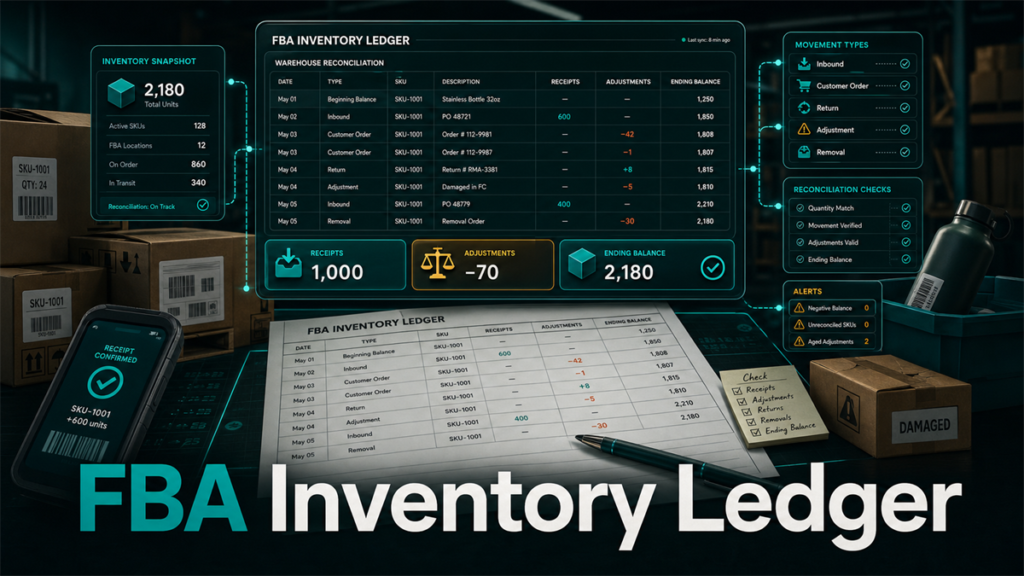
The FBA Inventory Ledger is Amazon's running record of every movement your inventory makes inside the fulfillment network: receipts, sales, returns, adjustments, transfers, and removals. If you reconcile FBA inventory or file reimbursement claims, the Inventory Ledger is the source of truth those tasks depend on, because it is the one report designed to make starting balance plus events equal ending balance.
Key Takeaways
- The Inventory Ledger works like a bank statement for FBA units: a starting balance, every event that changed it, and an ending balance per SKU.
- The summary view answers "does my inventory balance for this period," and the detailed view answers "what exactly happened to these units."
- Event types tell you which team or process moved the stock: receipts, customer orders, returns, warehouse adjustments, transfers, and removals.
- Unexplained negative adjustments that never reverse are the main feed for reimbursement claim candidates.
- A monthly ledger reconciliation routine catches losses while the evidence is fresh and claim windows are open.
What Is the FBA Inventory Ledger?
The Inventory Ledger is a fulfillment report in Seller Central that consolidates inventory movement into a single auditable view. Before the ledger existed, sellers stitched together separate reports for received inventory, adjustments, and inventory events; the ledger replaced that patchwork with one balance-based report.
The core promise of the report is arithmetic: for any SKU and period, the starting warehouse balance plus receipts, minus customer shipments, plus returns, plus or minus adjustments, minus removals, should equal the ending balance. When the math holds, your inventory story is complete. When it does not, the gap is exactly where reconciliation and reimbursement work begins.
Summary View vs Detailed View
The ledger offers two views, and using the right one saves hours.
Summary view
The summary view aggregates by SKU over a date range: starting balance, receipts, customer shipments, returns, adjustments, removals, ending balance. Use it to answer the period question: did anything happen this month that the totals cannot explain? A SKU whose columns do not add up is flagged for detail work.
Detailed view
The detailed view lists individual events with dates, event types, reference IDs, fulfillment centers, dispositions, and quantities. Use it to trace specific units: which fulfillment center adjusted them, what reference ID connects the event to a shipment or removal order, and whether a loss was later reversed.
A practical workflow: run summary monthly for all SKUs, then pull detail only for the SKUs that fail the balance check. Date-range limits apply to the detailed view, so do not let reconciliation lag more than a few months behind.
The Columns That Matter
Column sets evolve, but the working columns in the detailed view typically include:
- Date: when the event posted, which may lag the physical event.
- FNSKU / MSKU / ASIN: the unit identifiers; reconcile at FNSKU level when possible.
- Event type: what kind of movement occurred.
- Reference ID: the connector to a shipment ID, order ID, or removal order, and your main pivot for tracing.
- Quantity: positive or negative unit count.
- Fulfillment center: where it happened.
- Disposition: the stock state involved, such as sellable or unsellable.
Disposition matters more than most sellers expect: a "loss" that is actually a sellable-to-unsellable disposition change is a different problem, and a different claim, than a vanished unit.
Common Event Types and What They Mean
Event names follow the current report version, but the families are stable:
- Receipts: units checked in against an inbound shipment. Short receipts show up here as a gap against your shipped quantity.
- Customer shipments: units leaving for orders. These should never be reconciliation surprises.
- Customer returns: units coming back, with disposition deciding whether they re-enter sellable stock.
- Adjustments: Amazon-initiated corrections, including found, lost, damaged, and disposition changes. This is the family to audit. Lost-and-found pairs that reverse within a settling period are normal; unreversed negative adjustments are claim candidates.
- Transfers: units moving between fulfillment centers. In-transit balances can make a SKU look short temporarily.
- Removals and disposals: units leaving via removal orders. Reconcile these against what you actually received back.
Tracing One Unit Through the Ledger
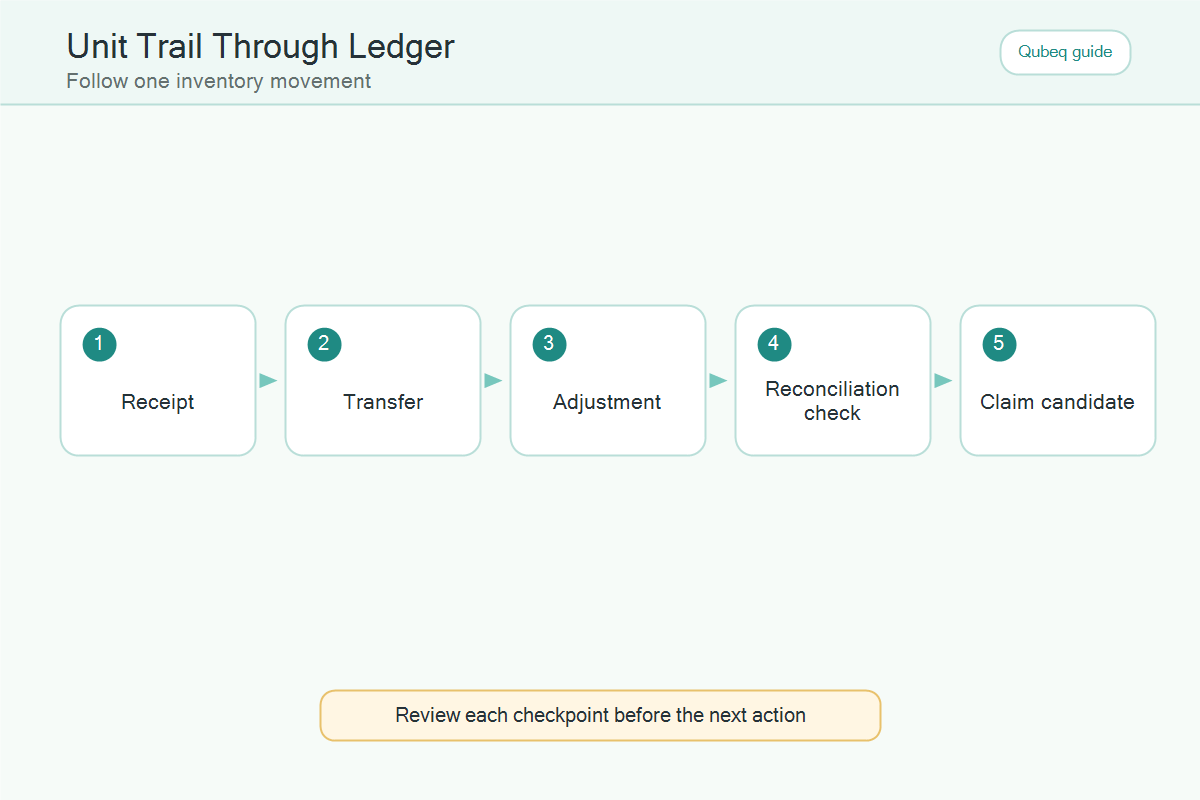
To see the ledger's value, trace a single FNSKU:
- Filter the detailed view to the FNSKU and a generous date range.
- Find the receipt event and match its reference ID to your inbound shipment.
- Follow the movement: transfers between fulfillment centers, customer shipments out, returns in.
- Stop at any adjustment. Note its sign, reason, disposition, and whether a later event reverses it.
- End at the current balance and confirm the math closes.
If the trace ends with a negative adjustment that never reversed, you have a documented loss with dates, locations, and reference IDs: exactly the evidence a reimbursement case needs.
A Monthly Ledger Reconciliation Routine
- Export the summary view for the full month, all SKUs.
- Flag every SKU where the balance equation does not close, and every SKU with net negative adjustments.
- Pull the detailed view for flagged SKUs only.
- Classify each unexplained event: receiving shortage, lost in warehouse, damaged, removal gap, or disposition change.
- Allow a settling window for recent events, because lost units are often found and reversed within weeks.
- Move unreversed losses past the settling window onto the reimbursement candidate list, with their ledger rows attached as evidence.
- File or escalate per your claim process, and log the case ID next to the ledger rows so next month's pass does not re-flag the same units.
Mini-Scenario: The 25-Unit Gap That Was a Transfer
An outdoor-gear seller's monthly check flagged a SKU 25 units short: the summary showed an ending balance 25 below what the events explained. The detailed view showed a transfer event moving 25 units between fulfillment centers late in the month, with no corresponding arrival event yet posted.
Instead of filing a claim, the team marked the SKU for a two-week recheck. The arrival event posted nine days later and the balance closed. The routine still paid off the same month: a different SKU showed a 12-unit negative warehouse adjustment from six weeks earlier with no reversal, which became a documented reimbursement case with ledger rows as evidence.
FAQ
Where do I find the Inventory Ledger in Seller Central?
It is in the fulfillment reports area of Seller Central. Menu paths change, so search "Inventory Ledger" in the reports section or the help hub if it is not visible.
What is the difference between the summary and detailed Inventory Ledger views?
Summary aggregates balances and event totals per SKU for a period; detailed lists each individual event with dates, reference IDs, and dispositions. Reconcile with summary, investigate with detail.
How far back does the Inventory Ledger go?
The detailed view has date-range limits and the report's history is finite. Export and archive monthly so older periods stay available for claims and audits.
Can I use the Inventory Ledger for reimbursement claims?
Yes, it is the primary evidence source. Unreversed negative adjustments, receiving shortages, and removal gaps documented in ledger rows are the foundation of most inventory reimbursement cases. Claim rules and windows are covered in our reimbursement guides.
Why doesn't my Inventory Ledger balance?
Common causes: in-transit transfers not yet posted, recent events still settling, disposition changes misread as losses, or genuine unreversed adjustments. Allow a settling window, then treat what remains as a real discrepancy.
Make the Ledger Your Inventory Source of Truth
Sellers who reconcile from the Inventory Ledger monthly find losses while they are still claimable and stop arguing with gut-feel inventory numbers. If your team has never reconciled the ledger, or you suspect unclaimed losses are sitting in old adjustment rows, Qubeq can audit the account's ledger history, separate real losses from settling noise, and recover what Amazon owes. No upfront cost for the reimbursement audit.