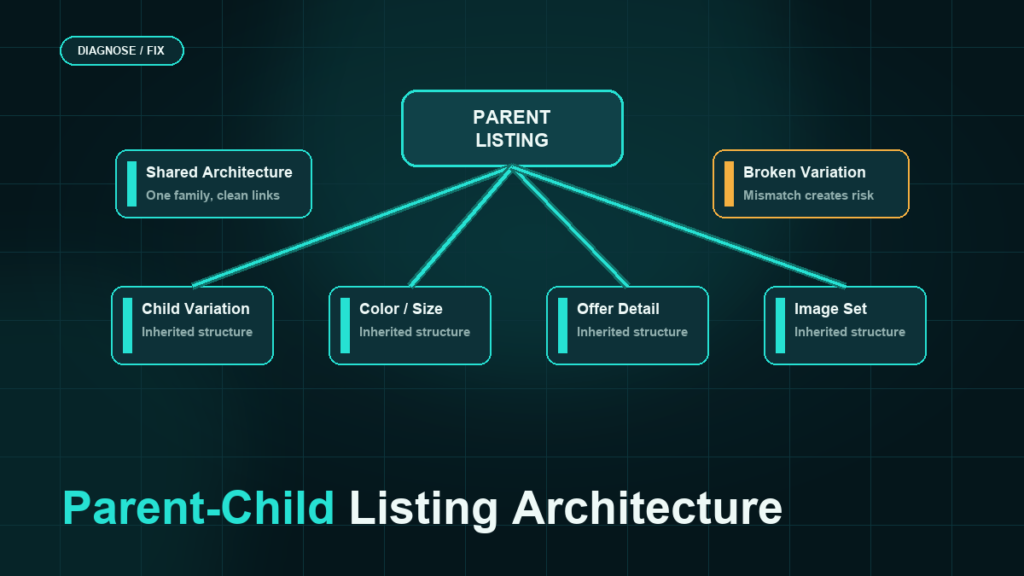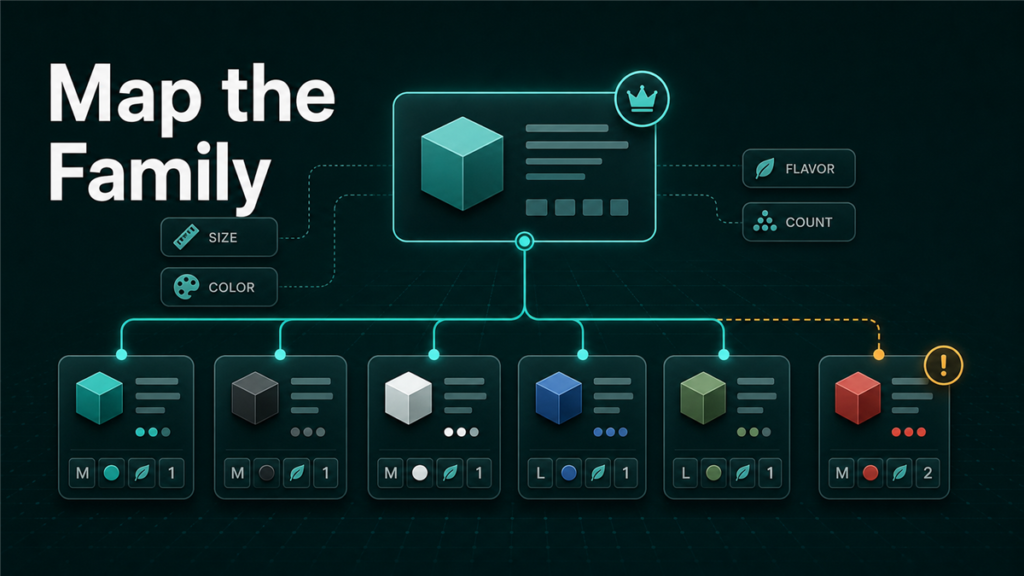
Amazon parent-child listings connect related child ASINs under one non-buyable parent record. This page covers the practical setup and repair basics: what each field means, when a variation family is valid, why children detach, and how sellers should approach a broken family without creating a larger catalog issue.
If you are planning a new variation system across a larger catalog, use the parent-child architecture framework for the architecture framework. This page is the tactical setup and repair guide.
Key Takeaways
- The parent listing is not the sellable product. It exists to connect child ASINs.
- Each child ASIN should represent a real buyable variation with its own SKU, offer, and accurate attributes.
- Amazon allows parent-child relationships only when the product type supports the selected variation theme.
- Broken variation families usually come from wrong product type selection, invalid variation themes, mismatched child attributes, or mixed products that should not share a parent.
- Sellers should document the current variation structure before making flat file changes.
This Page vs the Architecture Guide
Use this page when you need to understand or repair the working parts of an existing parent-child listing. Use the architecture guide when you are designing the structure before upload.
| Need | Use this page | Use the architecture guide |
| Understand parent SKU, child SKU, parentage, and relationship type | Yes | Reference only |
| Fix detached child ASINs or invalid variation errors | Yes | Only for planning root cause |
| Decide whether several products should share a parent | Maybe | Yes |
| Plan variation families across a catalog | No | Yes |
| Build a repeatable variation architecture before upload | No | Yes |
Quick Definitions: Parent, Child, Theme, and Relationship
- Parent SKU: the non-buyable grouping record that connects related child ASINs.
- Child ASIN: the buyable product variation a customer can purchase.
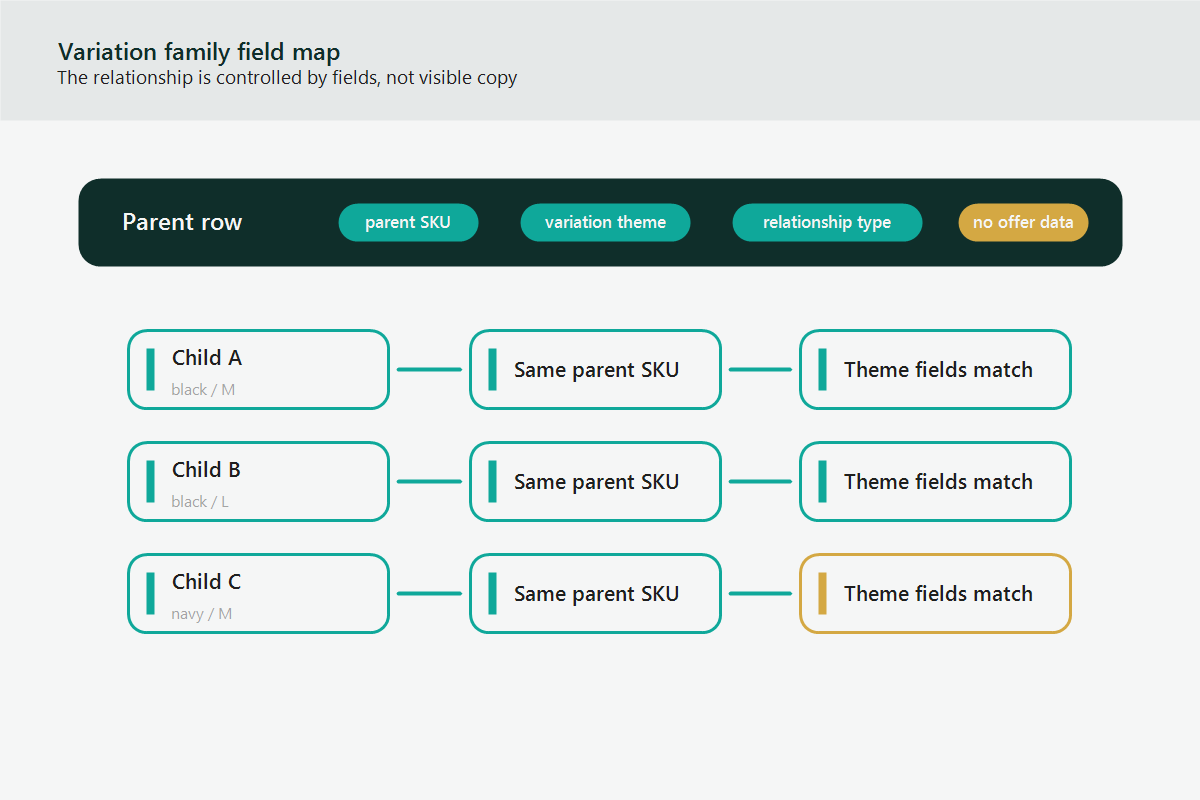
- Parentage: the field that tells Amazon whether the row is a parent or child.
- Relationship type: the field that connects the child to the parent as a variation.
- Variation theme: the approved attribute relationship, such as size, color, flavor, count, or style, depending on product type.
These fields need to agree. A valid child ASIN can still fail to attach if the product type, variation theme, or child attributes do not match Amazon’s rules for that category. For theme-level troubleshooting, review Amazon variation theme rules.
Common Parent-Child Repair Scenarios
- Child ASIN detached from parent: check parent SKU, parentage, relationship type, variation theme, and child attributes.
- Invalid variation theme: confirm the product type supports that theme before re-uploading.
- Wrong product type: correct product type first; variation repair may fail if the template does not match.
- Missing child attribute: fill the attribute that defines the variation, such as size or color.
- Duplicate or abandoned parent: document the current family before deleting or rebuilding anything.
- Mixed products under one parent: separate products that are not true variations.
Safe Repair Checklist Before Upload
- Export or document the current family.
- Identify parent SKU and all child SKUs.
- Confirm the product type for every child ASIN.
- Confirm the valid variation theme.
- Check that every child has a unique variation value.
- Fix the smallest set of fields first.
- Save the flat file and processing report.
- Wait for the catalog to process before repeating uploads.
When the repair depends on batch files, connect the changes to the bulk listing update workflow so the processing report and upload history stay traceable.
What Is an Amazon Parent-Child Listing?
An Amazon parent-child listing is a variation relationship where one parent record groups multiple related child products on a shared product detail experience.
The parent is a non-buyable catalog record. The child ASINs are the actual sellable products. A customer does not buy the parent. A customer buys one child variation, such as a blue medium shirt, a 12-pack size, or a vanilla flavor.
The parent-child structure helps customers compare related options without leaving the product detail page. It also helps the seller manage related items in a cleaner architecture when the variation relationship is valid.
The structure usually contains:
| Element | What it does | Seller risk if wrong |
| Parent SKU | Groups related child listings | Broken family or duplicate parent |
| Child SKU | Represents the sellable variation | Missing or incorrect offer |
| Parentage | Tells Amazon whether the row is parent or child | Flat file rejection |
| Relationship type | Identifies the child as part of a variation | Child does not attach |
| Variation theme | Defines the attribute used for the relationship | Invalid variation error |
| Child attributes | Size, color, flavor, count, or other theme values | Confusing customer experience |
When Should Sellers Use an Amazon Parent-Child Listing?
Sellers should use an Amazon parent-child listing only when the products are the same core product and differ by an approved variation attribute.
A valid variation relationship should make the buying decision easier. If the child ASINs are materially different products, the variation family can create customer confusion and may violate Amazon catalog rules.
Good parent-child candidates include:
- Same shirt in different sizes or colors
- Same supplement in different count sizes, if allowed for that product type
- Same cable in different lengths, if the product type supports length as a variation theme
- Same home product in different patterns, if the product type allows pattern variations
Bad parent-child candidates include:
- Different products bundled under one parent only to share reviews
- Products with different brands
- Products with different core functions
- Products from different product types forced into the same family
- Accessories grouped with the main product when they are not true variations
Amazon variation work should be treated as catalog architecture, not a quick merchandising trick. A variation family that looks convenient to the seller may still be invalid if it does not match Amazon's product type and variation theme rules.
How Does the Parent-Child Structure Affect Amazon Catalog Operations?
The parent-child structure affects listing edits, flat file uploads, search display, catalog cleanup, and Seller Central case resolution.
When the variation architecture is clean, the seller can update related child listings in a controlled way. When the architecture is messy, normal listing edits may fail or create new problems. One wrong parent-child field can affect every child ASIN attached to the parent.
Common operational effects include:
- A child ASIN may detach from the parent after an incorrect update.
- A child ASIN may show the wrong color, size, or style label.
- A flat file upload may fail because the selected variation theme is invalid for the product type.
- A parent may remain in the catalog after the seller thinks the relationship has been deleted.
- Seller Support may ask for evidence before correcting a locked or conflicted variation family.
For sellers with large catalogs, parent-child errors are rarely isolated. A small mistake in the template can repeat across dozens or hundreds of SKUs.
How to Plan an Amazon Parent-Child Listing Before Uploading
A parent-child listing should be planned before the seller touches the flat file or listing editor.
Use this workflow before creating or repairing a variation family:
- Confirm the product type for the ASINs.
- Download the correct category-specific listing template or use the correct listing workflow.
- Check which variation themes are allowed for that product type.
- Confirm that every child ASIN belongs in the same family.
- Build a clean parent SKU naming convention.
- Fill the parent row and child rows consistently.
- Validate child attribute values before upload.
- Upload a controlled file and review the processing report.
- Verify the live detail page after the catalog update applies.
The product type comes first because product type controls the required attributes, valid values, and allowed variation themes. If the product type is wrong, the seller may waste time fixing symptoms while the underlying catalog foundation remains broken.
What Fields Matter Most in a Parent-Child Flat File?
The most important flat file fields are the fields that define the relationship, not only the visible listing copy.
Exact column names can vary by template and marketplace, so sellers should verify against the downloaded template. In most parent-child repair work, the operator reviews these fields closely:
| Field type | What to verify |
| SKU | Each parent and child row has the intended SKU |
| Product ID | Child rows use the correct UPC, EAN, GTIN, or ASIN logic |
| Product type | The template matches the product family |
| Parentage | Parent row and child rows are correctly identified |
| Parent SKU | Child rows point to the intended parent SKU |
| Relationship type | Child rows show a variation relationship |
| Variation theme | The theme is valid for the product type |
| Theme attributes | Size, color, flavor, count, or other values are filled correctly |
| Update action | The seller uses the correct update or delete action for the goal |
If a variation family already exists, export or document the current structure before changing it. That backup gives the seller a way to diagnose what changed if the new upload creates unexpected results.
Common Amazon Parent-Child Listing Mistakes
Most Amazon parent-child listing problems come from a few repeatable mistakes.
Using the Wrong Variation Theme
The variation theme must match the product type. A seller cannot safely copy a theme from another category and assume it will work.
For example, one product type may support a size-color theme while another product type may require a different field name or may not support that combination at all. The flat file may look similar, but the backend validation is different.
Mixing Products That Should Not Be Variations
Some sellers try to group related but different products under one parent to concentrate reviews or traffic. This is risky and can create a poor customer experience.
If the product function, brand, product type, or customer use case is different, the safer path is usually separate listings with internal catalog organization, not one forced variation family.
Creating Multiple Parents for the Same Children
Duplicate parent records can confuse catalog management. A child ASIN should not drift between parent SKUs because two operators created competing variation structures.
Before rebuilding a family, check whether an old parent still exists and whether any child rows are still attached.
Editing a Live Family Without a Backup
Variation repair can affect live traffic and customer experience. Sellers should record the current parent SKU, child SKUs, ASINs, titles, variation attributes, and live page state before a change.
Treating Seller Support as the First Step
Seller Support can help with some catalog conflicts, but a vague case usually creates circular replies. A strong case includes the current issue, affected ASINs, intended parent-child structure, exact evidence, and the requested correction.
Parent-Child Listing Repair Checklist
A broken Amazon parent-child listing needs diagnosis before correction.
Use this checklist:
- Identify whether the issue is missing child, wrong child label, broken parent, duplicate parent, invalid theme, or flat file rejection.
- Confirm the product type and marketplace.
- Export or document the current family structure.
- Check whether the variation theme is allowed for that product type.
- Confirm every child belongs in the same relationship.
- Fix obvious attribute mismatch before opening a case.
- Use a clean flat file only after the structure is mapped.
- Review the processing report line by line.
- Check the live detail page after Amazon processes the change.
- If the system still blocks the fix, open a case with evidence and a clear requested action.
Mini-Scenario: The Variation Family That Kept Splitting
A seller has one parent listing with 18 child ASINs across two colors and nine sizes. After a routine content update, three child ASINs stop showing under the parent. The seller tries to reattach the children through the listing editor, but the children split again after each update.
The root cause is not the title or bullet copy. The catalog file uses a variation theme that does not match the current product type template. The fix is to document the live family, download the correct template, rebuild the parent-child relationship with the accepted theme, and verify every child attribute before upload.
If the catalog rejects the rebuilt relationship, the Seller Central case should include the parent SKU, child SKUs, affected ASINs, the intended relationship, the processing report, and evidence that the children are true variations.
FAQ
Is the parent ASIN a buyable product?
No. The parent record exists to connect related child products. The child ASINs are the buyable products.
Can I put different products under one parent listing?
Only if Amazon allows the relationship and the products are true variations of the same core product. Different products should not be forced into one variation family.
Can I change the variation theme after a listing is live?
Sometimes, but it often requires a controlled flat file rebuild and careful verification. The correct process depends on the product type, marketplace, and current catalog state.
Why did my child ASIN detach from the parent?
Common causes include invalid variation theme, missing child attributes, conflicting catalog contributions, duplicate parent records, or product type mismatch.
Should I open a Seller Central case first?
Usually no. First diagnose the structure and gather evidence. A clear case works better when the seller already knows the affected ASINs, intended relationship, and blocking error.
Build Variation Families Like Catalog Infrastructure
Amazon parent-child listings are not just a display feature. They are catalog infrastructure. When the structure is planned well, customers can compare options clearly and operators can manage the listing with less friction.
If your team is dealing with broken variation families, detached child ASINs, or flat file errors that keep returning, Qubeq can review the catalog structure and identify whether the problem is product type, variation theme, contribution authority, or file execution.