Amazon listing content overwrite is the broad troubleshooting problem: the live title, bullets, images, or product facts do not match what your account submitted. The cause might be Brand Registry permissions, a flat-file mismatch, product type rules, policy review, another contributor, or retail history. This guide helps sellers isolate the cause before opening a case or uploading another file.
If you already know Amazon Retail, vendor data, or a stronger historical catalog contribution is controlling the field, use the more specific retail or vendor contribution override workflow. This page stays broader: it is for diagnosing which type of overwrite you are dealing with.
Key Takeaways
- Not every content overwrite is hijacking. Many overwrites are catalog contribution conflicts.
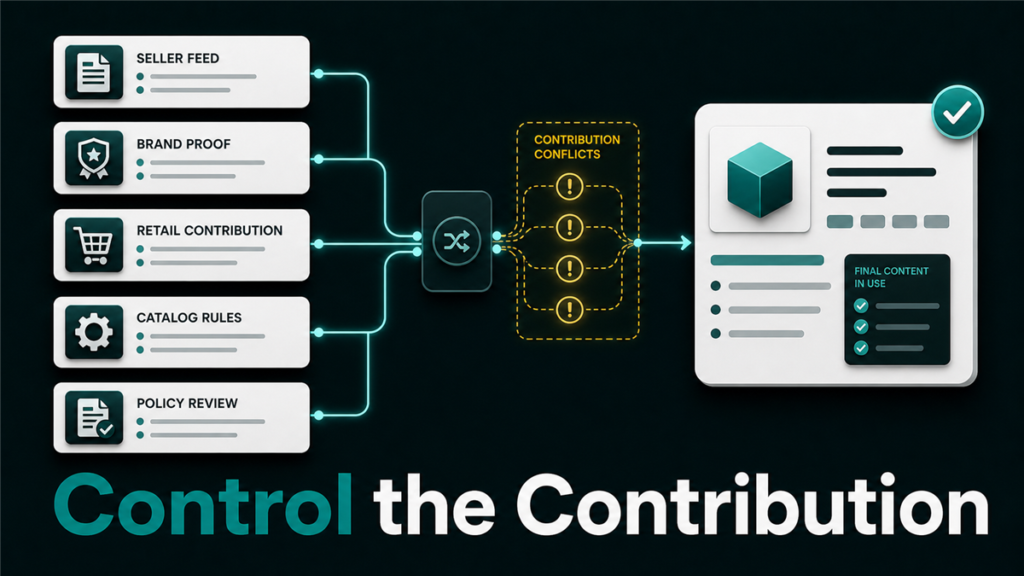
- Amazon detail pages can receive content from multiple contributors, including sellers, brands, vendors, and Amazon retail systems.
- Brand Registry can help support accuracy, but it does not guarantee that every submitted field will display immediately.
- Reuploading the same content repeatedly can make the case history harder to read.
- A strong evidence package connects current live content, intended content, product proof, brand proof, and recent feed history.
What Is an Amazon Listing Content Overwrite?
An Amazon listing content overwrite is a change where the live title, bullets, description, images, product facts, or other attributes do not match the content your account submitted. The content may change after a flat file upload, manual edit, catalog merge, Brand Registry update, vendor contribution, or automated Amazon review.
The first step is to identify what changed. A title overwrite is not the same as an image rejection. A bullet update that never displays is not the same as another seller adding inaccurate product facts. Treat each overwritten field as a separate catalog problem.
Why Does Amazon Listing Content Change by Itself?

Amazon listing content can change because the product detail page is a shared catalog record. Multiple parties may submit information for the same ASIN, and Amazon may decide which contribution to display.
Common causes include:
- Multiple sellers contributing different product data.
- Brand Registry ownership or role mismatch.
- Vendor, retail, or stronger catalog contribution overriding seller content.
- Product type or attribute mismatch.
- Flat file upload that updated one field while leaving another old field untouched.
- Content rejected because of policy, formatting, or unsupported claims.
- Catalog merge or duplicate ASIN cleanup.
- Image or title compliance review.
The correct response depends on the field, the contributor, the brand relationship, and the evidence available.
Is This a Retail Contribution Override or a Broader Content Overwrite?
The first decision is whether the overwrite points to retail/vendor source authority or a broader catalog troubleshooting issue.
- Did the field save in Seller Central or your feed but fail to appear live? Check contribution priority, required fields, and product type rules.
- Did a processing report show errors or warnings? Treat this as a feed or attribute-mapping problem first.
- Does the same old content keep returning after accepted edits? Check for retail, vendor, or historical contribution clues.
- Is the rejected field an image, claim, title, or restricted attribute? Check policy and category rules before opening a case.
- Is the issue limited to one attribute or many attributes? One attribute may be locked or conflicted; many attributes may indicate a product type, merge, or source-priority issue.
If the evidence points to retail/vendor authority, route the case through the retail contribution override workflow. If not, continue with this broader content-overwrite workflow and isolate the field-level cause.
| Symptom | Likely path | Next step |
| Title saves but live title stays old | Contribution priority, retail/vendor source, or title rule | Compare submitted value, live value, and source evidence |
| Bullets update in feed but not live | Attribute conflict or contribution priority | Check processing report and attribute mapping |
| Images disappear or revert | Image compliance or stronger image contribution | Review image rules and contributor source |
| Product facts show old values | Product type or attribute-source conflict | Confirm correct product type and required attributes |
| Edits are rejected immediately | Policy or formatting issue | Clean content before resubmitting |
Evidence Package for General Content Overwrites
- Current live value.
- Intended value.
- Affected field name.
- ASIN, SKU, marketplace, product type, and brand.
- Seller Central screenshot or feed file showing the submitted value.
- Processing report or batch ID.
- Brand Registry role evidence if brand-owned fields are involved.
- Product proof if the disputed value is factual.
- Prior case IDs and outcomes.
Use this evidence to identify the cause before escalating. If the cause turns out to be retail or vendor contribution authority, move to the more specific retail contribution override workflow. For feed-related evidence, start with flat file processing errors; for brand-owned fields, escalate a Brand Registry case with the evidence package.
How to Tell Overwrite From Hijacking
Content overwrite and listing hijacking are not the same issue. A hijacking concern often involves an unauthorized offer or counterfeit risk. A content overwrite can happen even when the offer is legitimate and no competitor is selling the product.
| Issue | What it usually affects | Best first response |
| Catalog contribution conflict | Title, bullets, description, product facts | Gather content proof and submit a precise correction |
| Brand role issue | Brand-owned attributes and images | Confirm Brand Registry roles and brand evidence |
| Retail or vendor contribution | Locked or persistent detail page fields | Build a stronger evidence package and escalate carefully |
| Hijacking concern | Offer ownership, product authenticity, buyer confusion | Review offers, Account Health, and brand protection paths |
| Policy rejection | Claims, images, restricted terms | Remove unsupported claims and resubmit compliant content |
Build a Content-Lock Evidence Package
A good content correction case is specific. Amazon support needs to understand the current live value, the intended value, and why the intended value is accurate.
Use this evidence checklist:
- Capture the current live title, bullets, images, and product facts.
- Save the intended content in a clean table by attribute.
- Include ASIN, SKU, brand name, product type, and marketplace.
- Attach manufacturer or brand-owned product page evidence when available.
- Include packaging photos only when they clearly support the attribute.
- Attach recent feed batch IDs or processing reports.
- Explain which exact attributes need correction.
- Avoid asking support to "fix everything" in one vague case.
If the overwrite affects many ASINs, start with a small representative sample. Fixing the pattern is more useful than flooding support with hundreds of unclear ASINs.
Safe Workflow for Updating Overwritten Content
The safest workflow is controlled and documented. The goal is to change one known set of attributes, confirm the result, and preserve a clean evidence trail.
- Pause conflicting manual edits and repeated uploads.
- Confirm the correct product type and browse node.
- Prepare a clean flat file or attribute table.
- Submit only the fields that need correction.
- Save the processing report and timestamp.
- Check whether the submitted value appears live.
- If the value does not display, open a case with the evidence package.
- Escalate only after the first case clearly documents the issue.
Mini-Scenario
A brand updates product bullets through a flat file, but the live bullets revert after two days. The team keeps uploading the same file, which creates multiple feed IDs without proving why the content is correct. A better workflow is to compare live bullets against brand-approved packaging and product page evidence, isolate the overwritten attributes, then open a case with one clean request and the supporting documentation.
FAQ
Why did my Amazon title change by itself?
The title may have changed because another contribution, brand role issue, retail contribution, flat file update, or automated content review affected the shared detail page.
Does Brand Registry stop content overwrites?
Brand Registry can help with brand ownership and accuracy evidence, but it does not guarantee every submitted attribute will display immediately.
Should I keep reuploading the same flat file?
No. Repeated uploads without diagnosis can create a messy feed history. Confirm the field, product type, and rejection pattern before uploading again.
Is a content overwrite always listing hijacking?
No. Many content overwrites are catalog contribution conflicts, not unauthorized seller activity.
What should I send Amazon support?
Send ASIN, affected attributes, current live content, intended content, proof of accuracy, feed IDs, and a clear requested correction.
Need Help Fixing Overwritten Listing Content?
If your catalog team is fighting repeated title, bullet, image, or product fact overwrites, Qubeq can audit the contribution pattern and prepare a cleaner correction workflow before the catalog history gets harder to unwind.