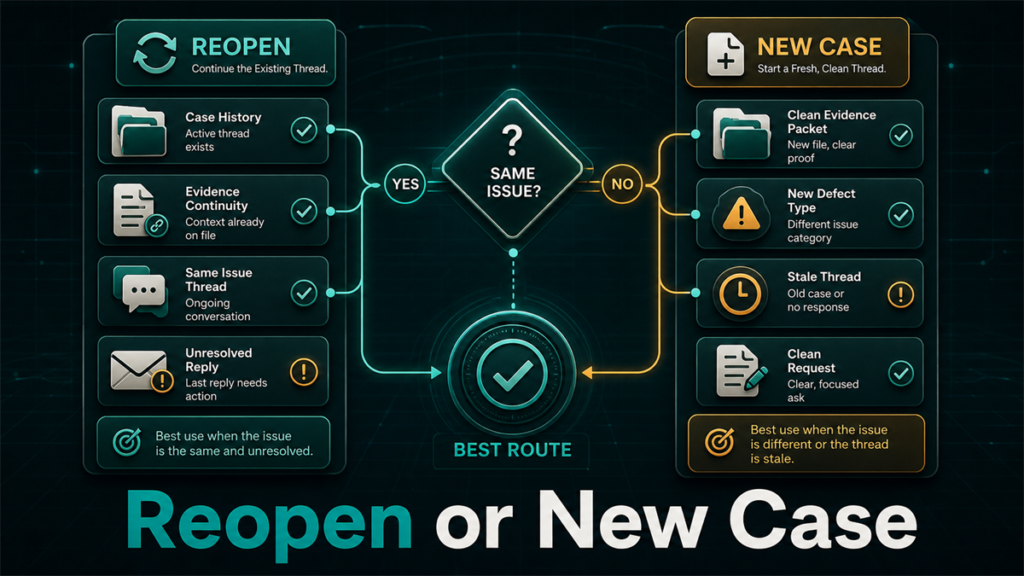
Reopen an Amazon case when the closure itself was wrong and the case history supports you; open a new case when the issue has evolved, the thread is polluted with canned replies, or a clean framing gives the next reader a better starting point. Each path buys something different: reopening buys continuity, a new case buys fresh eyes, and picking the wrong one usually buys another canned reply.
Key Takeaways
- Reopening preserves the case ID, thread, and history; a new case trades that history for a clean read by someone new.
- Five factors decide it: wrong closure, identical or evolved issue, reopen cycles spent, new evidence, and whether the history helps or hurts.
- A useful default: reopen once on a wrong closure with the gap named precisely; after two failed reopens, change the approach.
- Never run a reopened case and a new case on the same issue in parallel; duplicates tend to get merged or answered with boilerplate.
- When both paths have failed, the answer is escalation, not a third lap through standard support.
What Reopening Actually Does vs Opening Fresh
Reopening continues an existing conversation under the same case ID; a new case starts a separate thread with no attached history. That single difference drives everything else.
A reopened case keeps the chronology intact: your framing, submitted evidence, and the disputed closure sit in one thread, and that thread is your proof the question was never answered. Whether the same person picks it back up isn't guaranteed, and reopen availability varies, so verify what the current Seller Central case log offers on the specific closed case.
A new case gets read on its own terms: no trail of canned replies, no earlier framing locking in a misread, no back-and-forth suggesting a difficult seller. The cost is starting from zero, with evidence resubmitted and the history of prior attempts visible only if you reference it.
The Five Decision Factors
Five questions decide the reopen-vs-new call, run in order every time a case closes badly.
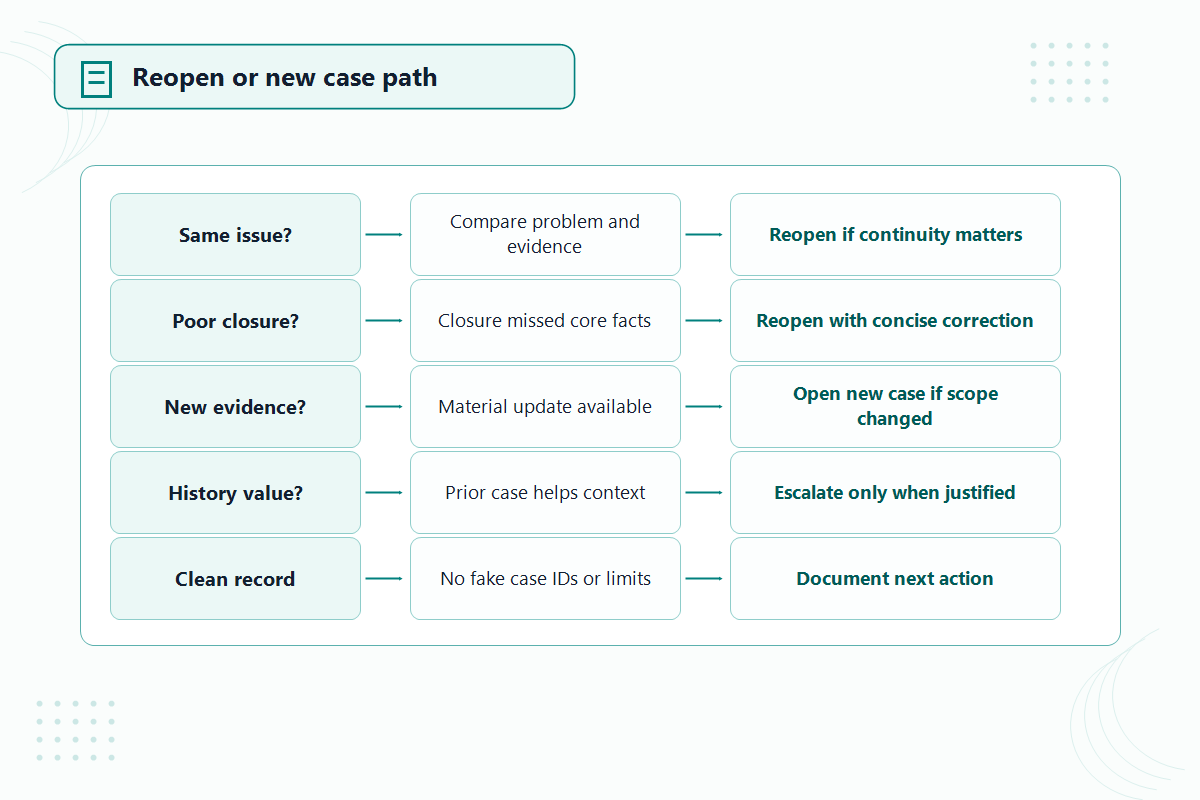
Was the case closed wrongly or with a non-answer?
A wrong closure is the strongest reopen signal. If the response answered a different question, restated policy without addressing your evidence, or marked the case resolved while the problem persists, the thread itself demonstrates the failure, and reopening points at that gap directly.
Is the issue identical or has it evolved?
Reopening fits only an identical issue. If the suppressed listing came back with a different error code, the old thread now describes a different problem. An evolved issue deserves a new case built around what's true now.
How many reopen cycles have already happened?
Each reopen that produces another non-answer devalues the thread. By the second or third cycle, the history reads less like patience and more like a loop the next responder will skim and repeat. Past two failed reopens, more reopening is rarely the move.
Is there new evidence?
New evidence is a tiebreaker, not a decider. Inside a reopen, it answers "what's changed since the closure?" Inside a new case, it builds the strongest argument from the first line instead of patching the old one.
Does the case history help or hurt?
Read your own thread the way a stranger would. A clean chronology of clear questions and ignored evidence is an asset: reopen and let it speak. A muddled thread with shifting framings or frustrated wording is a liability: write a tighter opener and start fresh.
A Simple Decision Rule Set
Six rules cover nearly every reopen-or-new decision.
- Closed wrongly, issue identical, zero or one reopens spent, clean history: reopen, and name the gap in the closure precisely.
- Issue evolved or the original framing was off: open a new case built around the current facts, referencing prior case IDs by number only.
- Two reopens already produced non-answers: stop reopening. Either a new case with materially new evidence, or escalation.
- History is messy or works against you: new case with a self-contained opener; don't import the grievance.
- Wrong closure on an enforcement or money issue: reopen even on cycle two, because the continuous dated record may matter to a later appeal.
- In every branch: one active case per issue. Close or abandon the old route before opening the new one.
Writing the Reopen Message vs the New Case Opener
A reopen message argues with the closure; a new case opener should read as if no prior case existed. Mixing the two styles is the most common self-inflicted wound we see in case threads.
The reopen message has one job: name the gap. Reference the specific line of the closing response, state what it failed to address, and restate the single question that needs an answer, with the key evidence attached. Three short paragraphs at most. No recap of the saga, no tone, no new side-issues.
The new case opener must be complete on its own: the problem as it exists today, the affected ASIN or transaction, what you've verified, and the specific action requested. Reference prior case IDs in one neutral line so support's records connect, without importing the old thread's frustration.
When Neither Is Right: Escalate Instead
When a precise reopen and a well-built new case have both drawn the same canned response, the standard support lane has given its answer, and the move is escalation, not a third lap. Escalation paths vary by issue type and account, but the signal is consistent: the next attempt needs a different audience, not different wording.
This is where a case log pays off. The dated chronology of case IDs, replies, and non-answers is exactly what an escalation needs to be taken seriously.
The Duplicate-Case Pitfall
Running parallel cases on the same issue reliably makes both worse. Sellers do it as a hedge, but duplicate cases tend to get merged, or one gets closed with a reference to the other, and the boilerplate rate goes up because the duplication itself reads as noise. Exact merge behavior isn't documented as a fixed rule, but the pattern is consistent enough to treat as one: pick a lane, finish it, then switch if needed.
Mini-Scenario: Three Reopens on the Wrong Question
An outdoor-gear seller had a variation family break after a catalog update. The first case asked Amazon to "fix the variations," got a generic template reply, and was closed. The seller reopened three times over five weeks, getting the same reworded template each time.
The actual problem had evolved by week two: a contribution conflict on the parent ASIN, visible in the error log, which the original case never mentioned. A new case, opened with the parent ASIN, the specific error, and the requested fix in four sentences, resolved in three days. The lesson wasn't persistence; it was recognizing by reopen two that the issue had evolved past the thread describing it.
FAQ
Can I reopen a closed Amazon Seller Central case?
Often, but availability and timing vary. Check the specific closed case in the current Seller Central case log for a reopen or follow-up option rather than assuming the window stays open.
Does reopening a case go back to the same Amazon representative?
Not reliably. The thread carries forward, but routing isn't something sellers control or see, so write the reopen message for a reader who may be new to the case.
How many times should I reopen the same case?
Treat two failed reopens as the practical limit. Past that, a clean new case or an escalation is more likely to break the loop than a third reopen.
What if both reopening and a new case have failed?
Escalate. Bring the dated chronology of case IDs and responses; that record is what gives an escalation weight.
Pick the Lane, Then Run It Properly
Most stalled cases aren't stuck because Amazon support can't help; they're stuck because the case is in the wrong lane or framed for the wrong question. If your team has a case that's been through the reopen loop, or a backlog of closed-without-resolution issues that still cost money, Qubeq can review the case history, pick the right path for each one, and run them to resolution as part of managing the account.